
Food List Tracking & Shopping v1.0.35
Brain Vault


About this app
Developer Description
Track your home food supplies and manage shopping list. Multi-user version.
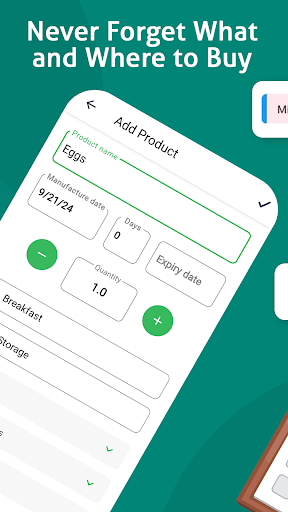
This application allows you to track your food supplies at home, keep an eye on expiration dates of products, use the shopping list to replenish your stock of food.
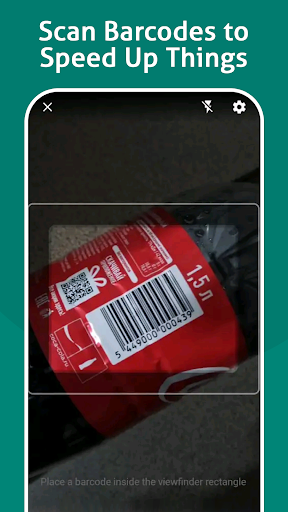
- Scan barcodes to speed up your work
- Get notifications before the expiration date and never waste your food
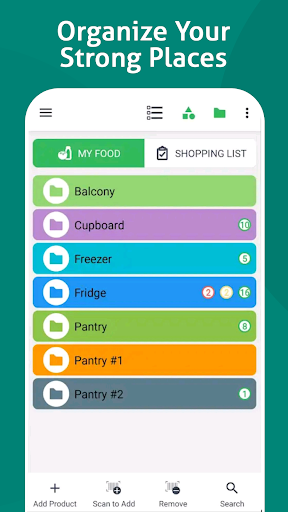
- Sort products by categories and assign storage places to keep all in order
- Access on any of your Android devices and share the list with your family
Details:
There are 2 lists on 2 tabs: "My Food" and "Shopping List"
"My Food"
- You can add there food stored in your fridge, freezer, on shelves and anywhere at home
- For each product you can set an expiration date if needed
- You can see expiration date of each product in the list as well as a visual indication of products expired soon or already expired
- You can copy any item from "My Food" list to "Shopping List" and set the quantity needed to purchase
"Shopping List"
- You can add there items directly or copy them from "Food List"
- After you have purchased an item you can move it from "Shopping List" to "My Food" list
- When you move an item from "Shopping List" to "My Food" the quantity is deducted from "Shopping List" and added to "My Food"
Barcodes
- You can use your phone's camera to scan barcodes of products
- Once barcode was added to a product you can just scan this barcode to perform an action (add or mark as purchased) instead of manual input
- You can associate more than one barcode to a single product. Use "Catalog" menu item to edit items and add extra barcodes
Categories and Storage Places
- Group products into categories;
- Create storage places (can be hierarchical) and know where your food is stored;
- Customize the view: plain list or with categories and/or storage places;
- Assign colors to storage places for easy and intuitive view;
Sharing and Syncing
- Share your lists with your family
- Go to "Users" menu item and add your family member's e-mail
- When this person installs the application and performs login with his e-mail he will be able to access your lists
- If you log in with your account on another device all data syncs automatically almost in real-time
Don't hesitate to contact us if you have any questions or suggestions.
We use Open Food Facts database https://world.openfoodfacts.org/ to fetch products' names and photos by barcode. This option's availability depends on the country.
What's New
In-app purchases
$4.99 - $59.00 per item
Version Information
- Version
- 1.0.35
- Downloads
- 100K+
- Updated on
- Dec 8, 2025
- Released
- Dec 18, 2019
- Requires
- Android 7.0
Statistics
Google Play Rating History
Rating Distribution
Downloads Over Time
Food List Tracking & Shopping has been downloaded times. Over the past 30 days, it averaged downloads per day.
Shaded area shows 30-day prediction based on historical trends
Historical data collection started recently. More data points will be available over time.
Food List Tracking & Shopping - Google Play Rankings
Top Rankings
| Rank | Country | Category | List | Change |
|---|---|---|---|---|
| — |
Ranking History in
No ranking data available yet. Rankings are updated daily.
#12 in Top Grossing Food And Drink in Brazil

#40 in Top Grossing Food And Drink in Italy
 ReciBuddy: Recipes Made Easy
Food List Tracking & Shopping
ReciBuddy: Recipes Made Easy
Food List Tracking & Shopping
 COOKmate - My recipe organizer
#41 in Top Grossing Food And Drink in Poland


#42 in Top Grossing Food And Drink in Mexico


Food List Tracking & Shopping users say on Google Play
 Sharon Stark
So far so good using this app. I chose to try this one because you can set up storage folders, categories and subcategories! It's easy to scan items. Even through thick vacuum seal bags with the code not perfectly flat this app recognizes it instantly. It's really amazing! I've used it about four times so far and the only issue I've had is that it doesn't always save the item. I'm going to document how often this happens to see if it's a bug in the program. Really happy so far though!
 Marc Acena
Hi Could you put an option to enlarge the interface, its a bit small
 Cassandra Martin
Your last update removed ALL of my store designations. Now when I put them back in, as soon as I hit save, to save that item to that store, it takes me back to 'MY FOOD' when what I was editing was on the 'SHOPPING' list. Very annoying, especially when I have over 100 line items (probably closer to 500) in my lists. This is a major headache and will take HOURS to fix. If I didn't have so much loaded into you app already, I'd probably jump ship.
 Chickie From TN
The most recent update uncategorized all of my items. Now I just have an "uncategorized" list of 461 items that are not even alphabetized. Very annoying and going to take some time to re-categorize everything.
 Martha May
I used to like this app. It was the best I could find for my purposes. Yes, there was an occasional ad and that was ok. Now, I can't scan something without an ad before and after the scan. Imagine doing that with a big load of groceries... it's a nightmare. I would pay, maybe $3 for no ads without buying into to the insane membership fee they have Adjusted from 2 stars to 1: it took 10 minutes to remove 3 items from the pantry and put them in my grocery list because of the ads. 3 items...
ApkTrusted Ratings & Reviews
More from Brain Vault
See more apps
Solitaire TriPeaks: Card Games
Free

Catapult Wars
Free

Drive Simulator 2024
Free

My Wild Pet: Online Animal Sim
Free

Truck Simulator Offroad 2
Free

Nebi - Film Photo
Free
Scan & Translate: Photo camera
Free

Animal Sim Online: Big Cats 3D
Free

Diff before after video photo
Free

Jigsaw Puzzle
Free
Multi Timer - Stopwatch Timer
Free

Streetfood Tycoon: World Tour
Free

Submarine
Free

Pinball HD
Free
Spades
Free

Math - Fun Math Games for Kids
Free
Similar Apps

NoWaste: Food Inventory Lists
Free

OurFlat: Household & Chores
Free
KITCHENPAL: Pantry Inventory
Free
Meal Planner & Recipe Keeper
Free

Receipt Tracker App - Dext
Free

BariRecipes
Free

Recify - Keeper & Organizer
Free
My Recipe Box: My Cookbook
Free
Shopping List - Listonic
Free

Mealscout
Paid

Expensify - Travel & Expense
Free

BLW Meals: Starting Solids
Free

Eat Smart Kiwi: Food Diary
Free

Calendly Mobile
Free
Mealime Meal Plans & Recipes
Free

Tradify - Easy Job Management
Free
Scan this QR code to download

Forwarding you to the page at Google Play market in seconds...
Open Google Play market now