
AR Art Projector: Da Vinci Eye v3.2.5
Da Vinci Eye LLC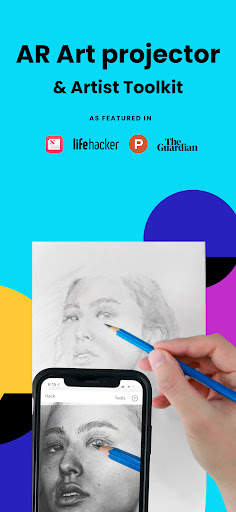
About this app
Developer Description
Unleash the artist in you with our AR drawing and tracing tool for photo drawing
Featured in Artist's Magazine, Watercolor Magazine, LifeHacker, Apple News, The Guardian, AR / VR journey, and more!
Trace, sketch and draw with the #1 essential digital tool - one of the top Graphics & Design apps in over 100 countries and used by thousands of creatives to make incredible artwork!
The app is not just for tracing, it offers a wide range of sketching and drawing tools, lessons, and a supportive community to share your artwork!
IMPORTANT!: Please read how this app works below and the device requirements for AR Mode BEFORE purchasing.
Da Vinci Eye: AR Drawing App highlights
• Create incredible drawings and sketches of your photos
• Make hyper-realistic drawings with our strobe feature
• Record time-lapse videos of your drawings and sketches
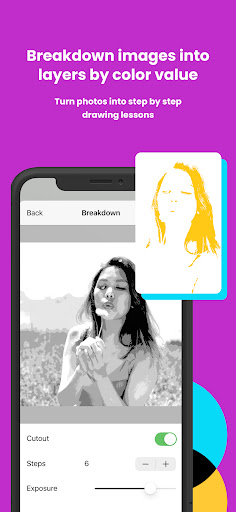
• Separate images into layers by color value, then view those areas on your canvas
• Breakdown any image into step-by-step instructions
• Video tutorials to learn how to sketch and draw
• Use filters to make drawing even easier
• Zoom in to capture micro details in your drawings
• Connect with our community to share your artwork
• Insanely fast customer support!
PERFECT FOR ANY ARTIST
• Bakers
• Cartoonists
• Tattoo Artists
• Illustrators
• Fiverr Designers
• Hobbyists
• Makeup artists
• Nail Technicians
• Animators
No matter what skill level you’re at — Da Vinci Eye: AR Art Projector is here for you!
OVERVIEW
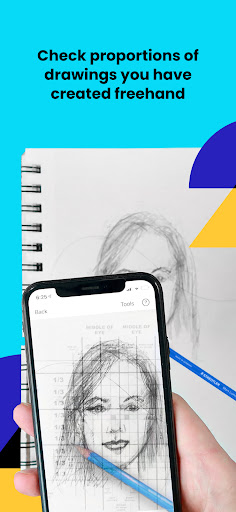
Ever spent hours sketching a portrait, only to discover that the nose or eye is misplaced? Use our AR art projector and tracing tool to layout artwork before you begin or check your work as you progress.
Struggling with light and shadow placement? Divide your image into color value layers and overlay them virtually to pinpoint the right spots for darks, mid-tones, and highlights.
LEARNING HOW TO DRAWING?
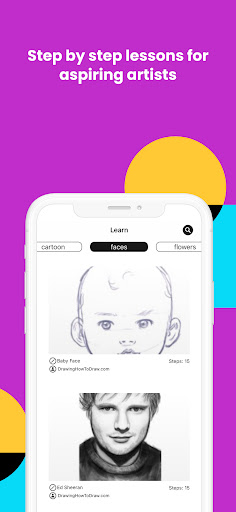
We have drawing tutorials and lessons using our unique patent-pending learning method. You can also turn ANY photo into a step by step shading drawing lesson with our AR tracing tool.
HOW DOES IT WORK?
Based on a tool that has been used by artists for centuries, this app is a digital version of a Camera Lucida.
You suspend your device above or in front of your canvas with a stand, tall glass, or other objects easily found around your house.
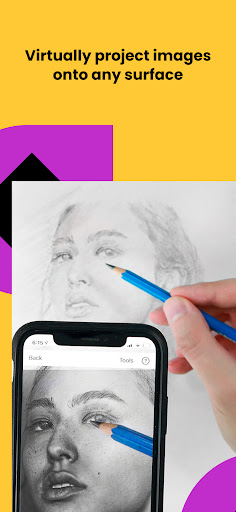
When using your phone, you can view both the image and the canvas simultaneously, offering functionality akin to an art projector or light box, but with expanded capabilities.
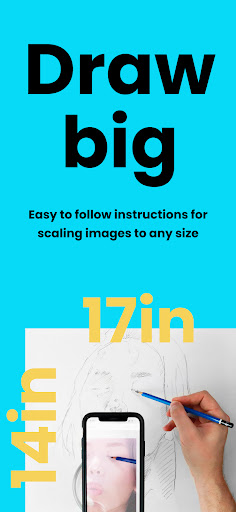
You can sketch or draw on any surface, zoom in to draw micro details in your drawing, and you don't have to draw in the dark.
WILL THIS HELP ME LEARN HOW TO SKETCH & DRAW?
You'll be training your eye to recognize proportions, sketch and draw with shading, and refine your hand for precise lines and strokes on paper. Our proven techniques ensure quicker and more efficient learning compared to any other sketch and draw app.
AR TRACING MODE REQUIREMENTS
AR mode works best on new and high end devices. Your device must have a high quality camera, fast processor, and a fast enough GPU to handle rendering and updates.
AR & CLASSIC DRAWING MODE
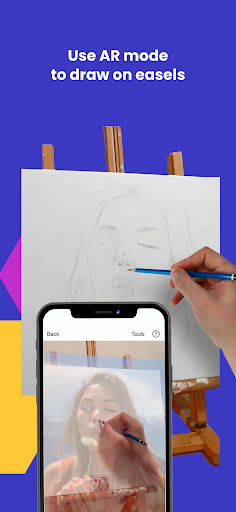
AR tracing mode anchors your image to an object in the real world. This lets you move your canvas or phone, and the drawing and projected image will move back into place.
Classic mode is like a normal art projector, where if you move your phone or canvas, your sketch or drawing will no longer be aligned.
AR tracing mode is especially useful for sketching, drawing or painting on an easel. However, in most cases, Classic mode will achieve the same result.
TAKE YOUR DRAWING TO THE NEXT LEVEL
Da Vinci Eye is waiting to help you to improve your drawing skills. Trace, sketch and draw using AR technology.
What's New
Version Information
- Version
- 3.2.5
- Downloads
- 50K+
- Updated on
- Aug 22, 2024
- Released
- Apr 10, 2018
- Requires
- Android 8.0
Statistics
Google Play Rating History
Rating Distribution
Downloads Over Time
AR Art Projector: Da Vinci Eye has been downloaded times. Over the past 30 days, it averaged downloads per day.
Shaded area shows 30-day prediction based on historical trends
Historical data collection started recently. More data points will be available over time.
AR Art Projector: Da Vinci Eye - Google Play Rankings
Top Rankings
| Rank | Country | Category | List | Change |
|---|---|---|---|---|
| — |
Ranking History in
No ranking data available yet. Rankings are updated daily.
#8 in Top Paid Art And Design in United States


#4 in Top Paid Art And Design in Spain


#8 in Top Paid Art And Design in Canada

#10 in Top Paid Art And Design in United Kingdom


AR Art Projector: Da Vinci Eye users say on Google Play
 Tom Hughes
There is a learning curve but their excellent support will get you there. It's worth the effort. I had almost given up but the strong support I received was clear, patient and helpful. I've been using the app every day for a week now and can't imagine not having it. Thanks to their team, really great work. I would also definitely buy their camera stand, the desk version or clamp version. Either one will offer much more flexibility with the app.
 Fox Hearn (Missy)
I like the app... Except... It quickly drains my phone battery and tends to make my phone overheat a little. The AR is hit or miss most days with it saying it can't find the anchor when it's clearly in sight. Other than that, it's great! I can arrange my subject perfectly in the areas I want, find the color value differences I might miss, and help get proportions right. There's tons of support and tutorials and lots of little features available. I hope to see it keep improving.
 Evelynn Passino
Android app is very different from the iPhone app. I started with the iPhone app and really like it. I reached out when I was planning to switch phones to ask if I'd have to pay for app again. They confirmed I would, which was fine. They did not tell me that while the projector part of the app is similar, the social part, which allows you to login to save and share your art and reference photos, see other people's art, and find new reference photos is completely absent.
 Deedee Reynolds
The app seemed to work fine, but I kept getting MOTION SICKNESS every time I tried to use it. Wish I could get a refund because I literally only tried using it for one project and had to stop after three attempts, each less than 5 mins. It's a huge bummer because I was really excited about using the app to trace outlines so I can do what I love and just paint.
 Ash
Ash
For $30, this app has let me down. I don't know if it's a Samsung thing, but the continuous glitching in both modes of drawing means that I cannot get a proportioned drawing no matter how quickly I do it. The anchor never seems to correlate to the angle I am using, and despite no knocking/moving of anything the camera looks like it is bouncing. On top of this, the app drowns my phone battery way quicker than any app on my phone. Such a waste of money.
ApkTrusted Ratings & Reviews
Similar Apps

AR Drawing - Paint and Sketch
Free

ArtFlow: Paint Draw Sketchbook
Free
Handy Art Reference Tool
Paid

Sketchar AR Drawing Sketchpad
Free

DreamBuild: Sketch to 3D
Paid

Smartify: Arts and Culture
Free
ibis Paint
Paid

Artlette
Free

AR Drawing: Sketch & Paint
Free
4ART
Free
Drawify - Photo to Sketch
Free

Pawtist: Pet Travel Postcards
Free

MediBang Paint:Draw Art, Comic
Free

Renovate AI : House Design
Free

HiPaint: Sketch & Draw art
Free

Key Collector Comics
Free
Scan this QR code to download

Forwarding you to the page at Google Play market in seconds...
Open Google Play market now