
Twomon SE - Portable Display v4.8.10
easynlight




About this app
Developer Description
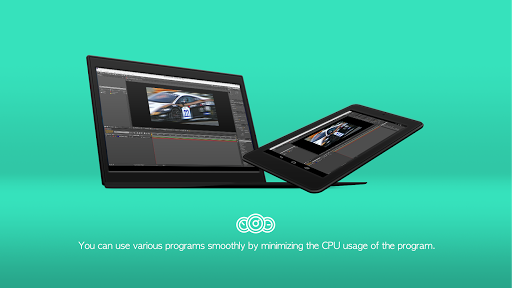
Use your tablet as portable display and USB Monitor with Twomon SE.
*To use Twomon SE, the PC program and the manufacturer ADB driver must be installed on the PC.
Twomon SE is very simple. Your tablet becomes a USB monitor at the moment you connect.
Do you want to take a lecture smarter in the lecture room?
Meet your tablet as a dual monitor. With Twomon SE, you do not need to hide and load several programs on your monitor.
Is there a monitor shortage while editing a video?
Meet your tablet with a dual monitor. If you have the Twomon SE, you can use additional monitor in a small space.
You can download the PC program from the website for free.
Website: https://www.easynlight.com/en/twomonse
Twomon SE supports PC and device below.
- Windows 10 or later (version 1703 or later / WDDM version 2.0 or later)
- Android 6.0 or later
Twomon SE always has a friendly tech support team.
Please feel free to contact us through our website if you have any questions. :)
Q&A: https://easynlight.oqupie.com/portal/2247/request
What's New
Version Information
- Version
- 4.8.10
- Downloads
- 10K+
- Updated on
- Dec 1, 2025
- Released
- Jun 25, 2018
- Requires
- Android 6.0
Statistics
Google Play Rating History
Rating Distribution
Downloads Over Time
Twomon SE - Portable Display has been downloaded times. Over the past 30 days, it averaged downloads per day.
Shaded area shows 30-day prediction based on historical trends
Historical data collection started recently. More data points will be available over time.
Twomon SE - Portable Display - Google Play Rankings
Top Rankings
| Rank | Country | Category | List | Change |
|---|---|---|---|---|
| — |
Ranking History in
No ranking data available yet. Rankings are updated daily.
#10 in Top Paid Productivity in South Korea
#25 in Top Paid Productivity in Japan

#78 in Top Paid Productivity in Egypt

#78 in Top Paid Productivity in Argentina
Twomon SE - Portable Display users say on Google Play
 Aleksi Korkee
This works perfectly with my Samsung Galaxy Tab s6 lite even with high resolutions. No noticable lag. One improvement suggestion would be to add support for onscreen keyboard. At least I didn't find any way to enable this. Windows 10 however has an onscreen keyboard which can be pinned in the taskbar and it worked perfectly with this so this is not actually a huge problem. Overall a great product!
 Jun B (준현)
The best one out there for what it does (oct 2020). Very responsive and fast by hacking its way through software limitations. Only disadvantages i see are limited to usb (no wifi). Also I would like having a second display than an extended display or having the tablet input as a second mouse but on a software level i think that is impossible as of right now.
 Tyler Fixel
Was an amazing tool for a long time, but ever since EasyLight required an update on my computer and uses this "El Display Hub" application on the computer for the connection, it has become complete junk. I wish they never tried to update it
 Daniel
This used to be a well functioning app. That's why I bought it: Dual monitors via usb cable or wifi. Until ... changes were made. The app seems to have been completely overhauled and now it is no longer working. Even their website isn't running properly. No transparency, in fact, this is theft! So may this be a warning before putting your trust and money in this company.
ApkTrusted Ratings & Reviews
More from easynlight
See more apps

Scan this QR code to download

Forwarding you to the page at Google Play market in seconds...
Open Google Play market now