
DS Compass v5.24
Disciple Skies Software




About this app
Developer Description
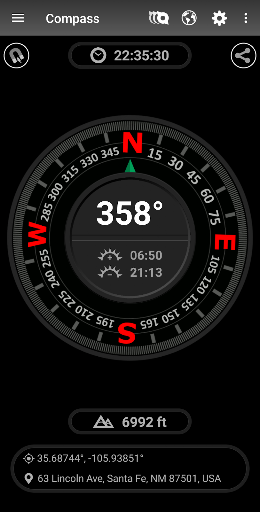
Full screen magnetic and GPS compasses with several great compass styles.
Whether you are navigating the back country or finding your way through the city, our smooth operating compasses will keep you on target.
Each compass works in either magnetic or GPS mode and has plenty of tools for adjusting look and performance characteristics. In magnet mode, the magnetic declination for your location is automatically calculated to show the offset from true north. Or, show offset from magnetic north, like a real compass, if that is your preference. All magnetic compasses in our app receive gyroscopic stabilization on devices with a built-in gyroscope sensor. Gyroscopic stabilization allows for the smoothest compass operation.
A military compass that displays heading in mils (milliradians) is included. A military compass has the advantage of allowing you to determine the distance of objects from your current position. **See the end of this description for details.
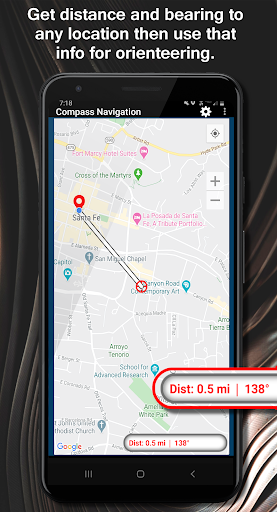
To assist with compass orienteering, there is a map with dynamic measurement tools that allow you to easily get the true heading and distance to any target from your current location.
Use the map to get a bearing to target, then follow that compass bearing until you reach your destination.
While the compasses do operate in both GPS and magnetic mode, we recommend using GPS mode for active navigation. This is because the magnetic compass in a smart phone may be affected at any time by surrounding electromagnetic fields or even the magnetic fields generated by the electric current in your device. If used properly, the compass in GPS mode will be more accurate than magnetic mode if you have a good view of the sky and you are moving forward. Practice using the compass in both modes in familiar surroundings before using the app in unfamiliar areas.
Two unique 3D compasses are included.
** Determining the distance of objects from your current location using the military compass:
1. Use the military compass to determine the arc width (milliradian span) of a distant object of known size.
2. Divide the size by the arc width to get the distance to that object.
What's New
2. Bug fixes.
3. Updated to latest Android features (Android 14).
In-app purchases
$1.99 per item
Version Information
- Version
- 5.24
- Downloads
- 100K+
- Updated on
- Jan 21, 2024
- Released
- Oct 25, 2013
- Requires
- Android 4.4
Statistics
Google Play Rating History
Rating Distribution
Downloads Over Time
DS Compass has been downloaded times. Over the past 30 days, it averaged downloads per day.
Shaded area shows 30-day prediction based on historical trends
Historical data collection started recently. More data points will be available over time.
DS Compass users say on Google Play
 A Google user
quiet accurate. even showed updated road name before Google.
A Google user
Recommended
A Google user
Goo
A Google user
Banner ad covers part of the display ... another full screen ad upon exiting. Uninstalling.
A Google user
My mobile basically don't have magnatic sensor so I installed this app for Gps based tracking direction but it is useless
ApkTrusted Ratings & Reviews
More from Disciple Skies Software
See more apps
Walking Odometer Pro
Free

GPS Waypoints Navigator | MAPS
Paid

Polaris GPS Hike, Bike, Marine
Free
DS Speedometer & Odometer
Free
Altimeter & Altitude Widget
Free

Bible Trivia Wheel - Quiz Game
Free
DS Barometer & Altimeter
Free

Delta Altitude
Free
Find My Car - GPS Navigation
Free
Trailblazer Navigator Pro
Free

Morse Code Telegraph Keyer
Free
DS Hygrometer -Humidity Reader
Free

Sun and Moon
Free
Land Calculator: Map Measure
Free
Real Mercury Thermometer
Free

Bible Horoscopes
Free
Scan this QR code to download

Forwarding you to the page at Google Play market in seconds...
Open Google Play market now