Altimeter & Altitude Widget v4.63
Disciple Skies Software






About this app
Developer Description
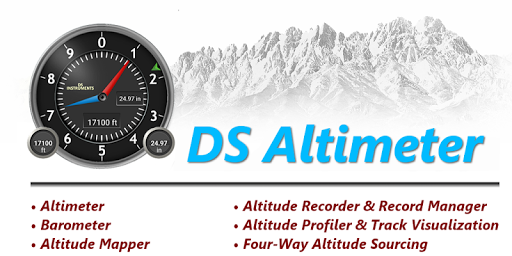
Barometric & GPS based altimeters, altitude tracker, maps, widget & photography.
You can select from the best sources of elevation data, including:
1. Location based altitude from NASA's Shuttle Radar Topography Mission.
2. Satellite based altitude (GPS altitude) corrected to height above mean sea level (AMSL).
3. Get actual land survey altitude values for your location from the United States Geologic Survey - available for customers in the contiguous United States, southern Canada and northern Mexico.
4. Devices equipped with a barometer sensor can also obtain pressure altitude which is converted to elevation above sea level. For the most precise readings, calibrate the pressure altitude.
The barometric altimeter offers 4 calibration tools:
1. Calibrate to the nearest airport. Choose your airport from the app's dynamic list of nearest airfields. Airfield data is usually updated every 20 - 30 minutes.
2. Enter a QNH value.
3. Enter the benchmark (known) altitude value for your location.
4. Calibrate the barometric altimeter against the SRTM altitude map.
DS Altimeter also works offline: barometric altitude and GPS altitude corrected to elevation above sea level do not require an internet connection.
NEW IN DS ALTIMETER:
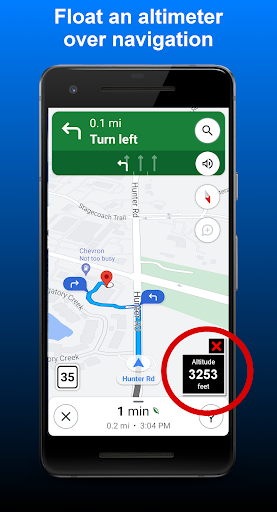
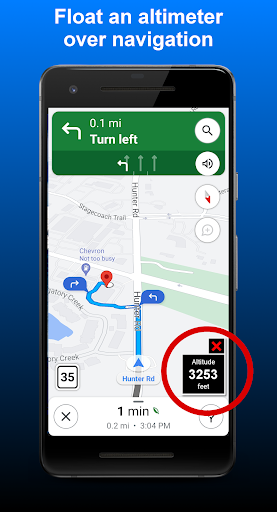
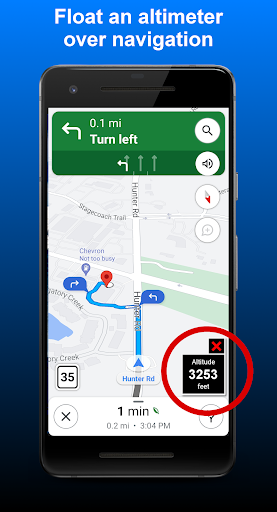
● Floating Altimeter that you can place over your navigation app or any other app.
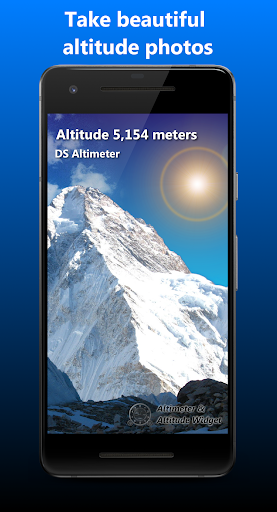
● Photo altimeter. Snap a picture of your favorite high places with the altitude shown on your photograph.
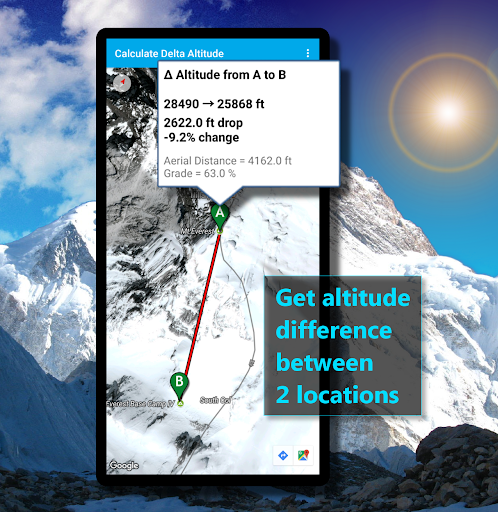
● Easily get the altitude difference and grade between two locations by tapping 2 points on a map.
● Record altitude profiles and elevation tracks for your favorite journeys to the highlands, the lowlands and everything in-between!
● [SPECIAL] View your altitude recordings on the included maps with all track points displayed. Tap any track point and get the altitude at that point.
● Elevation Search: Enter a place name or address and get the altitude above sea level at that location.
Upgrade the application to pro and gain access to even more features including the Altimeter Widget.
Going skiing? Record your ski run with DS Altimeter, then view your ski trail with its elevation points on the included maps. Minimum and maximum altitude points for your run will be clearly shown.
Altitude mapping is included with DS Altimeter. Tap anywhere on a map to find the altitude and address at that location.
● The application includes a detailed help section.
* The perfect altimeter for skiing, hiking, mountain climbing and other outdoor sports. Use it anytime you are curious about your elevation!
PERMISSIONS AND PRIVACY:
1. Location permission if required for GPS. GPS data is used for land survey altitude matching and to determine elevation above the Geoid (then corrected to elevation above sea level).
2. Photos/Media/Files permission is required for the screen capture procedure allowing you to share an image of your altitude result.
3. Boot permission and Wake-up phone (Wake-Lock) permission are required to periodically refresh the values on the Altimeter Widget and to reactivate the Altimeter Widget when the phone is rebooted / restarted. (Wake-Lock is required only on phones running Android Lollipop and earlier).
4. Internet and Network permissions are needed to access online land survey databases in Government facilities.
5. Billing permission is required to purchase the application for the purpose of activating the altimeter widget, remove advertising and to receive unlimited altitude-track recordings.
6. Vibrate permission - to vibrate the phone for important alerts.
What's New
* Place an altimeter on top of your favorite navigation app or any other app.
In-app purchases
$2.99 per item
Version Information
- Version
- 4.63
- Downloads
- 1M+
- Updated on
- Sep 4, 2025
- Released
- Feb 9, 2013
- Requires
- Android 6.0
Statistics
Google Play Rating History
Rating Distribution
Downloads Over Time
Altimeter & Altitude Widget has been downloaded times. Over the past 30 days, it averaged downloads per day.
Shaded area shows 30-day prediction based on historical trends
Historical data collection started recently. More data points will be available over time.
Altimeter & Altitude Widget users say on Google Play
 Chayakorn Pahnichaputt
The QNH calibration doesn't work. The app reported "Airfield data not available at this time." Please help!! Update: The QNH calibration is working right now. Thank you for the latest update. Anyway, since the barometer reading on each devices are not so accurated and different, therefore, an additional barometer adjusting for each devices would be nice.
 Noman Siddiqui
I found it very friendly and informative.. Nice... Recommended...
 Curtis Colley
I bought the paid version of the app to have the widget for a quick home screen view of the alit/barometer readings. The only thing the widget displays is altitude. If it would display both on the widget, I would gladly give 5 stars. But for what I bought it for, it's not it, and wasn't communicated in any description I read.
 PiroChu
Please reduce the number of taps necessary to launch Floating Alt (per my original ask in Mar'23; now July'24!). The best would be to launch it by tapping on a widget (1 tap). The 2nd best would be to add a designated button on the app to launch it (2 taps). Currently too deep hidden under app's 3 dots (3 taps) while driving. I got this app only for its brilliant Floating Altimeter (Pro/$paid version), which is quite useful for when driving thru the mountains while running Maps/Waze.
 Ahmad Dan-Hamidu
I'm EXTREMELY, GRAVELY DISAPPOINTED in the performance of this is app's widget. Despite my upgrading (paying) the app to unlock all its features, the following dysfunctional attributes persist: 1. Its values/readings are static and refuses to present live readings from the app; I constantly have to launch the app to get a "current reading". 2. There is no option for the widget to display either altitude or air pressure, it persistently shows only GPS altitude which is useless to me!
ApkTrusted Ratings & Reviews
More from Disciple Skies Software
See more apps
Walking Odometer Pro
Free

GPS Waypoints Navigator | MAPS
Paid

Polaris GPS Hike, Bike, Marine
Free

Bible Horoscopes
Free
DS Speedometer & Odometer
Free

DS Compass
Free

Bible Trivia Wheel - Quiz Game
Free
DS Barometer & Altimeter
Free

Delta Altitude
Free
Find My Car - GPS Navigation
Free
Trailblazer Navigator Pro
Free

Morse Code Telegraph Keyer
Free
DS Hygrometer -Humidity Reader
Free

Sun and Moon
Free
Land Calculator: Map Measure
Free
Real Mercury Thermometer
Free
Similar Apps

Qibla Direction- GPS Compass
Paid
Sunrise and Sunset Times
Free
Sun Seeker: Sunlight Tracker
Paid
My Emotional Compass
Paid

Compass & Altimeter
Free

Windmate
Paid
GPS Essentials
Free

DeRadar
Paid

Orca: Boat GPS, Charts, Routes
Free

Solar Walk 2: Planetarium 3D
Paid

SIGNALERT
Free

ATMOS : Online dive logbook
Free

Mergin Maps: QGIS in pocket
Free

SunCalc org
Free
Compass Steel 3D
Free

YourSweep
Free
Scan this QR code to download

Forwarding you to the page at Google Play market in seconds...
Open Google Play market now