
mydlink+ v3.8.17
D-Link Corporation



About this app
Developer Description
Stay connected to what matters most.
You can also check your Cloud Router’s current upload/download bandwidth, or manage your wireless network security and status. Parental controls let you see what sites your children have visited when you were away, and you can even block or unblock network access for individual devices.
For more information, go to mydlink.com or dlink.com
Features:
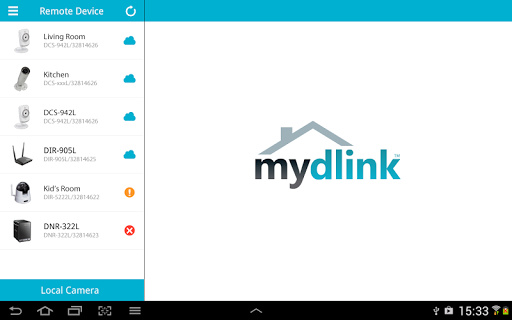
- View live video from your Cloud Camera, including a full-screen view. Tablet users may purchase the mydlink+ app for multiple camera viewing.
- Supports H.264 video streaming for smooth high-quality video (specific models only.)
- Listen to audio from your camera’s microphone (audio-enabled models only)
- Save snapshots of your camera’s video to your phone
- View the online status of your Cloud Cameras and Cloud Routers
- Remotely monitor and configure your Cloud Routers
- Access and view your camera's video feed (without audio) through your NVR.
- Support remote viewing period of five minutes in relay mode. Helpful 60 second left countdown timer.
- Touch and drag to move your view around for non-PT cameras. Pinch to zoom in/out.
- Toggle camera's view modes between Night mode, Day mode, and Automatic mode.
- After initial settings on the mydlink website, you can enable/disable motion/sound detection from the app for supported cameras.
-You can talk back with 2-way audio support (for DCS-942L, DCS-5211L, DCS-5222L, DCS-2132L, DCS-2310L, DCS-7010L, DCS-6010L), and cameras will mute their microphones to avoid feedback during two-way audio communication.
- SD Card Playback
- Camera firmware upgrade feature
- Push notifications: Tap to select which device you want to receive push notifications from.
- Local mode: Allow users to explore and access nearby cameras that are connected to the same LAN network with your phone.
- Online setup: Users can follow the online setup feature to configure new cameras. This app will lead you to configure your camera from A to Z.
- White light light-emitting diode feature of DCS-2136L
Please check https://www.mydlink.com/content/productfamily for supported model list.
Note:
* The mydlink + app is dynamically linked to the FFmpeg shared video decoding library, which is compiled to contain LGPL decoders and splitters only. The repository can be cloned from git://github.com/dlinker/mydlink-Lite---Android.git using the git clone command.
*For tablet users, we recommend downloading the mydlink+ app.
* mydlink + is not guaranteed to support Android devices using ""dirty"" linux kernel (e.g. LG P990).
What's New
Version Information
- Version
- 3.8.17
- Downloads
- 100K+
- Updated on
- Oct 20, 2023
- Released
- Nov 18, 2011
- Requires
- Android 4.4
Statistics
Google Play Rating History
Rating Distribution
Downloads Over Time
mydlink+ has been downloaded times. Over the past 30 days, it averaged downloads per day.
Shaded area shows 30-day prediction based on historical trends
Historical data collection started recently. More data points will be available over time.
mydlink+ users say on Google Play
 Yu Chong
Over the past 8 years have bought 8 D-Link IP cameras and they all still work. Parts have cracked, fallen off and the white plastic has yellowed, but they still work and I am recording 24*7 to a Dlink NAS which also worked for the past 8 years! I get no respect from my wireman, but if you know how to do a little repair these things just keep going! They are no longer updated and neither is this app but I bought this to maximize my investment. For now it works fine.
 Brooks Pitts
My live view is 3 & 4 seconds delayed. Slow but works great!! Remote or Local both slow, but both works good. I would buy again. Thanks
 A Google user
Works better than the lite version, got this app because of multi view, shame that even after paying around £100 for 2 cameras you still need to pay for the app to have multicam view, shame on you DLink.
A Google user
not working with DCS-936L remotely after the latest firmware updated. The camera work locally and works on a pc with Chrome only.
A Google user
App no longer works, all my cameras are either offline or are showing online but i cannot connect. No change or any issues with in my internet at home. This service just keeps getting worse and worse. About time to move to a different brand. Inaccessible security cam defeats the purpose of having one in the first place! Bad!
ApkTrusted Ratings & Reviews
More from D-Link Corporation
See more apps



Scan this QR code to download

Forwarding you to the page at Google Play market in seconds...
Open Google Play market now