mydlink v2.14.0
D-Link Corporation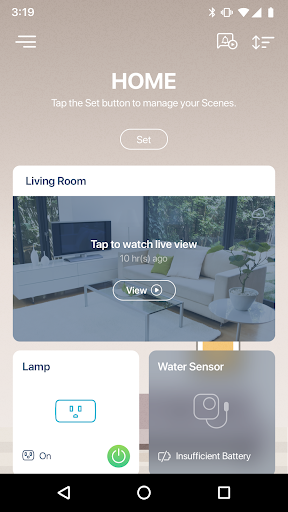


About this app
The mydlink app solves the problem of managing multiple devices and interactions in one place, benefiting users with smart homes or multiple D-Link devices. Compared to alternatives in the Productivity category, mydlink stands out for its unified control and ease of use, but may fall short in terms of customization options. With over 1 million downloads and a 3.6-star rating, the app has a solid reputation, but its limited permissions and lack of ads are notable advantages. However, the app's in-app purchases and potential data collection raise some concerns.
Pros
- The mydlink app has a large user base, with over 1 million downloads, indicating a high level of social proof and trust in the app's functionality.
- The app's developer, D-Link Corporation, is a well-established company with a reputation for producing high-quality networking devices, which lends credibility to the app.
- The app's lack of ads and limited permissions are significant advantages, as they reduce the risk of data collection and annoying advertisements.
- The app's unified control and ease of use make it an attractive option for users with multiple D-Link devices or smart home setups.
- The app's regular updates and decent rating suggest that the developer is actively maintaining and improving the app.
Cons
- The app's in-app purchases, ranging from $0.99 to $199.99, may be a concern for users who are sensitive to additional costs or feel that certain features should be included in the base app.
- Some users may be concerned about the potential data collection and privacy implications of using the app, particularly if they are not familiar with D-Link's data handling practices.
- The app's compatibility with Android 8.0 and later may be a limitation for users with older devices, and the lack of offline capability may be a drawback for users with limited internet access.
- The app's feature set may not be as comprehensive as some alternatives in the Productivity category, which could be a disappointment for power users.
Best for: The ideal user for the mydlink app is a tech-savvy individual or family with multiple D-Link devices or a smart home setup, who values ease of use, unified control, and customization options, and is willing to invest time in setting up and configuring the app to optimize their experience.
Developer Description
Control all your devices and interactions in one place with the new mydlink.
• Older D-Link cameras (DCS-xxxL and DCS-xxxxL) can still be used with the new mydlink app, but advanced functionality such as Cloud Recording and Automation will not be supported.
• The new mydlink app does not support mydlink™ Home devices (DCS-935LH, DCS-8200LH, DSP-W110, DSP-W215, DCH-S150, DCH-S160, DCH-S220, DCH-G020, DCH-Z110, DCH-Z120).
• The new mydlink app does not support setup and control of D-Link Wi-Fi router devices. To install and control these devices, follow the accompanying instructions on the router packaging and manual
With the new mydlink app, smart home control is now Smarter, Simpler, and More Compatible. You can view your home monitoring cameras in real-time, be alerted and record video when motion or sound is detected, turn appliances on/off, as well as set schedules and automations to make your life easier. All from the convenience of your smartphone or tablet.
Your Home, Only Smarter
NEW RICH NOTIFICATIONS*
• See and do more right from your lock screen
• Get clear snapshots, open live-views, and call designated contacts** in one tap
NEVER MISS A MOMENT WITH CLOUD RECORDING
• Save motion and sound-triggered video footage to the cloud, and watch it anywhere, anytime
• Filter recordings by Event Type, Date, Device, and Location
WORKS WITH THE GOOGLE ASSISTANT, ALEXA
• Use voice commands to bring up live-views from a camera on your Chromecast and Echo Show, or turn your lights, fans, and other appliances on or off
SET IT AND FORGET IT WITH SCHEDULING
• Wake up to freshly-brewed coffee every morning
• Walk into your brightly-lit home every evening after work
---
Cloud Recording Paid Plans(Price for reference only, local currencies applies)
Lite
Event recording, 1 day and up to 3 cameras.
USD $0.99 Monthly, USD $9.99 Yearly
Basic
Event recording, 7 days and up to 3 cameras.
USD $2.49 Monthly, USD $24.99 Yearly
Premium
Event recording, 14 days and up to 5 cameras
USD $4.99 Monthly, USD $49.99 Yearly
Pro
Event recording, 30 days and up to 10 cameras
USD $9.99 Monthly, USD $99.99 Yearly
Pro Plus
Event recording, 90 days and up to 10 cameras
USD $19.99 Monthly, USD $199.99 Yearly
---
Privacy
Given the app's limited permissions, it appears that D-Link is not collecting excessive data, but users should still be cautious about the potential for data collection and transmission. To minimize risks, users should review D-Link's privacy policy and ensure they understand what data is being collected and how it is being used. Additionally, users should keep their app and device software up to date to protect against potential security vulnerabilities.
Tips
To get the most out of the mydlink app, users should start by setting up their devices and configuring the app's settings to optimize performance and customize their experience. Users can also explore the app's hidden features, such as remote monitoring and alerts, to enhance their smart home or device management experience. Furthermore, users should regularly review their app settings and device configurations to ensure they are running efficiently and securely.
What's New
In-app purchases
$0.99 - $199.99 per item
Version Information
- Version
- 2.14.0
- Downloads
- 1M+
- Updated on
- Nov 19, 2025
- Released
- Jan 26, 2018
- Requires
- Android 8.0
Statistics
Google Play Rating History
Rating Distribution
Downloads Over Time
mydlink has been downloaded times. Over the past 30 days, it averaged downloads per day.
Shaded area shows 30-day prediction based on historical trends
Historical data collection started recently. More data points will be available over time.
mydlink - Google Play Rankings
Top Rankings
| Rank | Country | Category | List | Change |
|---|---|---|---|---|
| — |
Ranking History in
No ranking data available yet. Rankings are updated daily.
#28 in Top Grossing Productivity in Italy


#41 in Top Grossing Productivity in Spain

#49 in Top Grossing Productivity in Canada


#51 in Top Grossing Productivity in Germany

mydlink users say on Google Play
 Olivia MIA
good picture quality, effective and sensitive to motion.
 chevymontecarlo2003
*Great feature that time stamps are in the videos. Hope next upgrade will include a semi transparent reverse colored background for the timestamps. *Another great feature is the WIRED option. So many wireless signals these days I have to keep changing wireless channels. *Sometimes the audio seems to pickup odd noises that aren't there though. *The 720 and 1080 videos are very good and don't take up too much bandwidth. *Wish the motion detection was more accurate though.
 Michael R
App freezes periodically have to reinstall. Sometimes Cloud recordings come up as no clip or not viewable. Sensitivity setting of camera can't be set below 90 or else it won't detect motion. At 90 or above camera seems too sensitive and get too many false alerts. Contacted the D-Link about sensitivity matter and they are to forward it to engineers to hopefully push an update to change that. Update: battery optimization on phone causes a lot of the previous issues. Not the sensitivity one.
 Justin G
continued payment issues, have a subscription but the app won't let me restore my plan with the message I'm not the original subscriber. just realized today I've paid a month but haven't gotten the benefit of it for 2weeks
 Alfred Ong
29/12/25-picture blurring n not clear n sound not clear 2/1/26-still picture n sound very bad distortion
ApkTrusted Ratings & Reviews
More from D-Link Corporation
See more apps




Similar Apps










Scan this QR code to download

Forwarding you to the page at Google Play market in seconds...
Open Google Play market now