
ScorePDF: Sheet Music Viewer v14.4.0
enoiu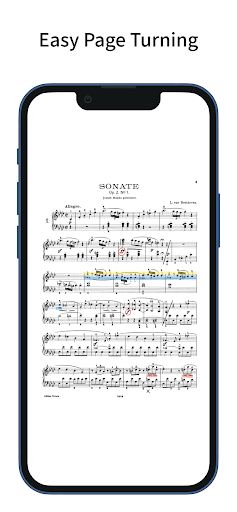






About this app
Developer Description
For Easy Page-Turning
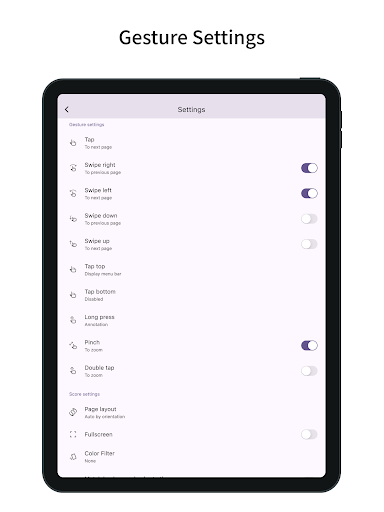
Turn pages with taps and swipes.
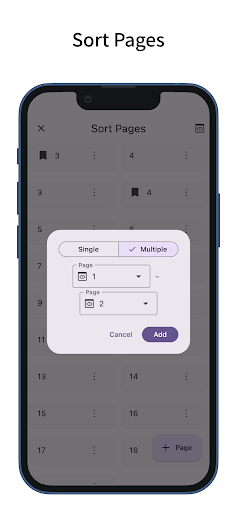
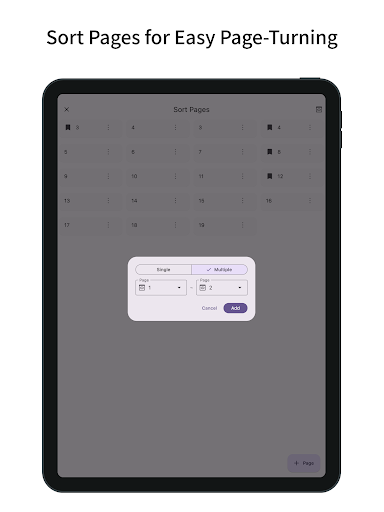
You can also reorder the pages of your sheet music.
Easy Page Turning
- You can turn pages with taps and swipes.
- Supports Bluetooth page-turning foot pedals.
- Tap assignments can be set to: previous page, left/right, top/bottom, next page, or disabled.
- Swipe gestures can be toggled on or off individually for up, down, left, and right.
- Actions other than page turning (such as displaying the menu or writing annotations) can be assigned to gestures that won’t interfere with page turning, such as long-pressing or tapping the top or bottom edges.
- Zoom operations on the sheet music (pinch or double-tap) can also be toggled on or off.
Page Reordering
- Reordering the pages makes page turning easier during repeats, dal segno, codas, and similar situations.
- When adding pages via reordering, you can add and drag multiple pages at once—not just one.
- You can also delete pages or add blank pages.
Annotations on Sheet Music
- You can write handwritten annotations on your sheet music.
- Two types of pens, markers, and an eraser are available, with undo and redo functions.
- Pens and markers allow you to choose line thickness and color, and you can draw straight lines.
- An eyedropper tool lets you pick up colors from the screen.
- You can output a PDF that includes your annotations.
Setlist
- You can group multiple pieces of sheet music into a setlist for continuous viewing without reopening files.
- Tapping the title in the menu bar displays the list of sheet music in the setlist; tapping one jumps to that piece.
Bookmark
- You can add bookmarks to specific pages of your sheet music.
- Bookmarks can have custom titles.
- Tapping the title in the menu bar displays a list of bookmarks; tapping one jumps to that page.
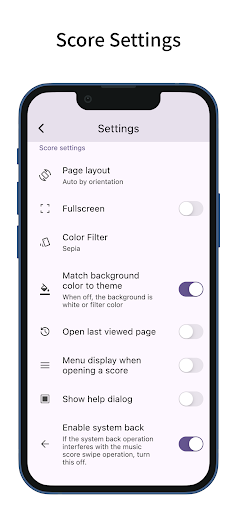
Page Layout
- You can choose from single-page, two-page (spread), fit width, fit height, half page (top/bottom) or half page (left/right) layouts for your sheet music.
- The layout can automatically change based on the screen orientation.
- When selecting fit width, the sheet music is displayed at full screen width, making it easier to view on small devices.
Color Filter
- You can apply a color filter to your sheet music, choosing from sepia, green, or inverted.
- If you find the white of the sheet music too bright, this setting may improve readability.
Adding Sheet Music
- You can add sheet music in PDF format.
- In the sheet music list screen, tapping the plus button at the bottom right lets you add PDF files from your device. (In the setlist screen, tapping the plus button opens the setlist addition screen.)
- You can also add sheet music by sharing PDF files from other apps.
- Multiple pieces of sheet music can be added at once.
Managing Sheet Music
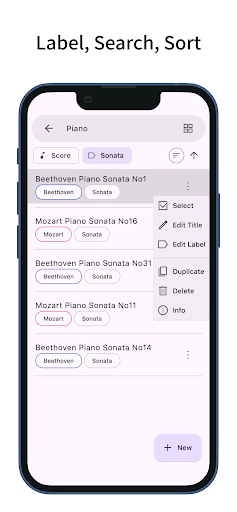
- The label feature lets you add labels to sheet music or setlists, allowing you to filter by multiple labels.
- Tapping the search bar lets you search for sheet music or setlists by title.
- Sheet music and setlists can be sorted by title, creation date, or last viewed.
Customization
- Supports dark mode.
- Allows you to change the theme color.
- Features a simple design adhering to Material Design principles.
What's New
In-app purchases
$4.49 per item
Version Information
- Version
- 14.4.0
- Downloads
- 100K+
- Updated on
- Dec 31, 2025
- Released
- Aug 12, 2022
- Requires
- Android 7.0
Statistics
Google Play Rating History
Rating Distribution
Downloads Over Time
ScorePDF: Sheet Music Viewer has been downloaded times. Over the past 30 days, it averaged downloads per day.
Shaded area shows 30-day prediction based on historical trends
Historical data collection started recently. More data points will be available over time.
ScorePDF: Sheet Music Viewer users say on Google Play
 Lorand Szekely
This is the best Android app for music scores management. I've been using this app for a year already on a Lenovo Tab P12 and it is working perfectly. Thank you for your work! You are doing a great job. A suggestion for the home page: it would be useful to choose the mode for viewing the list of scores - default or compact.
 Ryan Lanciloti
Works well, but the notation and annotation leaves something to be desired. it gives you a pen, marker, and highlighter, however it would be more helpful to drag and drop symbols. For instance, if I wanted to mark a flat or change a note. Clunky to do with the pen. Overall great for viewing sheet music, but not recommended for making digital edits in it's current state.
 Thomas Kinstler
I have a hard time with the absence of folder/file navigation. Also the multiple copies that show up in the main index every time you create a set list. I can't find to play requests like that. I have over 1000 songs. Not a total failure, but you're not earning 4 stars. I doubt you'll ever make 5 until you go to a common index format.
 Matthew James
The app works for its function, but I've been having massive problems importing new scores ever since downloading. Exporting a MuseScore file as a PDF then sending it to DropBox, Google Drive, any of these, and the software simply does not see some of the PDFs, so it can't pull it in. Extremely frustrating, seeing as half of the music I get, I cannot pull in which kind of defeats the purpose of using this app instead of paper music. Going to look for other apps as this one has been disappointing
 Benjamin Scott
unusable. No way to load a PDF on my version. Waste of money.
ApkTrusted Ratings & Reviews
More from enoiu
See more apps
ToDo: Simple ToDo List
Free
Cursive: Learn Cursive
Free
ScorePDF: Sheet Music Viewer
Free

Chord Quiz: Learn Piano Chord
Free

MarkSheet: answer sheet
Free
MarkSheet: answer sheet
Free

ScRec: screen recorder
Free

六法: 条文にジャンプ
Free

ColorScheme for M3
Free

Achieve: ToDo Counter
Free

100 Square Calc: Add & Mul
Free

日常カタカナクイズ: カタカナ語を学ぶ
Free

Memo: copy & share templates
Free

Room Screen: Clock & Weather
Free
Room Screen: Clock & Weather
Free
Similar Apps

IMSLP
Free

Flat: Music Score & Tab Editor
Free

Tomplay Sheet Music
Free

MuseScore: sheet music
Free

Set List Maker
Paid

Songsterr Guitar Tabs & Chords
Free

Functional Ear Trainer
Free

Earz Solo - Game to the Music
Free

MyScript Notes (Nebo)
Free

Piano Marvel
Free

Noteshelf - Notes, Annotations
Paid

Chord ai - learn any song
Free

Music Theory Companion
Free

SongbookPro
Free

The Ear Gym - Ear training
Free

Perfect Ear: Music & Rhythm
Free
Scan this QR code to download

Forwarding you to the page at Google Play market in seconds...
Open Google Play market now