
Video Compressor - ShrinkVid v1.1.165
TransMedia Inc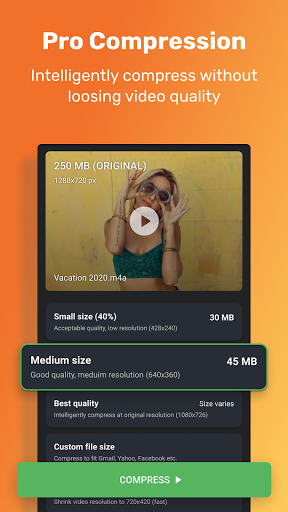












About this app
The Video Compressor - ShrinkVid app solves the problem of large video file sizes, benefiting users who need to share or store videos on their devices. With its excellent rating of 4.6/5 and over 100,000 downloads, it stands out as a reliable option in the Video Players category. Compared to alternatives, ShrinkVid's ability to compress videos to any size is a unique selling point. However, its lack of additional video editing features may make it fall short for users seeking more comprehensive video management tools.
Pros
- The app's high user rating and significant download numbers indicate a high level of social proof and trust among its user base, suggesting that it is effective in compressing videos.
- With no permissions requested, the app ensures a high level of user privacy and security, making it an attractive option for those concerned about data collection.
- The presence of in-app purchases suggests that the developer is committed to providing additional features or support, which could enhance the user experience.
- The app's small size and Android 7.0 requirement make it accessible to a wide range of devices, including older models or those with limited storage capacity.
Cons
- The app's monetization model, which includes ads and in-app purchases, may be seen as aggressive by some users, potentially disrupting the user experience.
- The lack of a developer website may raise concerns about the app's long-term support and updates, potentially affecting its reliability and security.
- Some users may find the app's functionality limited, as it only provides video compression features without additional editing or management tools.
Best for: The ideal user for the Video Compressor - ShrinkVid app is likely a casual smartphone user who frequently records or shares videos and needs to reduce file sizes for storage or sharing purposes, such as social media influencers, content creators, or individuals with limited device storage capacity.
Developer Description
Best video compressor app to reduce video file size. Compress video to any size.
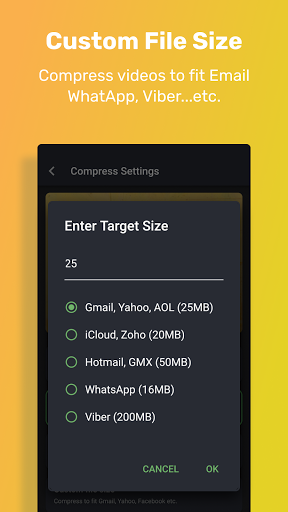
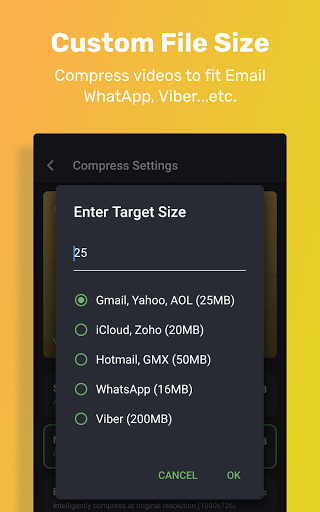
Compress video to your desired file size and easily share it over e-mail, chat, or social platforms.
ShrinkVid Video Compressor Features
- Compress video without losing quality
- Super easy & intuitive video compress app.
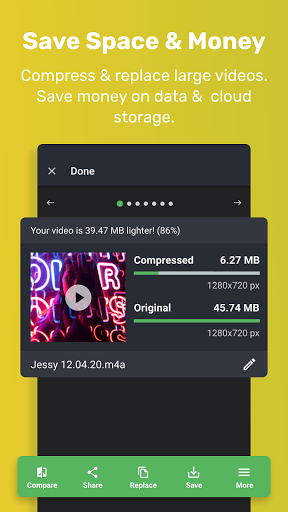
- Compress and replace function to free up device storage.
- Supports all video formats (MOV, MP4, FLV, MKV, AVI, 3GP...etc.)
- Quickly share compressed videos.
- Compress video files to any custom size.
- Compress video files to fit Gmail, WhatsApp, Viber, iCloud, Discord, WeChat...etc.
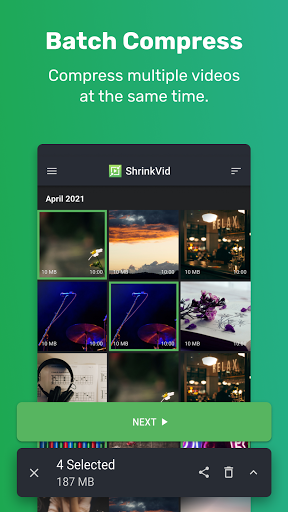
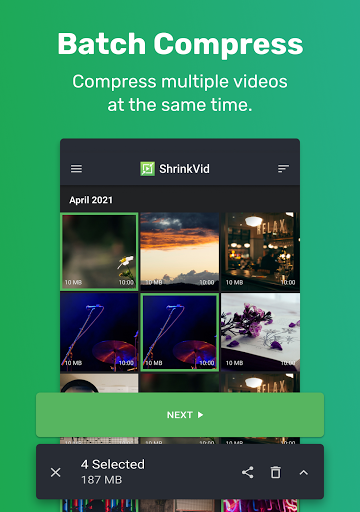
- Compress multiple videos at the same time.
- Respect privacy (compression is done on your device)
Best Quality Video Compress App
- Intelligently compress while preserving video quality.
- Optionally preserve the original video resolution.
- Compare before and after quality.
- Easily compress video files by up to 90% using advanced video codecs.
Compress Video for Email
- Want to send a large video via email? ShrinkVid video compressor can compress videos to fit any email program.
- Compress video to fit WhatApp, iCloud, email
- Easily share on Instagram, Facebook, YouTube, Viber, Discord, telegram...etc.
Video Resizer
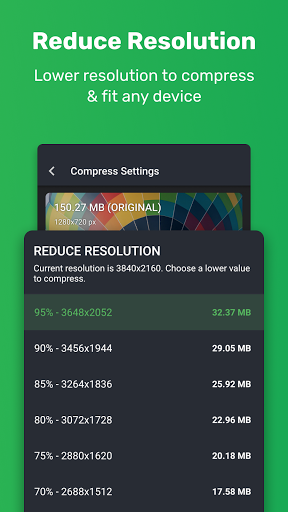
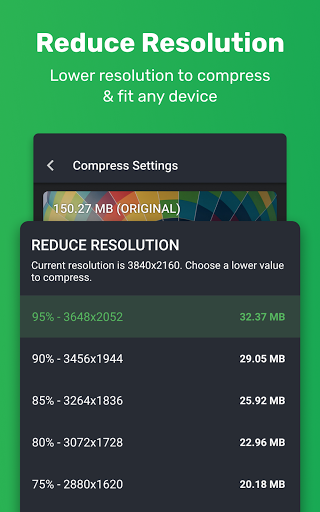
- Easily resize video files to reduce the file size
- Our video resizer can resize video to 4K, 2K, 1080p, 720p, and 360p resolutions
- You can also resize videos to a custom resolution.
Fast Video Compressor
- Video compress in seconds
- The app runs in the background too!
EASILY LOCATE & SHARE COMPRESSED VIDEOS
Easily access all of your compressed videos on the app’s “HISTORY” tab. Plus, once a video is compressed, you can easily share it with friends and family with just a click.
SAVE SPACE & MONEY
Is your phone getting full? Use the ShrinkVid video compressor to shrink and replace videos that take up space. It can also save you a lot of money on cloud storage.
EASILY FIND AND COMPRESS VIDEOS
If your phone is full, most likely it is because a few large videos are taking up space. Our in-app gallery makes it super easy to sort your video library by size, name, date...etc. So you can easily find and compress any video on your phone.
SAVE MOBILE DATA
Are you on a slow or limited mobile data connection but still want to share your beautiful videos with the world? Use the ShrinkVid video compress app to reduce video file size. You will be surprised by the highest video quality at fraction of the original file size! Our video resizer lets you save money on mobile data.
BULK VIDEO COMPRESSOR
Do you have many videos that you wish to compress? You found the right app! ShrinkVid video compressor can easily batch compress videos. You can even apply different video compression settings to each video or apply one setting to all of the videos.
Subscription Information:
- ShrinkVid premium subscription removes ADs and unlocks advanced video compression options that can drastically reduce video file size while retaining video quality.
- Premium subscriptions are billed quarterly (3-months) and annually. You can also purchase a lifetime premium subscription (one-time payment)
- Subscription will be charged to your iTunes after confirmation.
- Subscription automatically renews unless canceled at least 24 hours before the renewal date.
- Account will be charged for renewal within 24-hours before the end of the current period, and identify the cost of the renewal.
- Users can manage Subscriptions And turn off auto-renewal by going to the user's Account Settings after purchase.
- Terms of Use https://freeconvert.com/compressor-app/terms.pdf
- Privacy Policy https://freeconvert.com/compressor-app/privacy.pdf
- E-mail admin@trmedia.ca
Privacy
Given that the app requests no permissions, users can be confident that their data is not being collected or shared. However, as with any app that includes ads, users should be cautious when clicking on advertisements to avoid unintended downloads or data sharing. To ensure safety, users should only download the app from trusted sources, such as the Google Play Store.
Tips
To get the most out of the Video Compressor - ShrinkVid app, users should first review the app's settings to understand the compression options available. Additionally, users can optimize performance by closing other resource-intensive apps while using ShrinkVid, and by regularly cleaning up compressed videos to free up device storage. For better results, users should also consider the original video quality and the desired output size to achieve the best compression ratio.
What's New
In-app purchases
$2.99 - $11.99 per item
Version Information
- Version
- 1.1.165
- Downloads
- 100K+
- Updated on
- Oct 27, 2025
- Released
- May 4, 2021
- Requires
- Android 7.0
Statistics
Google Play Rating History
Rating Distribution
Downloads Over Time
Video Compressor - ShrinkVid has been downloaded times. Over the past 30 days, it averaged downloads per day.
Shaded area shows 30-day prediction based on historical trends
Historical data collection started recently. More data points will be available over time.
Video Compressor - ShrinkVid users say on Google Play
 Hayley Gimingham
Excellent app!! Did exactly what I wanted quickly and easily. I am so upset that I never found it before paying $8 for another app that was useless.
 cece lawther
rhis is pretty good! free too which I like.
 Waqar Manj
good quality good
 Кот Мизантроп
I've left bad review on this app by an accident. Meant to leave it for another app with similar icon. But noticed that my bad review for this app was deleted. So, don't be illusioned, 4.7 rating for this app is most likely result of censoring reviews, not the quality of the app.
 Saivardhan Koutla
it changes metadata example compression video date is 1 january but it compressed at 6 january. it should do compress with original date time.
ApkTrusted Ratings & Reviews
More from TransMedia Inc
See more apps

Similar Apps

Video Recorder
Paid

Smart Video Crop - Video Cut
Free

Focus Video - Video Compressor
Free

3D Photo: Imager
Paid

Video Converter Pro
Paid

Splice - Video Editor & Maker
Free

Add Music To Video & AI Editor
Free

Video Downloader & HLS Player
Free

MP4Fix Video Repair Tool
Free

Viome
Free

LightCut -AI Auto Video Editor
Free

GoPro Quik: Video Editor
Free

Promeo - Story & Reels Maker
Free

ActionDirector - Video Editing
Free

TIKTOK Meme
Paid

PhotoSpot: For Travel Planning
Free
Scan this QR code to download

Forwarding you to the page at Google Play market in seconds...
Open Google Play market now