
Handwritten Messages, MMS v1.0.7
Fulmine Software



About this app
Developer Description
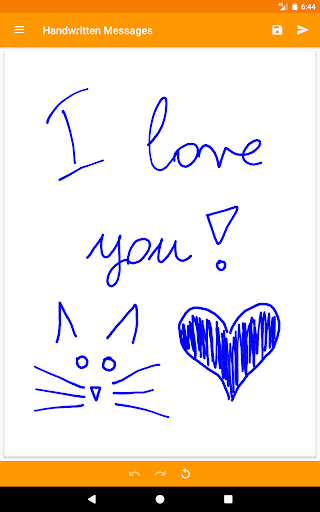
Send personal, handwritten messages using your favorite app!
Advanced pen simulation
This app utilizes an advanced pen simulation technology to make your handwriting look as if you were writing with a real pen that uses ink. Nothing makes your messages more elegant and original than ink and your own handwriting. Through the use of a stroke smoothing algorithm lines will look amazing and smooth.
How it works
• Hand write with your finger or stylus.
• Use Handwritten Messages as a standalone app to send result to any messanger or other app.
• Use this app as an image source from any messenger or other app that opens images.
• This app works as a virtual camera too, so you can use it in any app that launches the camera app to take pictures.
• Save your messages as pictures in the gallery.
Other features
• Correct your message easily using the "Undo" and "Redo" buttons.
• Make this app personal by customizing the app theme.
• Lightweight - very quick installation.
Permissions
Storage: required to save and send your messages.
Network access: to allow bug reporting (optional) and showing ads (not many).
What's New
- Better support for Android 16.
- Better navigation experience starting from Android 15.
- Better support for various screen sizes.
- Android 5.x versions are no longer supported.
- Navigation drawer now closes on back press.
Bugfixes:
- Improved app stability.
Version Information
- Version
- 1.0.7
- Downloads
- 50K+
- Updated on
- Sep 12, 2025
- Released
- Apr 13, 2017
- Requires
- Android 6.0
Statistics
Google Play Rating History
Rating Distribution
Downloads Over Time
Handwritten Messages, MMS has been downloaded times. Over the past 30 days, it averaged downloads per day.
Shaded area shows 30-day prediction based on historical trends
Historical data collection started recently. More data points will be available over time.
Handwritten Messages, MMS users say on Google Play
 A Google user
Still really Really like this -As an important GoTo Refuge - for fast storage and/or rapid text send, in times of walking or waiting (in queue) when I'm unable to sit or spend time eno for full text. . This is lite and not overdone(the only one I've seen). The best of these I've used, don't need keyboard, no need to dictate in queue or on lift - jot a quick word or phrase while moving, between stops. I was hoping for an app targeted for this. Easy to tap, jot, n save what's slowing yer mind.
A Google user
I just wish we could change the color of the text. 🙁
A Google user
works with online messaging, though sends MMS as picture, so it costs extra per text. if it can bypass this somehow I will give full marks. (I am a cheapskate that only pays 11 dollars a month for texting)
A Google user
Poor S Pen support. The app is handy, with lots of potential. But the calibration of the S Pen is off quite a bit, and does not do "Palm Check" well either. Now, with a generic stylus or your finger, for basic notes, it's very convenient. I wish there was a way to wedge it into apps like Hangouts Draw used to do…well done.
A Google user
cant fit many words on screen writing with my finger pen doesnt work and cant type either for some reason so add these abilities and id use it
ApkTrusted Ratings & Reviews
More from Fulmine Software
See more apps
My Jump
Free
Flashlight Lite
Free

Compass
Free

Compass Pro
Paid
Battery Indicator Pro
Paid
Mirror: Frames - Flowers
Free
Battery Indicator
Free
Flashlight
Free

Mirror
Free

Night Mode - Blue Light Filter
Free

Alarms: Notes & Task List
Free

Alarms Pro
Paid

Handwritten Messages Pro
Paid

Mirror: Effects - Various
Free

Mirror: Frames - Various
Free
Mirror: Frames - Love
Free
Scan this QR code to download

Forwarding you to the page at Google Play market in seconds...
Open Google Play market now