
Night Mode - Blue Light Filter v1.3.5
Fulmine Software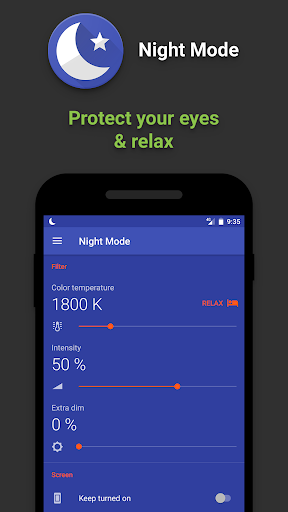


About this app
Developer Description
Reduces blue light to protect your eyes at night and for better sleep
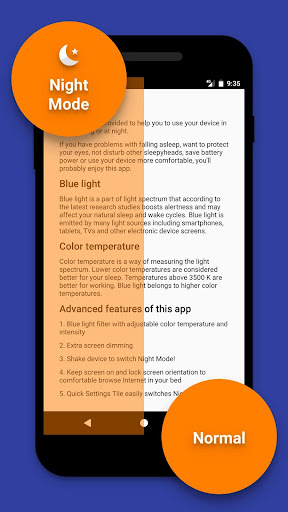
Night Mode app filters blue light that according to the latest research studies boosts alertness and may affect your natural sleep and wake cycles (circadian rythm). Additionally it precisely controls screen color temperature to setup the best light to calm down and relax.
Protect your eyes
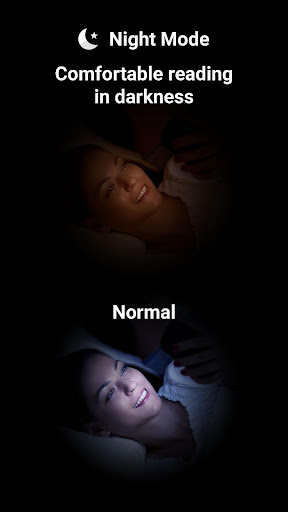
When using your device at night or twilight, even minimum screen brightness may tire your eyes. Shift to Night Mode to turn on extra screen brightness reduction by dedicated dim filter as well as by main blue light filter.
Do not disturb others
If you sleep with other person or use your device in places where screen light may disturb others, this app is for you.
Read comfortable in bed
If you are night owl that uses your mobile in bed for browsing Internet or reading, this app can prevent turning off the screen as well as lock screen rotation to any orientation you like, even upside down.
Quick shift
Just shake your device to turn into Night Mode and back (this is additional feature to turn on in app's settings).
For Nougat users it's possible to add Quick Settings Tile to quickly shift to Night Mode.
Automatic scheduler can switch Night Mode by preferred time, for example turn on on twilight and off in the morning.
Save battery power
Night Mode lowers battery power consumption by reducing blue light and screen highlight.
Customization
Night Mode has many customization options like blue light filter color temperature, intensity, shaking sensitivity, notification visibility, pause duration, app theme and more.
Permissions
Draw over other apps – required to overlay the blue light filter.
Run at startup – to allow scheduling and keep filter on/off state during device restarts.
Network access – to allow bug reporting (optional) and showing ads (not many).
Accessibility Service
The app will ask you to enable the accessibility service.
Enabling the service is optional, but useful if you want to apply the blue light filter over notifications, lock screen, system navigation bar and some other system windows.
The app uses this service only to apply the filter over other apps.
The app does not collect data in connection with the accessibility service.
What's New
- Better support for Android 16.
- Better navigation experience starting from Android 15.
- Better support for various screen sizes.
- Android 5.x versions are no longer supported.
Bugfixes:
- Fixed bottom part of the UI while night mode enabled.
- Improved app stability.
Version Information
- Version
- 1.3.5
- Downloads
- 100K+
- Updated on
- Sep 12, 2025
- Released
- Jan 12, 2017
- Requires
- Android 6.0
Statistics
Google Play Rating History
Rating Distribution
Downloads Over Time
Night Mode - Blue Light Filter has been downloaded times. Over the past 30 days, it averaged downloads per day.
Shaded area shows 30-day prediction based on historical trends
Historical data collection started recently. More data points will be available over time.
Night Mode - Blue Light Filter users say on Google Play
 A Google user
The most amazing and useful blue light filter app, you can adjust the intensity and screen dim percentage according to your preference and one can select on and off time the the app can automatically adjust the brightness and filter on time. Just amazing with so many useful features! RECOMMENDED
 Nathan Silver
One of my favorite apps tell Android forced an update that messed up half the apps on my phone and changed the layout and made it ugly, wish the makers of Android would stop messing up my phone and wrecking good apps like this one.
 S.k. Røñy
nice
 Sarah Pilliard (Nocturniquette)
App worked like it should. However, I noticed a glaring problem. It wouldn't allow my screen to power off. I have it set to turn my screen off after ten minutes and this app prevented that. I lost over 30% of my battery last night. Great app and I truly do like it. Small issue hopefully easy fix.
A Google user
I'd give it zero star if I could cause yes,I like how you can customise how dim or filtered our screen is,but it's so annoying how it keeps turning itself off randomly.Thinking of uninstalling it.
ApkTrusted Ratings & Reviews
More from Fulmine Software
See more apps
My Jump
Free
Flashlight Lite
Free
Compass
Free
Compass Pro
Paid
Battery Indicator Pro
Paid
Mirror: Frames - Flowers
Free
Battery Indicator
Free
Flashlight
Free
Mirror
Free
Alarms: Notes & Task List
Free

Handwritten Messages, MMS
Free
Alarms Pro
Paid

Handwritten Messages Pro
Paid

Mirror: Effects - Various
Free

Mirror: Frames - Various
Free
Mirror: Frames - Love
Free
Similar Apps

Sleep Tracker
Paid

ZenAlarm: Smart Wake Up
Paid

Sleep Tracker: Sleep Recorder
Free

Secret Voice Recorder
Free
Sleep Sounds - Relax Music
Free

Breethe - Sleep & Meditation
Free

Pzizz - Sleep, Nap, Focus
Free

Sleep Tracker basic
Free

Wetrair
Paid
OffScreen - Less Screen Time
Free

True Resonance: 432 Hz Player
Free
Slo: Sleep Sounds, Brown Noise
Free
Sunrise and Sunset Times
Free
SnoreLab : Record Your Snoring
Free
Binaural Beats Brainwaves
Free

Battery Charging Animation
Free
Scan this QR code to download

Forwarding you to the page at Google Play market in seconds...
Open Google Play market now