Battery Indicator Pro v2.8.15
Fulmine Software


About this app
Developer Description
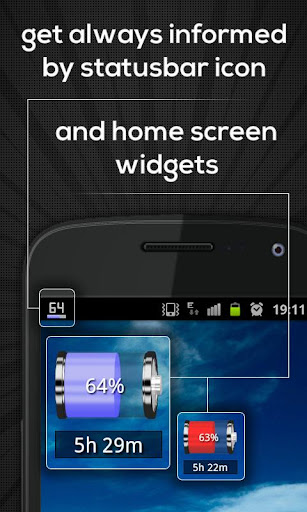
Battery level indicator in notification area with widget!
Key features of this app:
• Home screen widgets.
• Displays estimated time left to discharge or charge.
• Displays colored icon with information in notification area (starting from Lollipop, colorful icons on status bar may not be supported depending on device).
• Big readable digits.
• Quick access to many details including temperature, voltage, charging or discharging velocity in percent per hour and system's information about what drains your battery.
• Graphical interface themes.
• Many configuration options.
This product is distributed under terms of following End User Licensing Agreement (EULA) available at http://www.fulminesoftware.com/eula.html, please read it before downloading. By downloading this product you agree on terms of the EULA.
What's New
- Fixed notification not shown on Android 16 in some cases.
Version Information
- Version
- 2.8.15
- Downloads
- 10K+
- Updated on
- Sep 28, 2025
- Released
- May 12, 2012
- Requires
- Android 6.0
Statistics
Google Play Rating History
Rating Distribution
Downloads Over Time
Battery Indicator Pro has been downloaded times. Over the past 30 days, it averaged downloads per day.
Shaded area shows 30-day prediction based on historical trends
Historical data collection started recently. More data points will be available over time.
Battery Indicator Pro users say on Google Play
 Richard Colless
This is the second time I have installed this app. The first time I had a few problems, but a couple of emails to the developer fixed that. I have now installed it on my upgraded phone, and it still works perfectly. The only thing you have to set is to make sure that the app doesn't close when the screen turns off. That varies with your Android version, but it's always in Settings>Apps. I have Android version 10, and it's now in Settings >Apps>App>Battery Indicator Pro>App launch.
 Campbell Campbell
Really happy with this. My phone's battery icon is too small for me to see without my glasses. This app makes it so easy to see at a glance! I do wish it had a wire icon or something extra to show when it's charging, because that would make the difference between charging mode and discharging mode even clearer. However, overall, I am very happy with this app. Lots of personalization of settings and so easy to check. Strongly recommend.
 Jan Pelchat
I like being able to swipe down to see the battery level, but this ability keeps disappearing and I have to keep turning it on.
 Rod Cannon
It seemed great at first but I noticed it's not Accurate for me The app says 69% when I plug my phone in it says 24%.
 Barry Foxworth
I paid for this app but it still has ads! It has a place to buy but it says I already bought it!
ApkTrusted Ratings & Reviews
More from Fulmine Software
See more apps
My Jump
Free
Flashlight Lite
Free

Compass
Free

Compass Pro
Paid

Mirror: Frames - Flowers
Free
Battery Indicator
Free
Flashlight
Free

Mirror
Free

Night Mode - Blue Light Filter
Free

Alarms: Notes & Task List
Free

Handwritten Messages, MMS
Free

Alarms Pro
Paid

Handwritten Messages Pro
Paid

Mirror: Effects - Various
Free

Mirror: Frames - Various
Free

Mirror: Frames - Love
Free
Similar Apps
Charge Meter
Free

CPU Monitor - temperature
Free

Wetrair
Paid

Sunrise and Sunset Times
Free
Rivercast - River Levels App
Free
Weather Forecast Accurate Info
Paid
Battery Transfer / Receiver
Free

Chargeway
Free
Weather Live
Paid

Live Weather Forecast : VR
Paid
AccuBattery
Free

Today Weather:Data by NOAA/NWS
Free

mySolarEdge
Free
Weather for Wear OS
Free

Solar Walk 2: Planetarium 3D
Paid

Castro Premium - system info
Paid
Scan this QR code to download

Forwarding you to the page at Google Play market in seconds...
Open Google Play market now