
Magnifier 4U v2.5.1
HANTORM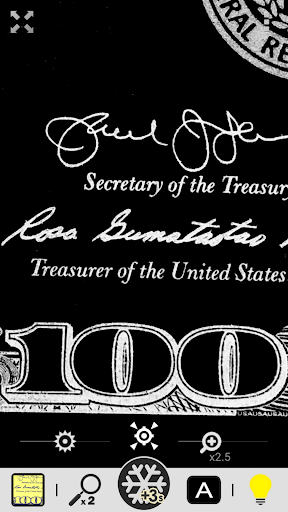

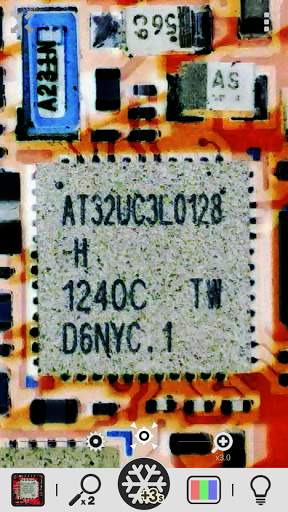

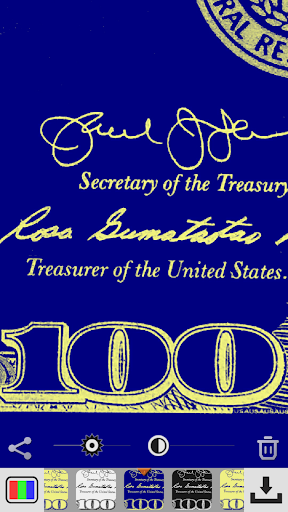
About this app
The Magnifier 4U app solves the problem of struggling to read small text or see distant objects clearly, benefiting individuals with visual impairments or those who need to inspect small details. Compared to alternatives in the Tools category, Magnifier 4U stands out with its clear image filters and excellent user rating of 4.7/5. However, its lack of permissions raises questions about its functionality and potential limitations. Overall, it is a top-tier app that delivers on its promise, but its simplicity may not appeal to power users.
Pros
- With over 100,000 downloads and an excellent user rating, Magnifier 4U has demonstrated its effectiveness and reliability in assisting users with visual needs.
- The app's developer, HANTORM, has established a reputable presence with a professional website and email support, ensuring users can reach out for assistance or feedback.
- The absence of permissions requests suggests a secure and private user experience, minimizing potential risks associated with data collection or unauthorized access.
- The app's simplicity and focus on a single task make it easy to use and understand, even for those with limited technical skills.
- The free with ads model allows users to access the app's functionality without upfront costs, although the presence of ads may be a drawback for some users.
Cons
- The lack of permissions may limit the app's functionality, potentially restricting its ability to access camera or storage features that could enhance its magnification capabilities.
- The presence of ads may detract from the user experience, particularly if they are intrusive or frequent, which could be a concern for users seeking an ad-free experience.
- Some users may find the app's simplicity and limited feature set to be a drawback, particularly if they are seeking a more comprehensive tool with additional features or settings.
- The app's compatibility with older Android versions, starting from 6.0, may not be suitable for users with older devices or those who prefer to use legacy systems.
Best for: The ideal user for Magnifier 4U is an individual with visual impairments or those who frequently need to inspect small details, such as seniors, students, or professionals in fields like engineering or design, who require a reliable and easy-to-use tool to assist with reading or viewing small text and objects.
Developer Description
The magnifying glass app with clear image filters for easier reading!
This app turns your phone into a powerful tool for reading small print—such as medicine bottle labels, electronic component tags, and restaurant menus—without the need for a physical magnifying glass.
It also includes high-contrast filters that make text stand out more clearly, making it especially helpful for people with low vision.
[Features]
① Easy-to-use magnifier
- Zoom control with seek bar
- Pinch-to-zoom gesture
- Quick zoom-out for easy targeting
② LED flashlight
- Bright lighting in dark places
③ Exposure and screen brightness controls
- Adjust the image brightness to your preference
④ Freeze frame
- Hold the image still for detailed viewing
- Apply negative, mono, or sepia filters
- Fine-tune brightness and contrast
⑤ WYSIWYG saves
- Save exactly what you see on screen
⑥ Special image filters
- Negative filter
- High-contrast black & white
- High-contrast negative black & white
- High-contrast blue & yellow
- High-contrast negative blue & yellow
- High-contrast mono
⑦ Photo gallery with filters
- Adjust brightness and contrast
- Save exactly what you see (WYSIWYG)
Thank you for using our Magnifier app!
Privacy
Given the app's lack of permissions, users can be assured that their data and device are secure, and no sensitive information is being collected or transmitted. However, users should still be cautious when using the app, especially if they are using it to capture or store sensitive information. To maximize security, users should ensure their device is updated with the latest security patches and use a reputable antivirus software.
Tips
To get the most out of Magnifier 4U, users should adjust the image filters to optimize the viewing experience for their specific needs, and consider using the app in conjunction with other accessibility tools to enhance their overall experience. Additionally, users can improve performance by closing unnecessary apps and background processes, which can help reduce battery consumption and ensure smooth operation.
What's New
v2.5
- Added a Share feature to the pause screen.
- Added a real-time Save button to the magnifier screen.
- Made it easier to select color filters.
- Added high-contrast color filters (Black & White, Blue & Yellow) to make text clearer.
- Added a black background mode for users with low vision.
- Long-press the screen to focus and freeze the image.
- Bug fixes and improvements.
Version Information
- Version
- 2.5.1
- Downloads
- 100K+
- Updated on
- Oct 19, 2025
- Released
- Jan 2, 2018
- Requires
- Android 6.0
Statistics
Google Play Rating History
Rating Distribution
Downloads Over Time
Magnifier 4U has been downloaded times. Over the past 30 days, it averaged downloads per day.
Shaded area shows 30-day prediction based on historical trends
Historical data collection started recently. More data points will be available over time.
Magnifier 4U users say on Google Play
 A Google user
The greatest of all. I've been waiting for a long time to get an app like this to see what the labels say. Now I can read the fine print on everything. It zooms in crystal clear letters and I can see them a mile away. Thank you so much for sharing your app with me and I hope the other people who needs help seeing fine print download it also.
A Google user
Except for the little delay in focus it's a fine app, it's comes handy when reading small fonts on food packs in the supermarket, much appreciated.
 Ibrahim Olufuwa AJAYI (RELOADED)
good app but makes my phone hot
 M S
M S
It has a big white constant ad at the bottom that is blinding to visually impaired people eith cataracts. You do not want lsrge areas of white space on the screen because for us its like staring into a florescent light bulb.... it hurts. A lot. Fast response time and well written, but that one flae makes it unusable. Maybe if you switched to dark themed ads exclusively.
A Google user
force me everytime to ratev5 star and to many ads so i give you 1 star don't force users to rate you
ApkTrusted Ratings & Reviews
More from HANTORM
See more apps![Magnifier & Microscope+ [Cozy] icon](https://play-lh.googleusercontent.com/gYn90JPsD2vQcJyODiS3tJ4MIFFfjfeEXAf1d0Wicsiri_ViuhgF869glBk7kJUJl-w)
![Magnifier & Microscope [Cozy] icon](https://play-lh.googleusercontent.com/d4aBMNK0YMNJf8Ua4icPNDGw3Ho2LAVn1nTNSkM2uAq1qClaLxROK4y2hOSxhfpRHXPx)

Similar Apps
Sun Seeker: Sunlight Tracker
Paid
Electrical Calculation PRO
Paid
My Emotional Compass
Paid

QR & Barcode Scanner
Paid
Envision
Free
Mindset Shifter
Paid

DeRadar
Paid

Plant Identification: AI Care
Paid

Camera Scanner
Free

Arenti
Free

Scientific Calculator Pro
Paid

CPU Monitor - temperature
Free

Daily Science Experiment
Paid
PlantSnap: Plant Identifier
Free

Personio
Free

Be My Eyes
Free
Scan this QR code to download

Forwarding you to the page at Google Play market in seconds...
Open Google Play market now