QuickBooks Desktop v5.4.0.0
Intuit Inc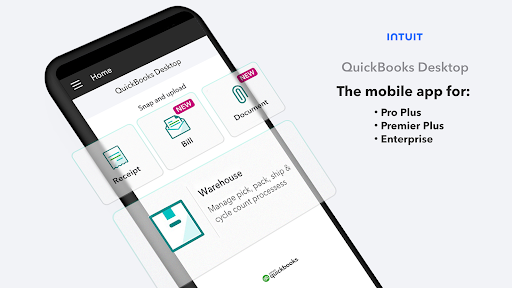
About this app
Developer Description
Scan receipts and bills. Attach documents. Warehouse & inventory management.
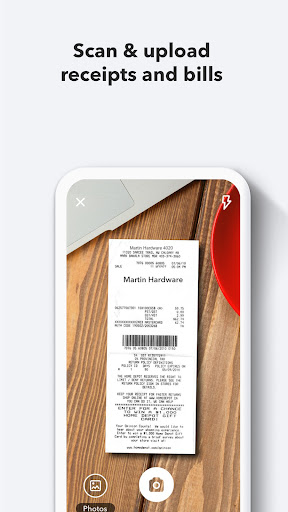
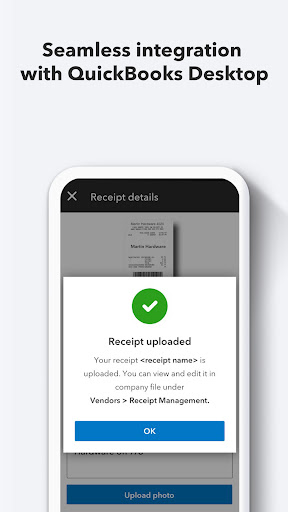
Save time with receipt and bill capture to automate entries. No more lost receipts or time-consuming expense reports! Easily attach documents to transactions.
Scan receipts
• Save time by automatically creating categorized receipt expense entries. Just photograph, import and review.
• Stay organized by attaching digital receipt images to expense transactions for audit trails.
• Accurately categorize, modify or record multiple receipt transactions at once.
Upload bills
• Save time by automating bill entries. Just photograph, import, and review.
• Stay organized by attaching files to bill transactions for simplified audit trails.
Attach documents to your transactions
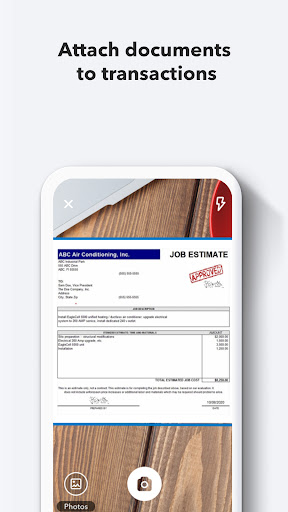
• Attach documents to transactions faster by directly uploading them.
• Save time by directly attaching multiple documents to transactions at once.
• Stay organized by eliminating the need to store physical documents.
Are you a 2019 or newer QuickBooks Enterprise Platinum or Diamond customer?
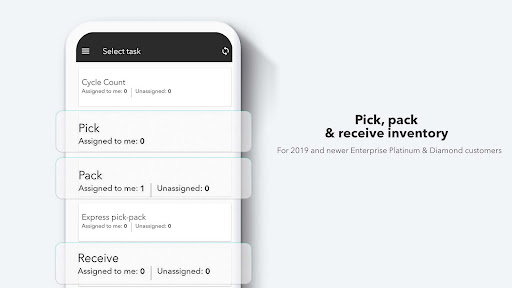
Boost your productivity with the warehouse and inventory management suite. Simplify the pick & pack cycle count process by reducing paperwork and data entry errors.
• Shipping, receiving and order fulfillment made easy with product management & inventory planning.
• Use a mobile device to provide real-time pick and pack storehouse updates to track order fulfillment progress.
• Send picked or partially picked orders for packing.
• Save time by consolidating the picker/packer roles, actions and approvals with express pick pack option.
• Control inventory stock & product details by updating packing information, like packages per order, weight and dimensions - all from a mobile device.
Want barcode scanning as well?
In addition to Android scanning, the app also offers integrated 2D barcode scanning on select Bluetooth barcode scanners – separate purchase necessary.
Disclosure:
*Scanners sold separately. Only available with the Advanced Inventory module.
What's New
Version Information
- Version
- 5.4.0.0
- Downloads
- 50K+
- Updated on
- Jul 18, 2025
- Released
- Sep 5, 2017
- Requires
- Android 7.1
Statistics
Google Play Rating History
Rating Distribution
Downloads Over Time
QuickBooks Desktop has been downloaded times. Over the past 30 days, it averaged downloads per day.
Shaded area shows 30-day prediction based on historical trends
Historical data collection started recently. More data points will be available over time.
QuickBooks Desktop users say on Google Play
 Sarah Jones
I love that I can use the many features in QuickBooks Desktop to meet the needs of my clients.
 Sensor-1 Cassone
Took a minute to get it set-up but it is working beautifully now, just what we needed! It does need the option to scan in Inventory a little better though.
 A Google user
It's OK, App could really use a search feature for Picks like there is for the PO's that would be super helpful or even have an option to sort by assending or desending order # rather than the defualt of when it was assigned to picker, as we have nearly 300 picks at one time and they are not always in order so it makes it extremely difficult to find what you are looking for sometimes.
A Google user
this like much of what Intuit does is on the edge of useful. does it function a bit? yes. but has huge problems. ex. you cannot delete or call back a pick. i have sales orders stuck in a picklist that are still there even if I restore a backup from before the SO was created. like a visitor from the future, it doesn't exist yet, but it's there. so if you use it, make damn sure you want the order picked because once it's sent, your stuck with it...
 Rhonda Stoddard
I upgraded to 2021 (9/25/20) because of the receipt upload new feature included in the DT premier plus. There are no help guides in the app or via QB to help navigate simple steps in the app. It would be nice to have a guide that explains receipt naming, how to crop and image, etc. A receipt gets uploaded and is available in QBDT. The scan feature does upload the information, but doesn't always get the correct date, vendor or amount. Within QBDT...The receipt manager allows you to assign or match it to a transaction. However, there aren't any instructions about how to remove it from the receipt history on the app. There is no way to sort or scroll through app images. I needed to upload numerous receipts and the app had trouble keeping up. The receipt management with in QBDT is another issue. If I had known how much time and effort it took to use the new feature, I probably would have waited another year to upgrade.
ApkTrusted Ratings & Reviews
More from Intuit Inc
See more apps







Similar Apps

Square Invoices: Invoice Maker
Free

JobNimbus: All-In-One Roof App
Free

GlossGenius: Booking, Payments
Free

Till: Debit Card for Kids
Free

Square Appointments Beta
Free

MoodWallet: Money Management
Free

Tradify - Easy Job Management
Free

Receipt Tracker App - Dext
Free

MetLife Personal Finance App
Free

SimplyWise: Receipts, Expenses
Free

Fergus Go
Free

Quicken Simplifi: Budget Smart
Free

Square Invoices Beta
Free

Square Team
Free

Easy Invoice & Estimate Maker
Free

Square Appointments: Scheduler
Free
Scan this QR code to download

Forwarding you to the page at Google Play market in seconds...
Open Google Play market now