Video to Audio MP3 Converter v17.0.6
Inverse AI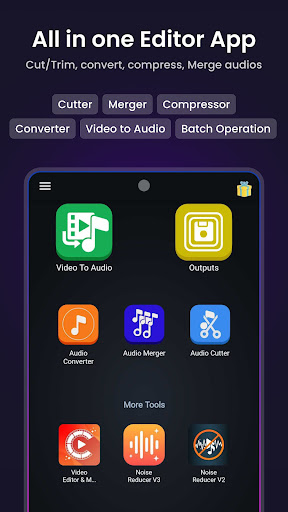




About this app
Developer Description
MP3 Cutter, Merger. Video to MP3. Extract Music from Video, Easy & Fast.
This app allows you to Cut or Trim your audios in precise points. It also gives you the option to convert and compress the audios into almost any other audio formats. This app also includes an audio merger as well as Video to audio converter. It supports almost any audio and video format for convert, compress, merge and cut/trim operations.
KEY FEATURES:
🎵 Batch Processing
- Users can queue multiple files for processing and they will be processed one by one automatically. Audio converter, video to audio, audio merger features support batch processing.
🎵 Audio Cutter
- We support both Audio cutting and trimming. We let the user input the exact starting and beginning time precise to the milliseconds. We show audio waveforms to the user for cutting or trimming..
Cut Audio: This option lets your keep part of the Audio you selected.
Trim Audio: This will let you remove the selected part of the video and keep the rest. This option works when you enable the REMOVE SELECTED option.
Audio Bitrate: When you try to save the cutting, you can configure your audio bitrate. We support 32K to 320K audio bitrate.
Output Format: You can save the cut audio to MP4, MP3, M4A(AAC), AC3, WAV, OGG, FLAC formats.
🎵 Audio Converter
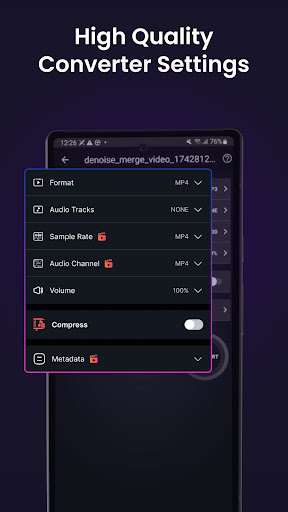
- Convert and Compress your audio to almost any audio formats. You can configure the following options of your audio:
Format: Supported Input and output formats are MP3, M4A(AAC), M4B(AAC), AC3, WAV, OGG, FLAC.
Channel: We let users choose between mono and Stereo channel. Choosing the mono channel effectively halves the size of the audio.
Compress Section:
Encoding: We support both Constant Bitrate(CBR) and Variable Bitrate(VBR) encoding. When CBR is selected you can configure the audio bitrate from 32K to 320K. When VBR is selected you can choose the quality of the audio. Higher the quality larger the audio file size.
Sample Rate: We let users choose from 8K to 48K sample rate. Changing sample rate is a great way to compress your audio file size.
🎵 Video to Audio
- Convert your videos to almost any audio format you want and also compress the audio. You can configure the following options while converting video to audio:
Format: Supported output audio formats are: MP3, M4A(AAC), AC3, WAV, OGG,
FLAC. Supported Input video formats are MP4, MKV, AVI, 3GP, FLV, MTS,
M2TS, TS, MPEG, MPG, WMV, M4V, MOV, VOB, F4V, WEBM, WMV, DAV, DAT, MOVIE,MOD.
Compress Section:
Encoding: We support both Constant Bitrate(CBR) and Variable Bitrate(VBR) encoding. When CBR is selected you can configure the audio bitrate from 32K to 320K. When VBR is selected you can choose the quality of the audio. Higher the quality larger the audio file size.
🎵 Audio merger
- Merge almost any format Audios to any other format. We support MP3, M4A(AAC), M4B(AAC), AC3, WAV, OGG, FLAC files as input and output format. You can pick any combination of audio formats to merge together. However choosing the same format of audio to be merged to the same format is significantly faster as we don't need to convert the audio before and after merging.
The above features work faster than any app in the market. This audio editing app for android is a complete package for all of your Audio editing needs.
This software uses code of FFmpeg and its source can be downloaded here. The instruction of how to compile and build the library is in the readme file inside the source.
What's New
+ Updated user Interface for better usability and experience.
In-app purchases
$0.99 - $49.99 per item
Version Information
- Version
- 17.0.6
- Downloads
- 1M+
- Updated on
- Dec 31, 2025
- Released
- Nov 30, 2018
- Requires
- Android 9
Statistics
Google Play Rating History
Rating Distribution
Downloads Over Time
Video to Audio MP3 Converter has been downloaded times. Over the past 30 days, it averaged downloads per day.
Shaded area shows 30-day prediction based on historical trends
Historical data collection started recently. More data points will be available over time.
Video to Audio MP3 Converter users say on Google Play
 ershadur rahman
Working great as Video to Audio, Video to mp3, MP4 to mp3 converter. Helped me to Extract Music from Video, awesome audio editor and ringtone maker. Select Videos then convert to mp3 fast and easy. Does what it says. Converted multiple MP4 to mp3 at a time. The audio cutter is super easy to use.
 Mithilesh Rai
best audio merg app
 Khadija Humayun
fine
 Mallu Rabanalli
DTS-HD audio codec missing in FORMAT section,add in next update, conversion speed is very impressive tq.
 Tom Welfringer
The app is not marked as having in-app purchases yet the first thing you are presented is a subscritption/pay to use window
ApkTrusted Ratings & Reviews
More from Inverse AI
See more apps
Photo Editor Filters & Effects
Free

Text On Photo
Free

Compress Video Size Compressor
Free
Video Converter, Compressor
Free

Image Compressor
Free

Audio Recorder AI Voice Memos
Free
Video to MP3 Converter Cutter
Free

Boost Audio Voice Reduce Noise
Free

Audio Video Noise Reducer AI
Free

Cut, Trim & Crop Video Editor
Free

Compress Image Chitro: KB, MB,
Free

Audio Video Noise Reducer
Free

Video Editor & Maker - VidArt
Free

Video Converter & Compressor
Free
Image to Text, document & PDF
Free

Video Player All Formats HD 4K
Free
Similar Apps

Ringtone Maker Wiz
Free

Garage Ringtones
Free

Add Music To Video & AI Editor
Free

Video to MP3 - Video to Audio
Free

Funny Ringtones - Ai Sound App
Paid
Music Audio Editor, MP3 Cutter
Free

Video downloader: Vid Play
Paid

Smart Video Crop - Video Cut
Free

Video Recorder
Paid

Boom: Bass Booster & Equalizer
Free

3D Photo: Imager
Paid

Smart Video Downloader
Paid

Joanne Cooper's LyricLab
Paid

Video Downloader Stream Saver
Paid

Al Quran- Qibla & Prayer Times
Free

Audio Editor & Music Editor
Free
Scan this QR code to download

Forwarding you to the page at Google Play market in seconds...
Open Google Play market now