
Compress Video Size Compressor v18.3.1
Inverse AI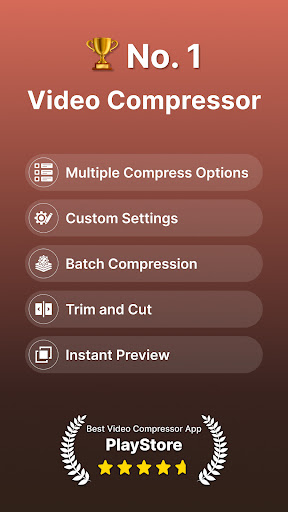
About this app
The Compress Video Size Compressor app effectively solves the problem of large video file sizes, making it ideal for users who need to share or store videos without compromising quality. This app benefits most those who frequently work with video content, such as social media influencers, content creators, and individuals with limited storage space. Compared to alternatives in the Video Players category, Compress Video Size Compressor stands out with its ability to compress videos without significant quality loss. However, its lack of advanced editing features may make it fall short for users seeking more comprehensive video editing capabilities.
Pros
- With over 5 million downloads and a 4.6-star rating, Compress Video Size Compressor has demonstrated its reliability and effectiveness in meeting user needs, making it a trustworthy choice for video compression.
- The app's ability to convert video formats, change resolution, and adjust bitrate provides users with a range of options to customize their video compression, catering to different use cases and requirements.
- The developer, Inverse AI, has maintained a good reputation through regular updates, ensuring the app remains compatible with the latest Android versions and addresses any emerging issues.
- Compress Video Size Compressor does not require any permissions, which is a significant advantage in terms of user privacy and security, as it minimizes the risk of data collection and misuse.
- The app's free version with in-app purchases offers a flexible monetization model, allowing users to access basic features without cost while providing optional upgrades for additional functionality.
Cons
- One concern is the presence of ads in the free version, which might disrupt the user experience and encourage users to make in-app purchases to remove them, potentially leading to unexpected costs.
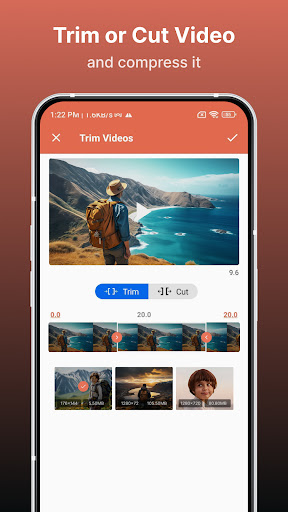
- The app's lack of advanced video editing features, such as trimming, merging, or adding effects, may limit its appeal to users seeking a more comprehensive video editing solution.
- Some users might find the range of in-app purchases, with prices up to $209.99, to be quite expensive, especially if they only need basic video compression functionality.
- The developer's website, hosted on a blogging platform, may not inspire confidence in terms of professional presence and support infrastructure compared to more established developers with dedicated websites.
Best for: The ideal user for Compress Video Size Compressor is likely a technically savvy individual or content creator between the ages of 18 and 45, who frequently works with video content, requires efficient video compression without significant quality loss, and values ease of use and flexibility in a video compression tool.
Developer Description
Compress Video without quality loss. Convert Video, Change resolution & Bitrate
MP4, MKV, AVI, 3GP, FLV, MTS, MPEG, MPG, WMV, M4V, MOV, VOB
KEY FEATURES
🎬 Compress an uncompressed video by keeping original quality.
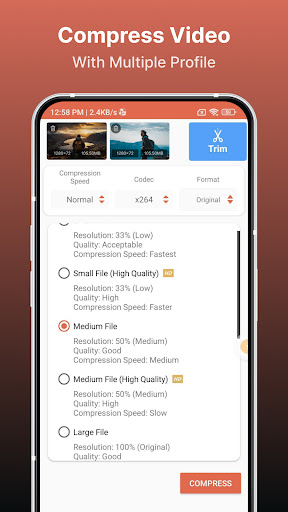
🎬 Choose from predefined multiple compression profiles with different quality and size settings.
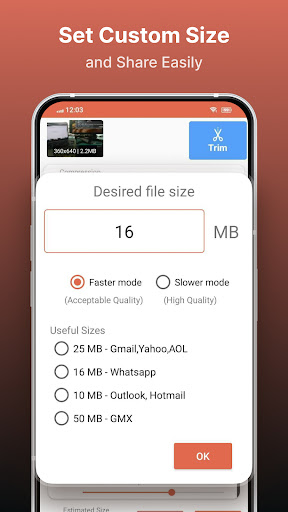
🎬 Compress video to a manually inputted size.
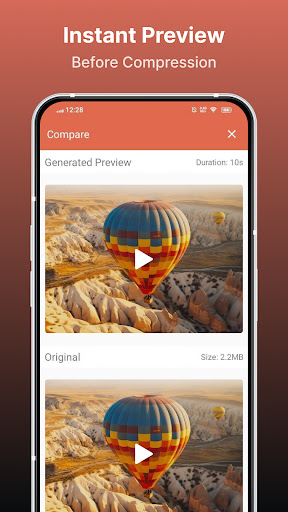
🎬 Shows a preview of small duration for the chosen compression settings before the compression process starts. Helps users to understand the quality of the compression beforehand.
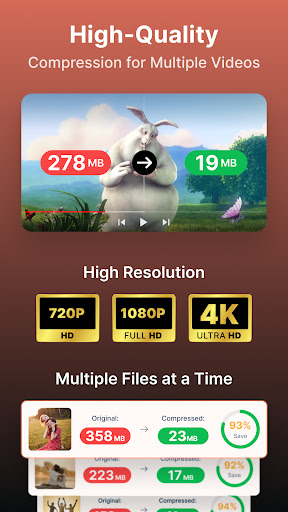
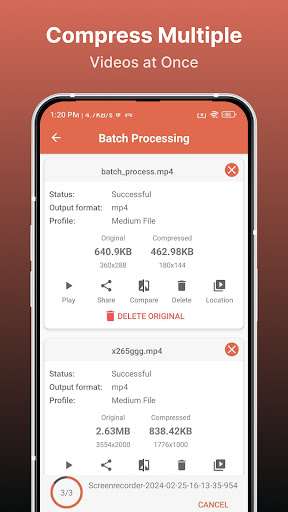
🎬 Queue multiple videos to compress them in batch mode.
🎬 Choose between X264 and X265(HEVC) codec for compression. HEVC codec provides much more compression than X264 codec. But X264 is much faster than X265 in terms of compression speed.
🎬 Choose Compression process speed. Higher the speed larger the compressed video size.
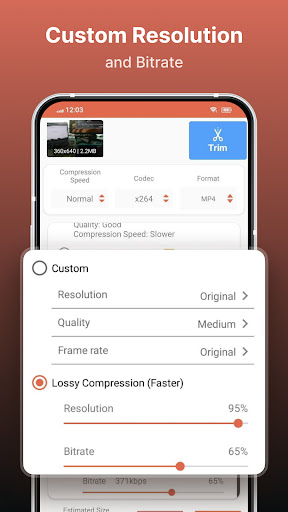
🎬 Choose custom resolution.
🎬 Compresses a video by decreasing resolution, video bitrate. In this option the user can see the estimated compressed video size before compressing. This doesn’t preserve original quality.
🎬 Compare compressed and original video by playing them simultaneously in the same screen.
🎬 Delete compressed or original file after compression from the app.
🎬 Reduces video size, shrink video, save and clear device's storage space.
🎬 High quality video compression and Low quality video compression.
🎬 Convert video to MP4, MKV, AVI, 3GP, FLV, MTS, M4V, MOV formats.(PRO Feature)
🎬 Convert video from MP4, MKV, AVI, 3GP, FLV, MTS, MPEG, MPG, WMV, M4V, MOV, VOB formats.
🎬 Play Compressed and Converted Video.
🎬 Share compressed, converted and size reduced videos.
Video Compressor - Compact Video application can compress and convert almost any format of videos. It provides users with default compress/preset profiles. Users can choose desired compression quality, compression speed, video resolution, bitrate etc. Also this compressor and converter lets the user input the desired compressed video size and it compresses the video to that size. Also you can compress videos in batch mode by queuing multiple videos.
This Video Compressor can compress an uncompressed video without losing quality using X264 and X265(HEVC) codec. It can also compress a compressed video by decreasing the quality which is Resolution, Bitrate. This video compressor gives the user a transparent and flexible way to choose the compression level by customizing resolution and bitrate of the video. It shows the estimated size of the compressed video before the compression begins. This helps you decide how much space you want to save with what quality of the compression. It supports many video formats.
This is the best Video compressor and converter app in the market which provides every possible settings for compressing your video.
Privacy
Given that Compress Video Size Compressor does not request any permissions, the risk of data collection and privacy breaches is significantly minimized. However, users should still be cautious when making in-app purchases and ensure they understand what they are buying. It's also advisable to review the developer's privacy policy, if available, to understand their data handling practices.
Tips
For optimal use, users should first explore the app's settings to understand the available compression options and how they affect video quality. Utilizing the app's batch processing feature can also save time when compressing multiple videos. Additionally, users should monitor their device's storage space and battery level when using the app, especially for large video files, to avoid running out of resources.
What's New
+ Updated the user interface for a better experience.
In-app purchases
$0.99 - $209.99 per item
Version Information
- Version
- 18.3.1
- Downloads
- 5M+
- Updated on
- Jan 1, 2026
- Released
- Jan 30, 2020
- Requires
- Android 8.0
Statistics
Google Play Rating History
Rating Distribution
Downloads Over Time
Compress Video Size Compressor has been downloaded times. Over the past 30 days, it averaged downloads per day.
Shaded area shows 30-day prediction based on historical trends
Historical data collection started recently. More data points will be available over time.
Compress Video Size Compressor - Google Play Rankings
Top Rankings
| Rank | Country | Category | List | Change |
|---|---|---|---|---|
| — |
Ranking History in
No ranking data available yet. Rankings are updated daily.
#92 in Top Grossing Video Players in United States


#70 in Top Grossing Video Players in Australia


#72 in Top Grossing Video Players in Indonesia


#82 in Top Grossing Video Players in Pakistan


Compress Video Size Compressor users say on Google Play
 Tanveer King
I absolutely love this video compressor app! It’s incredibly fast, easy to use, and delivers excellent results without compromising the quality of my videos. The user interface is clean and intuitive, making the entire compression process smooth and hassle-free. Whether I need to reduce file size for sharing or save storage space, this app always performs perfectly. It’s definitely one of the most efficient and reliable tools I’ve ever used — highly recommended!
 Atish Gandhi
Quite good. Compression is excellent, reduces to max 20-25% of original size (I already saved 15GB in few days. I have lifetime access.) Only issue is consumes battery quickly. Minor changes - by default sorting should be by size (high to low)
 Seyed Mousavi
app itself seems to work quite well and it's fair with its ads as in allowing you to choose to watch an ad to use the features that are otherwise behind the Pay wall however....the ads are very pornographic. basically anything (which is the entirety of the ads I get) that involves AI 🙄 is pornographic.
 Sigge Sigvardsson
It's good, but when ever you press a button a 30 sec commercial shows. And if you press the wrong button you still have to watch it before you can go back. Good for 1 or 2 videos a month, otherwise I would continued looking.
 Prashant Kumar
worst appl don't work
ApkTrusted Ratings & Reviews
More from Inverse AI
See more apps
Photo Editor Filters & Effects
Free

Video to Audio MP3 Converter
Free

Text On Photo
Free
Video Converter, Compressor
Free

Image Compressor
Free

Audio Recorder AI Voice Memos
Free

Video to MP3 Converter Cutter
Free

Boost Audio Voice Reduce Noise
Free

Audio Video Noise Reducer AI
Free

Cut, Trim & Crop Video Editor
Free

Compress Image Chitro: KB, MB,
Free

Audio Video Noise Reducer
Free

Video Editor & Maker - VidArt
Free

Video Converter & Compressor
Free

Image to Text, document & PDF
Free

Video Player All Formats HD 4K
Free
Similar Apps

Smart Video Crop - Video Cut
Free

LightCut -AI Auto Video Editor
Free

BeatSync: Photo & Music Videos
Free

Add Music To Video & AI Editor
Free

PowerDirector - Video Editor
Free

Spring - Video Editor & Maker
Free

GoPro Quik: Video Editor
Free

Splice - Video Editor & Maker
Free

VLLO - Video Editor Vlog Edits
Free

PixelFlow: Intro Video maker
Free

ActionDirector - Video Editing
Free

Videoleap: AI Video Editor
Free

Screen Recorder - AZ Recorder
Free

MP4Fix Video Repair Tool
Free

KMPlayer - All Video Player
Free

FilmoraHD - AI Video Creator
Free
Scan this QR code to download

Forwarding you to the page at Google Play market in seconds...
Open Google Play market now