Video Converter, Compressor v17.0.7
Inverse AI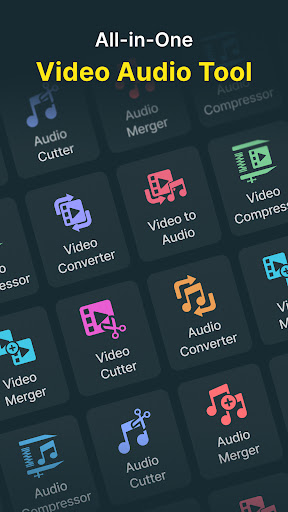

About this app
Developer Description
Batch Convert, Compress Video to MP4, MP3, 3GP, MKV, AVI, MOV, MTS, WMV, VOB,AAC
This video audio editor app also lets you trim/cut both audio and video as well as merge your audio and video files.
KEY FEATURES:
🎬 Video Converter
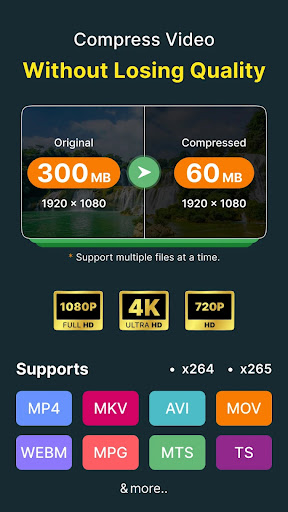
** Convert and Compress your video to almost any video and audio formats.
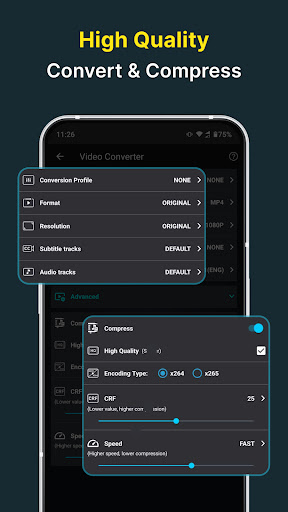
Supported Formats: MP4, MKV, AVI, 3GP, FLV, MTS, M2TS, TS, MPEG, MPG, WMV, M4V, MOV, VOB, F4V, WEBM, DAV, DAT, MOVIE, MOD, MXF, LVF, H264.
Resolution: Choose from predefined 4K resolution to 240P or put any custom resolution.
Frame Rate: Choose from any predefined frame rates or put any custom frame rate.
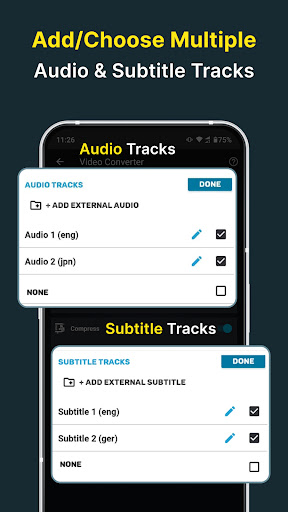
Subtitle Track: Choose from existing subtitles tracks of the video or upload subrip, mov_text, srt, webvtt, vtt format subtitles.
Audio Track: Choose from existing audio tracks of the video to keep or add external audio tracks of mp3, aac, m4a, wav formats.
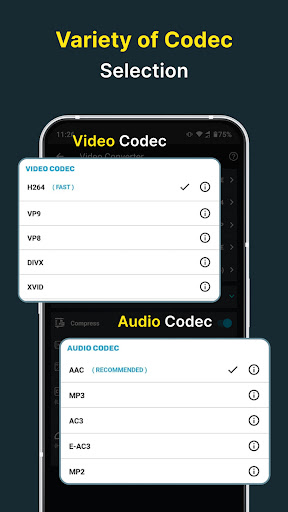
Video & Audio Codecs: We support h264, mpeg4, mpeg1, mpeg2, flv1, vp8, vp9, wmv1, wmv2, aac, mp3, mp2, ac3, opus, vorbis, flac, alac, wmav1, wmav2 video and audio codecs.
Rotate & Flip Video: Apply 90 degree clockwise/anticlockwise or 180 degree rotation and Flip videos vertically or horizontally.
Compress option:
High Quality: This compression option uses X264 codec to compress your video keeping nearly original video quality.
Video Bitrate: Reset video bitrate to compress the video to a specific size.
🎬 Video Merger
** Join/merge/concat multiple videos into one video in sequential, Top-Bottom or Side-By-Side style.
🎬 Video Cutter
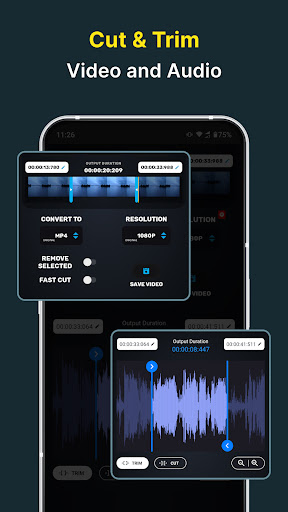
** Cut and trim your video files. You can input the exact starting and ending cutting time precise to the milliseconds.
Cut Video: This option keeps part of the video you selected.
Trim Video: This option removes the selected part of the video if you enable the REMOVE SELECTED switch.
🎬 Video to Audio
** Convert videos to almost any audio format and also compress the audio.
Supported Formats: MP3, M4A(AAC), AC3, WAV, OGG, FLAC. MP4, MKV, AVI, 3GP, FLV, MTS, M2TS, TS, MPEG, MPG, M4V, MOV, VOB, F4V, WEBM, WMV, DAV, DAT, MOVIE, MOD.
🎵 Audio Cutter
** Cut and trim your audio files. You can input the exact starting and ending cutting time precise to the milliseconds.
Cut Audio: This option keeps part of the Audio you selected.
Trim Audio: This option removes the selected part of the audio if you enable the REMOVE SELECTED switch.
Audio Bitrate: Choose any audio bitrate while saving your cut audio.
Output Format: MP4, MP3, M4A(AAC), AC3, WAV, OGG, FLAC.
🎵 Audio Converter
** Convert and Compress your audio to almost any audio format.
Supported Formats: MP3, M4A(AAC), M4B(AAC), AC3, WAV, OGG, FLAC.
Channel: Choose between mono and Stereo channel.
Compress Section:
Encoding: We support both Constant Bitrate(CBR) and Variable Bitrate(VBR) encoding.
Sample Rate: You can choose sample rate from 8K to 48K.
🎵 Audio merger
** Merge almost any format Audios to any other format. We support MP3, M4A(AAC), M4B(AAC), AC3, WAV, OGG, FLAC files as input and output formats.
Batch Processing
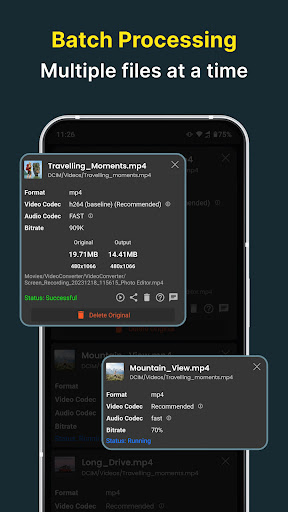
** Users can queue multiple files for processing. All our features support Batch processing.
This software uses source code of FFmpeg which is available here. The instruction to compile and build the library is in the readme file inside it.
What's New
+ Updated user Interface for better usability and experience.
In-app purchases
$0.99 - $49.99 per item
Version Information
- Version
- 17.0.7
- Downloads
- 10M+
- Updated on
- Jan 5, 2026
- Released
- Mar 18, 2019
- Requires
- Android 8.0
Statistics
Google Play Rating History
Rating Distribution
Downloads Over Time
Video Converter, Compressor has been downloaded times. Over the past 30 days, it averaged downloads per day.
Shaded area shows 30-day prediction based on historical trends
Historical data collection started recently. More data points will be available over time.
Video Converter, Compressor users say on Google Play
 Nima Heydari
Literally the best app that you can find for converting your videos, etc. I'm using the free version and it made me satisfied! I literally recommend you this app! Thank you so much!
 john john
please make this app all pro unlocked for free. please make new app that can burn hardcode subtitle srt to mp4 or mkv or burn the existing subtitle in video of mp4 or mkv to mp4 to mkv without too much size in output.
 Wayne Stevens
the running progress from mp3 to flac runs twice in audio converter did you use the two file is uploaded to google Drive
 Hossein Rahimifar
bad
ApkTrusted Ratings & Reviews
More from Inverse AI
See more apps
Photo Editor Filters & Effects
Free
Video to Audio MP3 Converter
Free

Text On Photo
Free

Compress Video Size Compressor
Free

Image Compressor
Free

Audio Recorder AI Voice Memos
Free
Video to MP3 Converter Cutter
Free

Boost Audio Voice Reduce Noise
Free

Audio Video Noise Reducer AI
Free

Cut, Trim & Crop Video Editor
Free

Compress Image Chitro: KB, MB,
Free

Audio Video Noise Reducer
Free

Video Editor & Maker - VidArt
Free

Video Converter & Compressor
Free
Image to Text, document & PDF
Free

Video Player All Formats HD 4K
Free
Similar Apps

KMPlayer - All Video Player
Free

MP4Fix Video Repair Tool
Free

ActionDirector - Video Editing
Free

Visha-Video Player All Formats
Free

Smart Video Crop - Video Cut
Free

Smart Video Downloader
Paid

Video to MP3 - Video to Audio
Free

PowerDirector - Video Editor
Free

Video Player All Format
Free

Add Music To Video & AI Editor
Free

LightCut -AI Auto Video Editor
Free

Focus Video - Video Compressor
Free

Video Converter Pro
Paid

BeatSync: Photo & Music Videos
Free

AI Video Maker - Renderforest
Free

Dolby On: Record Audio & Music
Free
Scan this QR code to download

Forwarding you to the page at Google Play market in seconds...
Open Google Play market now