USB Camera Pro vVARY
沈垚 / ShenYao China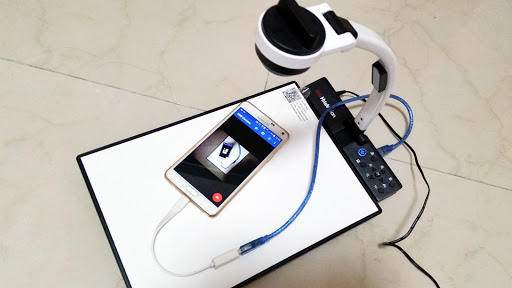





About this app
Developer Description
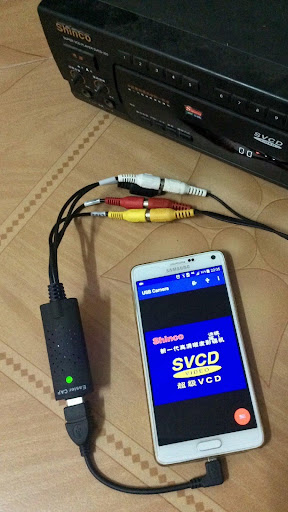
Connect EasyCap or UVC devices for recording and broadcast video/audio stream
Using UVC H.264 device : https://youtu.be/j-71QMNuDr0
Connect multiple devices : https://youtu.be/2znw4eVazDs
RTSP real time stream : https://youtu.be/-Qzc0RSDerg
RTMP live streaming : https://youtu.be/S5Bc1r57CUU
Picture In Picture : https://youtu.be/Mbturdxyi5c
VR/FPV View : https://youtu.be/zEqBXLNFnE0
Display Video On Lock Screen : https://youtu.be/Hdf2H_YusO
Tip:
Supports following devices:
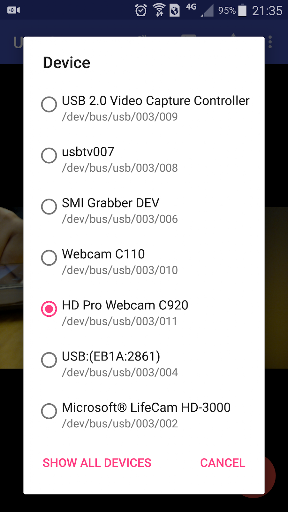
* UVC WebCam with microphone or external USB Audio input (Supports H.264, H.265, HEVC, MJPG, YUY2, P010, NV12 and so on)
* UVC video grabber with audio input or external USB Audio input (Up to 4K via HDMI, Supports H.264, H.265, HEVC, MJPG, YUY2, P010, NV12 and so on, Supports progressive and interlaced video)
* Windows Hello Camera and IR Camera
* Geek szitman supercamera(2ce3:3828)non-UVC devices, e.g. USB Endoscope
* EasyCap including audio with UTV007 / HTV600 / HTV800 chipsets (VID_1B71&PID_3002)
* EasyCap including audio with STK1160 + SAA7113/GM7113 + AC97 chipsets (Audio 48kHz stereo version VID_05E1&PID_0408)
* EasyCap including audio with STK1160 + SAA7113/GM7113 (Audio 8kHz mono version VID_05E1&PID_0408)
* EasyCap including audio with EM2860 + SAA7113/GM7113 + AC97 chipsets (VID_EB1A&PID_2861)
* EasyCap including audio with SMI2021 + SAA7113/GM7113 + ES7240/CS5340 chipsets (VID_1C88&PID_0007, PID_003C, PID_003D, PID_003E, PID_003F, PID_1001)
Please use a good quality OTG cable and ensure power supply. Some devices may need to bridge HUB to enhanced USB signals to work properly, e.g. Elgato Cam link, ezcap Video Grabber.
Using HEVC for video recording/streaming requires Android 5.0 or above, and the device must supports HEVC codec.
Using AV1 for video streaming requires Android 10 or above, and the device must supports AV1 codec.
"USB Camera" can let your android device connect to USB WebCam or video capture card via USB-OTG. You can record video or capture snapshot, OR turn your phone into a wireless IP Camera via build-in RTSP and HTTP Server for security monitoring WITH Bi-directional audio support, you can use your browser to view, of course, include "IP Camera" App.
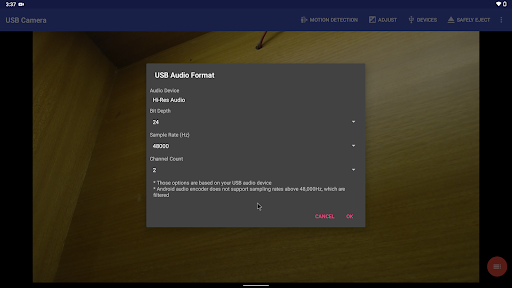
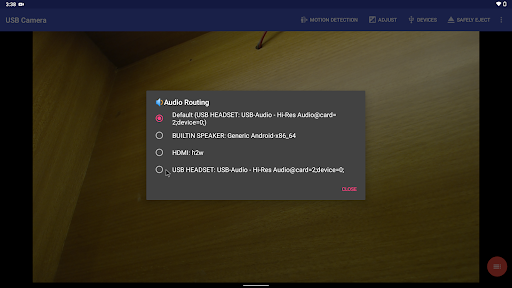
"USB Camera" can mix USB Audio with a built-in microphone or system audio and output, or overlay the built-in camera/screen video onto the external camera video.
"USB Camera" can push the video and audio to RTMP/SRT live media server and use for network live broadcast. It supports the rtmps security protocol and SRT protocol and it can also push the media to multiple media server at the same time. It also supports HEVC/AV1 over RTMP and can be used for YouTube Live currently.
"USB Camera" supports Side by Side(SBS) view and it can work with FPV goggle
"USB Camera" can add timestamp, GPS, speed and other info on the video frames while recording and can use your headset or Bluetooth headset to capture snapshot and record video. It also supports WebCam's snapshot button.
"USB Camera" supports loop-recording. Can set auto-segment when recording and auto-delete old video archives when no enough storage. "USB Camera" can be used as "Dash Cam"
USB Camera can seamless switching between foreground and background. Just press 'Enter background' from menu. The recording will not interrupted during switching!
It support auto video recording which based on Motion Detection and the video record can be uploaded to FTP server automatically and notify you via Email!
Bi-directional audio requires IP Camera App, you can get it from https://play.google.com/store/apps/details?id=com.shenyaocn.android.WebCamPro
IMPORTANT! On Android 9 and above, Camera permission is required to get fully USB Video device access.
This is userspace driver so it used for the app only. Android does not allow to install kernel driver so it unable to use for third-party apps.
What's New
* Can disable camera overlay when entering background
* Now you can overlay the screen and internal camera video onto USB video at the same time
* Supports mix the system audio output with USB audio or Built-in microphone
* Some UVC devices may containing multiple cameras now can be accessed correctly, e.g. Windows Hello Camera and IR Camera
* Supports 'Geek szitman supercamera' (ID 2ce3:3828) devices, which are commonly used in USB endoscopes
Version Information
- Version
- -
- Downloads
- 50K+
- Updated on
- Dec 28, 2025
- Released
- Mar 20, 2017
- Requires
- Android Varies with device
Statistics
Google Play Rating History
Rating Distribution
Downloads Over Time
USB Camera Pro has been downloaded times. Over the past 30 days, it averaged downloads per day.
Shaded area shows 30-day prediction based on historical trends
Historical data collection started recently. More data points will be available over time.
USB Camera Pro - Google Play Rankings
Top Rankings
| Rank | Country | Category | List | Change |
|---|---|---|---|---|
| — |
Ranking History in
No ranking data available yet. Rankings are updated daily.
#7 in Top Paid Video Players in United States


#2 in Top Paid Video Players in Japan


#2 in Top Paid Video Players in Germany


#3 in Top Paid Video Players in South Korea

USB Camera Pro users say on Google Play
 Marco Fresange
You found it ! ! Look no further, this is the one you're looking for. You're welcome 🌞 Highly configurable and even more so with every upgrade. And to think it's the only one that works without any sluggishness. Using this app for viewing my drone in flight. I've been using Pro for a couple of years now and it has proven itself to be a robust app, not flimsy at all. It always works every time.
 Patryk Lesiecki (LosTigeros)
Great app, I would love to see SRTLA protocol on it for transferring data through multiple data connections (mobile + wifi) at the same time. The SRT connection is constantly reconnecting (even on Wi-Fi), which makes it unusable.
 David Pierre
Very good aplication. But I'm using with a Meta Quest 3, sideloading using third party stores, I brought the Pro versin but I can't run in my meta quest because the app can't verify my license. Could you producer guys make some improvments on the payment check method? Im using the app for artroscopes ortopedic surgerys in my research about this new surgery VR guidance technic, and is very important for my team to use the PRO version.
 Greenlungs81
Worked when I first tried it now don't show anything shows it's connected but still nothing on the screen I uninstalled it reinstalled it still nothing . It will work on my phone but not on my tablet anymore smh and phone screens just to small if I known it was going to do this I would never paied for it
 Amanda Fife
I started with the free version before upgrading to the paid version. Worked great until the last update. I've been using this with my phone connected to my DSLR. Worked great but tried using it today and all I get is a black screen. I've done all I know how to do to fix it but no luck. If it gets fixed I'll keep the app. Otherwise, I will delete it and look for a different option.
ApkTrusted Ratings & Reviews
More from 沈垚 / ShenYao China
See more apps


Similar Apps

SuperCam Plus
Free

Video Recorder
Paid

Video Converter Pro
Paid

IPC360 Home
Free

Loom – Screen and Cam Recorder
Free

mcpro24fps manual video camera
Paid

HQ Video Player & Casting
Paid

Cinmoore
Free

Viidure-Dashcam Viewer
Free

Ajax Security System
Free

Arenti
Free

InstaVision: Smart & Safe Home
Free

Emaldo
Free

eZy Watermark Photos Pro
Paid

Canon Camera Connect
Free

MP4Fix Video Repair Tool
Free
Scan this QR code to download

Forwarding you to the page at Google Play market in seconds...
Open Google Play market now