
AirReceiver AirPlay Cast DLNA v5.1.7
softmedia
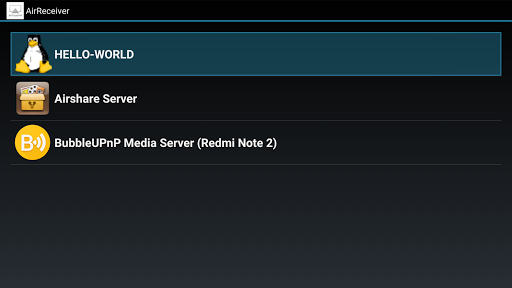


About this app
Developer Description
All in one multi protocols stream receiver for AirPlay, Cast and DLNA.
With AirReceiver, you can streaming screen,photos,music,videos from your phones,laptops to your TV.
It works in the background, streaming media to your Android device, It's special suitable for Android TV/Box.
Features:
- support Youtube video.
- support audio sync with other AirExpress devices.
- supporting AirMirror. the best performance in the third-party AirPlay application.
- fully support IOS16.
- support slideshow feature.
- Compatibility with AirParrot. you can use AirParrot mirror your PC screen on your Android Tablet.
- stream audio/video/photo from AirPlay clients (itunes, iOS, ...)
- stream audio/video/photo from DLNA clients(WMP12, AirShare,...)
- run in the background as a service
- configurable network name
- can be started on boot
- Windows Screen Mirror: Download and Install the Free Tools AirSender in your PC(http://www.remotetogo.com). Click the icon of "AirSender" at Windows status bar, select the Device running AirReceiver.
NOTES:
1, Please turn off or uninstall other AirPlay application like AirReceiverLite on your phone because AirPlay use some hardcode tcp port.
2, AirMirror is heavy CPU load, Please make sure your phone is enough powerful(1GH CPU with two core is ideally).
3, If you don't like it, contact us for a refund within 7 days.
What's New
Version Information
- Version
- 5.1.7
- Downloads
- 100K+
- Updated on
- Oct 10, 2025
- Released
- Apr 2, 2013
- Requires
- Android 5.0
Statistics
Google Play Rating History
Rating Distribution
Downloads Over Time
AirReceiver AirPlay Cast DLNA has been downloaded times. Over the past 30 days, it averaged downloads per day.
Shaded area shows 30-day prediction based on historical trends
Historical data collection started recently. More data points will be available over time.
AirReceiver AirPlay Cast DLNA - Google Play Rankings
Top Rankings
| Rank | Country | Category | List | Change |
|---|---|---|---|---|
| — |
Ranking History in
No ranking data available yet. Rankings are updated daily.
#15 in Top Paid Video Players in United States


#1 in Top Paid Video Players in Japan

#2 in Top Paid Video Players in South Korea

#6 in Top Paid Video Players in Italy
AirReceiver AirPlay Cast DLNA users say on Google Play
 Geoff Esposito
Bought this to cast from my iPhone for few apps that don’t support chromecast. It’s cheap, unobtrusive, and does exactly what it is supposed to without issue, which apparently is saying a lot since I tried three others first and they were all terrible.
 Brenton
Works great, my orientation setting is not in my settings anymore. Does anyone know why?
 Jairo Narvaez
Looks like the store has changed, after buying this app, I can't even install it, I get an error retrieving information from server DF-DFERH-01, if I try to refund it, I get an email confirmation of me requesting a refund for $0.00 and it's rejected. Somehow the store got very broken. Edit, about 30 minutes after waiting a finding, the play store started working well, the application works really well after having it installed.
 Neha Shukla
Airplay works at time but not always. Airplay doesn’t work with Netflix, Amazon Prime or third party app. Everytime i have to open youtube app manually cast video
 Zinja Shike
App cannot maintain sync with other zones/systems. I can adjust latency to get an acceptable level, then within seconds they're out of sync again. Unfortunately doesn't fit my usage.
ApkTrusted Ratings & Reviews
More from softmedia
See more apps

Similar Apps

RealVNC Viewer: Remote Desktop
Free
Lenovo
Free

Lorex Classic
Free

spacedesk - USB Display for PC
Free

Plume Home
Free
Home Assistant
Free

Linksys
Free

Home V
Free

Nedis SmartLife
Free
Microsoft Intune
Free

HeadTrack
Paid

Yatse: Kodi remote and cast
Free
Home + Control
Free

Send Anywhere (File Transfer)
Free

FlexiRoam: eSIM & Data Plans
Free

Lib of Dev (Open Source)
Free
Scan this QR code to download

Forwarding you to the page at Google Play market in seconds...
Open Google Play market now