USB Dual Camera Pro vVARY
沈垚 / ShenYao China










About this app
Developer Description
Connect 2 UVC devices for recording and broadcast video/audio stream
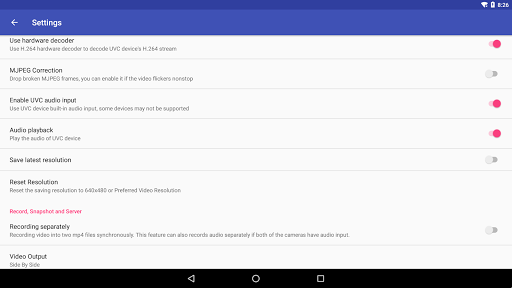
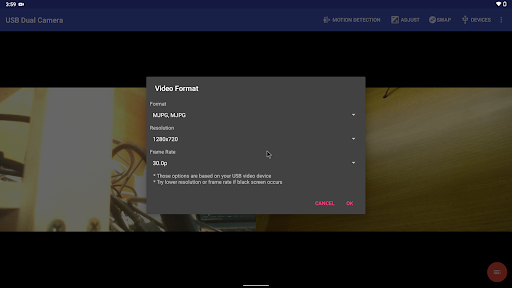
* Supports UVC WebCam WITH microphone and UVC video grabber WITH audio input(Up to 4K via HDMI, Supports progressive and interlaced video). MJPEG(or H.264, H.265, HEVC) format is required when using 2 cameras at the same time.
* Windows Hello Camera and IR Camera
* Geek szitman supercamera(2ce3:3828)non-UVC devices, e.g. USB Endoscope
Please use a good quality OTG cable and ensure power supply
Please ensure that the 2 cameras have sufficient power supply. It is recommended to use HUB with external power supply! Some devices may need to bridge HUB to work properly, e.g. Elgato Cam link.
Using HEVC for video recording/streaming requires Android 5.0 or above, and the device must supports HEVC codec.
Using AV1 for video streaming requires Android 10 or above, and the device must supports AV1 codec.
See the video for more info: https://youtu.be/B569qfWx83U
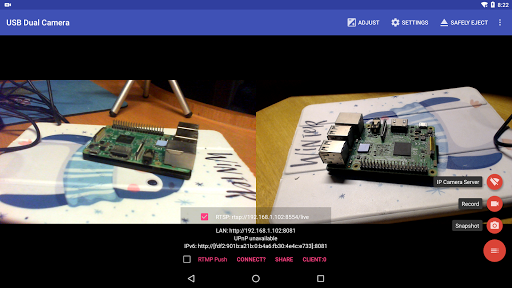
"USB Dual Camera" can let your android device connect to 2 USB WebCams or video capture cards via USB-OTG at the same time. You can record video or capture snapshot., OR turn your phone into a wireless IP Camera via build-in RTSP and HTTP Server for security monitoring WITH Bi-directional audio support, you can use your browser to view, of course, include "IP Camera" App.
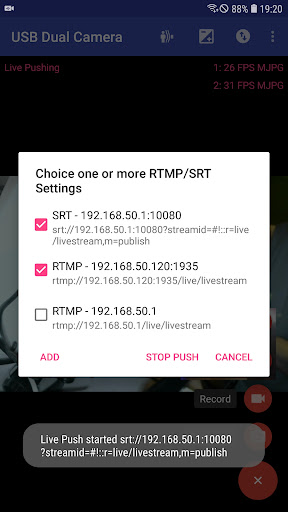
"USB Dual Camera" can push the video and audio to RTMP/SRT live media server and use for network live broadcast. It supports the rtmps security protocol and SRT protocol and it can also push the media to multiple media server at the same time. It also supports HEVC/AV1 over RTMP and can be used for YouTube Live currently.
"USB Dual Camera" can mix USB Audio with a built-in microphone or system audio and output, or overlay the built-in camera/screen video onto the external camera video.
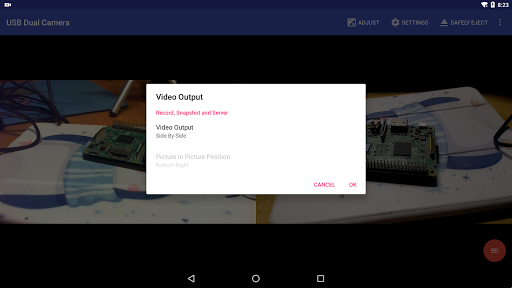
"USB Dual Camera" can record video into two mp4 files synchronously if you connect to 2 USB WebCams at the same time and record. This feature can also records audio separately if both of the cameras have audio input. It can also set to create full Side-by-Side (SBS) 3D video. You can use your 3D video player to view 3D video. It can mix audio automatically if both cameras have audio input.
"USB Dual Camera" can add timestamp, GPS, speed and other info on the video frames while recording. Or overlay the built-in camera video onto the external camera video.
"USB Dual Camera" supports loop-recording. Can set auto-segment when recording and auto-delete old video archives when no enough storage. "USB Dual Camera" can be used as "Dash Cam"
USB Dual Camera can seamless switching between foreground and background. Just press 'Enter background' from menu. The recording will not interrupted during switching!
It support auto video recording which based on Motion Detection and the video record can be uploaded to FTP server automatically and notify you via Email!
Bi-directional audio requires IP Camera App, you can get it from https://play.google.com/store/apps/details?id=com.shenyaocn.android.WebCamPro
IMPORTANT! On Android 9 and above, Camera permission is required to get fully USB Video device access.
This is userspace driver so it used for the app only. Android does not allow to install kernel driver so it unable to use for third-party apps.
What's New
* Now you can overlay the screen and internal camera video onto USB video at the same time
* Supports mix the system audio output with USB audio or Built-in microphone
* Some UVC devices may containing multiple cameras now can be accessed correctly, e.g. Windows Hello Camera and IR Camera
* Supports 'Geek szitman supercamera' (ID 2ce3:3828) devices, which are commonly used in USB endoscopes
Version Information
- Version
- -
- Downloads
- 1K+
- Updated on
- Jan 8, 2026
- Released
- Nov 24, 2017
- Requires
- Android Varies with device
Statistics
Google Play Rating History
Rating Distribution
Downloads Over Time
USB Dual Camera Pro has been downloaded times. Over the past 30 days, it averaged downloads per day.
Shaded area shows 30-day prediction based on historical trends
Historical data collection started recently. More data points will be available over time.
USB Dual Camera Pro - Google Play Rankings
Top Rankings
| Rank | Country | Category | List | Change |
|---|---|---|---|---|
| — |
Ranking History in
No ranking data available yet. Rankings are updated daily.
#41 in Top Paid Video Players in Netherlands

#42 in Top Paid Video Players in Turkey

#42 in Top Paid Video Players in Mexico
#42 in Top Paid Video Players in India
USB Dual Camera Pro users say on Google Play
 t. z.
t. z.
Great - I have a large pickup with a brush bar, and now have two USB cameras which make parking, or even seeing when I'm emerging from a narrow alley easy. It also records and streams. The only thing I would add is a 90 degree left or right rotation so I could see more below than to the left or right.
 joseph “Oreo” onorio
Overall works great. Easy to use and plug and play. Only item keeping it from 5 stars for me. 1) Wish there was a way to rotate the cameras. My two webcams are mounting in portrait and this leads to to images that are side ways and have a wasted screen space when viewing on the screen. I get that Im a small use case since I have portrait mounted cameras and I am actually viewing the camera on a monitor attached to phone instead of recording/using IP server
 AHMAD ZAKWAN
DUAL NOT WORK FAIL
 Brian Ciesicki
I think there's a new problem with the app because a Verizon visible and TracFone having different owners within the past 5 years. this app works on Motorola phones that use the North American Google Play store but not on phones that use the TracFone software channel. no one is able to get me to change back to Google Play. This mismatch error has to be fixed, because I tried fixing it myself and there's no way a user can by themselves.
 A Google user
Vivo 55s mein nahi chalta pocket ke paise Gaya Mera
ApkTrusted Ratings & Reviews
More from 沈垚 / ShenYao China
See more apps


Similar Apps

Video Recorder
Paid

Video Converter Pro
Paid

Loom – Screen and Cam Recorder
Free

HQ Video Player & Casting
Paid

SuperCam Plus
Free

eZy Watermark Photos Pro
Paid

mcpro24fps manual video camera
Paid

Screen Recorder
Free

Dr. Dish Player
Free

Chaos Audio
Free

Arenti
Free

INTEGRA CONTROL
Free

JAMMATES
Paid

InstaVision: Smart & Safe Home
Free

UE | BOOM by Ultimate Ears
Free

LAVA+
Free
Scan this QR code to download

Forwarding you to the page at Google Play market in seconds...
Open Google Play market now