
Hide Navigation Bar v1.0.62
Manuel Wrage
About this app
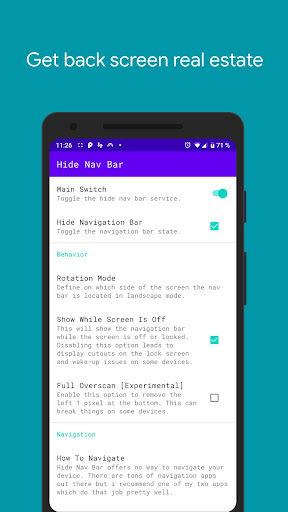
Developer Description
Finally get rid of the navigation bar
This is app does not work on Android 11 and above because Google removed the ability
for apps to do so. Further information is provided here: https://bit.ly/3z62OBn
Warning
This app is meant for advanced users only. You have to use a PC to grant the WRITE_SECURE_SETTINGS permission with ADB.
Note that ADB simply is a developers tool and it will not void the warranty unlike root.
If you're device is rooted you can grant the permission with just one click.
Finally get rid of the "Navigation Bar"
You want to use one of those cool new gesture navigation apps to use your device in a futuristic way?
Or you want to gain a little more screen space?
But you cannot get rid of the "Navigation Bar"?
With "Hide Navigation Bar" it's possible to hide your "Navigation Bar"
Automation Apps Support
You can send broadcasts to "Hide Navigation Bar" with your favorite automation apps like "Tasker"
to hide the "Navigation Bar" only when you want it.
Android ADB PC instructions
1 - Enable Developer Mode in the Android settings.
2 - Enable USB Debugging
3 - Setup ADB on your PC
4 - Run the following adb command to grant the permission:
adb shell pm grant com.ivianuu.hidenavbar android.permission.WRITE_SECURE_SETTINGS
To restore the navigation keys disable the app or run this command:
adb shell wm overscan 0,0,0,0
How to install ADB
Gadget Hacks - https://bit.ly/3uT9iAo
Lifehacker - https://bit.ly/3x8LQAN
Xda developers - https://bit.ly/3x40usM
Links
Reddit:
https://bit.ly/3comOFJ
What's New
In-app purchases
$1.99 - $5.99 per item
Version Information
- Version
- 1.0.62
- Downloads
- 100K+
- Updated on
- Oct 21, 2025
- Released
- Jun 28, 2018
- Requires
- Android 9
Statistics
Google Play Rating History
Rating Distribution
Downloads Over Time
Hide Navigation Bar has been downloaded times. Over the past 30 days, it averaged downloads per day.
Shaded area shows 30-day prediction based on historical trends
Historical data collection started recently. More data points will be available over time.
Hide Navigation Bar users say on Google Play
 zach duncan
(ADB) Works as advertised, to those who it doesnt work with, reboot your device, problem solved for me
 H Harter
Does it's job but wish I could toggle without opening the app to turn on the toggler
 Dylan Gregori Singer (symmetricalboy)
Unfortunately it doesn't work for me. Granted WRITE_SECURE_SETTINGS but does nothing. Pixel 5 Android 12 beta. Hopefully you can find another way to do it.
 Rob
Rob
Doesn't work on xiamo
 Gavin Lantz
Doesn't work on my device (You see my software and hardware info, right?) Yes, I understand it might not work on some devices, considering android can be completely butchered, like on huawei
ApkTrusted Ratings & Reviews
More from Manuel Wrage
See more apps



Similar Apps

Fothong Pass - Pass Manager
Free

RosettaMind
Paid

Lib of Dev (Open Source)
Free

Progressive Pomo: Focus Timer
Paid

Earth Map App - Live Cam View
Paid

Nothing Pomodoro Timer
Paid

Quikshort: Shortcut Creator
Free

The Salt Lake Tribune
Free

SkySafari 7 Pro
Paid
Hermit — Lite Apps Browser
Free

IFSTA Company Officer 6
Free
Shortcut Maker
Free

Video Recorder
Paid

YourSweep
Free

Google Automotive Keyboard
Free
Scan this QR code to download

Forwarding you to the page at Google Play market in seconds...
Open Google Play market now