
Vivid Navigation Gestures v3.5.8
Manuel Wrage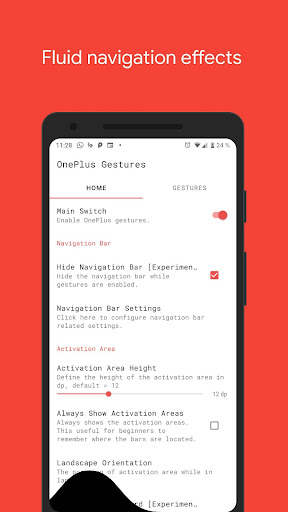
About this app
Developer Description
Fluid navigation gestures for all of us!
But why should we buy a new device or wait for a new android version to use our device in this awesome intuitive way?
"Vivid Navigation Gestures" allows you to control your device with gestures instead of button presses.
Fluid Effects
"Vivid Navigation Gestures" includes beautiful visual effects while performing gestures.
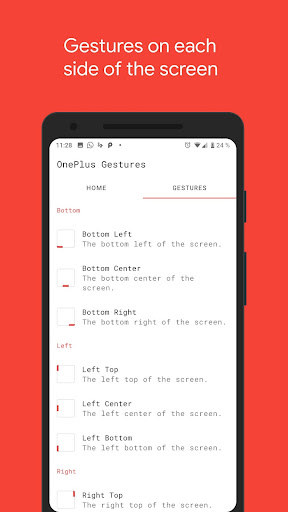
Multiple Gesture Triggers
• Bottom Left
• Bottom Center
• Bottom Right
• Left Top
• Left Center
• Left Bottom
• Right Top
• Right Center
• Right Bottom
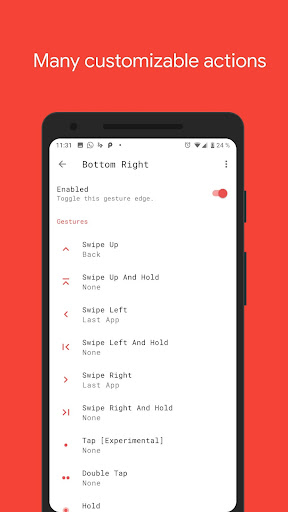
Available Gestures
• Swipe up
• Swipe up and hold
• Swipe left
• Swipe left and hold
• Swipe swipe
• Swipe swipe right and hold
• Swipe swipe down
• Swipe swipe down and hold
• Hold
• Double Tap
• Tap
Available Actions
• Launch Google Assistant
• Back
• Home
• Menu
• Kill App
• Last App
• Open notifications
• Open power dialog
• Recent apps
• Open quick settings
• Toggle split screen
• Toggle auto rotation
• Toggle nav bar
• Launch apps
• Launch shortcuts
• Take screenshots
• Play/Pause your current track
• Skip to the next track
• Skip to the previous track
• Search
• Keycodes
• Input method picker
• Show volume controls
• You can request actions in my subreddit
Accessibility services
This app uses accessibility services to programmatically execute actions such as back, home or quick settings.
This app does not collect any data via accessibility services
Hide the navigation bar
"Vivid Navigation Gestures" allows you to hide your stock nav bar as long as the gestures are enabled.
You need ADB or Root in order to use that feature.
Android ADB PC instructions
1 - Enable Developer Mode in the Android settings.
2 - Enable USB Debugging
3 - Setup ADB on your PC
4 - Run the following adb command to grant the permission:
adb shell pm grant com.ivianuu.oneplusgestures android.permission.WRITE_SECURE_SETTINGS
To restore the navigation keys disable the app or run this command:
adb shell wm overscan 0,0,0,0
How to install ADB
Gadget Hacks - https://youtu.be/CDuxcrrWLnY
Lifehacker - https://lifehacker.com/the-easiest-way-to-install-androids-adb-and-fastboot-to-1586992378
Xda developers - https://www.xda-developers.com/install-adb-windows-macos-linux/
So what you're waiting get the next big thing now no matter which device you're using or which android version you're running.
Links:
Reddit:
https://www.reddit.com/r/manuelwrageapps/
What's New
Version Information
- Version
- 3.5.8
- Downloads
- 10K+
- Updated on
- Sep 21, 2025
- Released
- Apr 22, 2018
- Requires
- Android 5.1
Statistics
Google Play Rating History
Rating Distribution
Downloads Over Time
Vivid Navigation Gestures has been downloaded times. Over the past 30 days, it averaged downloads per day.
Shaded area shows 30-day prediction based on historical trends
Historical data collection started recently. More data points will be available over time.
Vivid Navigation Gestures - Google Play Rankings
Top Rankings
| Rank | Country | Category | List | Change |
|---|---|---|---|---|
| — |
Ranking History in
No ranking data available yet. Rankings are updated daily.
#53 in Top Paid Tools in United States

#16 in Top Paid Tools in South Korea

#19 in Top Paid Tools in United Kingdom


#22 in Top Paid Tools in Spain


Vivid Navigation Gestures users say on Google Play
 Asher Seonia
Tried a few gestures apps and this one is by far the best. Unfortunately these no longer work with android 11. I reverted back to 10 just to keep using it and hopefully there will be a work around in newer versions of android eventually.
 Dave Regan
Hiding the navigation bar doesn't seem to work on Android 14, do you have a fix? Other than that, great app.
 Akshay Rao
I just updated the app & the latest version is missing some crucial features - I can no longer adjust how "tall" the side areas can be; there's no way for me to have a gesture area that's only 50% of the screen - I can only turn on or off three equally sized areas. The old versions also allowed me to have two corner areas on the bottom so I could have a total of 5 bottom areas. I might just grab an apk for an older version. The latest one also doesn't have dark mode.
 Rajesh Phadke
Facing Problems on POCO X6 Pro. Not able to hide navigation buttons. adb shell pm grant com.ivianuu.oneplusgestures android.permission.WRITE_SECURE_SETTINGS does not hide navigation buttons. Used settings command as well. Doesn't work on On OnePlus 12.
 Dragonyck
This app does not hide the navigation bar in certain android versions. I'm running 13, and some say 11 and up can't hide with no root. You should've added this information on your app description so ppl don't waste time and money on this if it's not gonna run on their devices.
ApkTrusted Ratings & Reviews
More from Manuel Wrage
See more apps



Similar Apps

Lib of Dev (Open Source)
Free

Quikshort: Shortcut Creator
Free

AIO Launcher
Free

PurpleLine Icon Pack : LineX
Paid

Retro Mode - Icon Pack (Light)
Paid

AppDash: App Manager & Backup
Free

Ajax PRO: Tool For Engineers
Free

OrderBoard Display
Paid

Taskbar
Free

ChargeNow
Free

Ares Light: Pastel Icon Pack
Paid

BOLT Icon Pack
Paid

dynamicSpot - Dynamic Island
Free
Hermit — Lite Apps Browser
Free

One Hand Operation +
Free

ABAX Admin
Free
Scan this QR code to download

Forwarding you to the page at Google Play market in seconds...
Open Google Play market now