
JS USB OTG vVARY
jsolwindlabs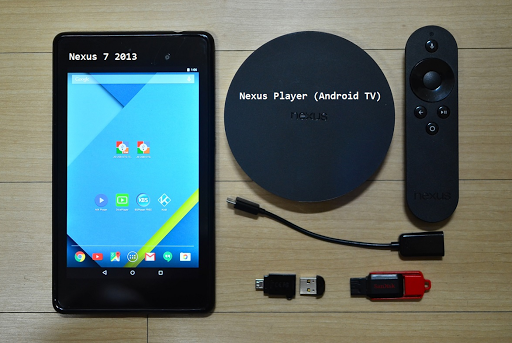





About this app
Developer Description
Without rooting, enjoy multimedia contents with USB drive. (NTFS, exFAT, FAT32)
● NTFS, ExFAT, FAT32 filesystem are supported. (Read-Only)
● USB drive, flash card should be formatted by NTFS or ExFAT or FAT32 filesystem. (Less than 2TB)
【 Video Streaming 】
ㆍ Without the need to save video files in the mobile device, you can directly watch a video by streaming. (http streaming)
ㆍ mp4, mkv, avi, mov, wmv, mpg, mpeg, flv, m4v, webm, 3gp, ts, mts, m2ts, iso streaming.
ㆍ Internal streaming. Does not need to turn on the Wifi or LTE / 5G network.
ㆍ By streaming, Play, Pause, Jump, Resume are possible for a video file which is over 4GB size.
ㆍ Recommend JS Player(from jsolwindlabs. mobile only), KODI(XBMC) as a video player that support http streaming.
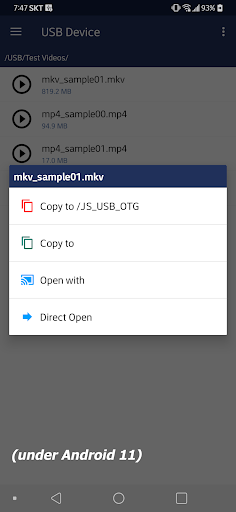
ㆍ Click video file and select ‘Open With’.
【 Built-in Video Player 】
ㆍ In addition to the 3rd party video player mentioned above, you can also use the built-in video player.
ㆍ No need to save the video file to your mobile device.
ㆍ Based on Google ExoPlayer.
ㆍ Supported container extensions: mp4, mkv, mov, ts, mpg, mpeg, webm.
ㆍ Supports Fast Rewind and Fast Forward with left and right double tap (Left and Right buttons for Android TV).
ㆍ Supports selection of multi-audio and multi-subtitles embedded in video file.
ㆍ External subtitle file is automatically read when saved with the same file name in the ‘Download’ folder of the local storage. Subrip (srt) format encoded by UTF8.
ㆍ Android 11 or higher - After copying a srt subtitle from USB to Downloads collection, the actual local file path of srt is 'Movies' directory. Please refer to it when using a 3rd party video player.
ㆍ Click video file and select ‘Direct Open’.
【 Built-in Image Viewer 】
ㆍ No need to save the image file to your mobile device.
ㆍ Supported image formats : png, jpg/jpeg, bmp, gif
ㆍ Full screen slideshow through the swiping right/left (for image files in the same folder)
ㆍ Pinch to zoom in/out
ㆍ Fit an image to screen by double tap.
ㆍ Click image file and select ‘Direct Open’.
【 Built-in Music Player 】
ㆍ No need to save audio files in the mobile device.
ㆍ Supported audio formats : mp3, flac, ogg
ㆍ Audio files in the same folder.
ㆍ Play, Pause, Stop, Prev, Next, Shuffle, Repeat.
ㆍ Background play by Home Button.
ㆍ Click audio file and select ‘Direct Open’.
【 Android TV version 】
ㆍ Functions are same with mobile version. UI is different.
ㆍ Built-in music player : click left or right button on the list for moving focus to the control panel.
【 Changes on Android 11 or higher devices related to local storage 】
ㆍFrom Android 11 or higher devices, the local storage security has been strengthened, and the app function has been changed to show media files (Video, Audio, Image) in the local storage.
- When you copy a file from USB to your mobile device, video file is added to the video collection in local storage, audio file is added to the audio collection, and image file is added to the image collection (Shared concept)
- If you copy a file other than the media file type, it is added to the download collection. Only files copied from JS USB OTG are visible (Private concept)
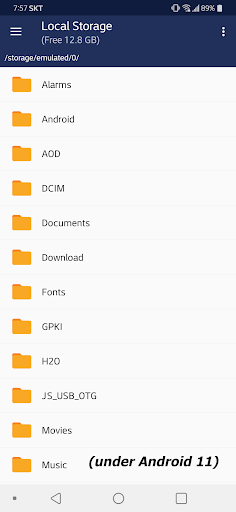
- Devices under Android 11 are the same as before without the above restrictions. (Multi-copy with Long Click / Copy to the selected folder in local storage / Local storage file manager functions)
What's New
- applies the requirements for Android 15
Version Information
- Version
- -
- Downloads
- 10K+
- Updated on
- Oct 21, 2025
- Released
- Sep 3, 2014
- Requires
- Android 5.0
Statistics
Google Play Rating History
Rating Distribution
Downloads Over Time
JS USB OTG has been downloaded times. Over the past 30 days, it averaged downloads per day.
Shaded area shows 30-day prediction based on historical trends
Historical data collection started recently. More data points will be available over time.
JS USB OTG - Google Play Rankings
Top Rankings
| Rank | Country | Category | List | Change |
|---|---|---|---|---|
| — |
Ranking History in
No ranking data available yet. Rankings are updated daily.
#53 in Top Paid Video Players in Saudi Arabia

#53 in Top Paid Video Players in Vietnam
#53 in Top Paid Video Players in India

#54 in Top Paid Video Players in Poland
JS USB OTG users say on Google Play
 A Google user
Does exactly what it says (and not much else) for a very reasonable price. I needed this app so I could have a way to view the videos on the SD card from my car's dash cam. The camera requires the FAT32 file system but my phone doesn't natively support that file system. This app let's me browse and open the videos. Other apps cost more for the same functionality.
 Nick Ochoa
Works on Chromecast Tv but sometimes my movie will become jittery using Kodi or Freeze towards the end if I used vlc player. Streaming 4k content on nfts formatted USB 3.0
A Google user
Bettet than paragon + total commander solution for phone & external drive visual wise // Needs to remember folder navigation location (e.g subfolder has many folders, opening one folder and going back to parentfolder resets navigation to beginning) // Background operation functionality for copying moving files, while still navigating external drive is a must for managing files with phone. // No cross-device functionality (to copy from phone to drive)!! // No eject functionality
A Google user
I downloaded this app to my Vodafone TV so I can watch videos from my NTFS-formatted harddrive. It was working for a while, but now suddenly it can't open any of the files... not sure what happened? The harddrive is working perfectly so unclear as to what's changed?
A Google user
Wasted my money on this. Took over my system. Could no longer save a DOC file to my USB memory the Writer word processor app. It appears the USB storage is only available to the JS app. The thumb drive no longer shows in anything else. It didn't even it appear in the system setting for removal. Uninstalling app. Even as I write thus thing it keeps poping up.
ApkTrusted Ratings & Reviews
More from jsolwindlabs
See more apps
Similar Apps
FX File Explorer
Free

spacedesk - USB Display for PC
Free

LocalSend: Transfer Files
Free

Symfonium: Music player & cast
Free

FiiO Music
Free

Super File Manager Explorer
Free

Earz Solo - Game to the Music
Free

USB Audio Player PRO
Paid

Hue Essentials
Free

Send files to TV
Free

ASTRO File Manager & Cleaner
Free

Total Commander - file manager
Free

MusiQuest ECE: Sketch-a-Song
Free

Marshall Bluetooth
Free

MP4Fix Video Repair Tool
Free

Regula Document Reader
Free
Scan this QR code to download

Forwarding you to the page at Google Play market in seconds...
Open Google Play market now