LoMag Barcode Scanner 2 Excel v0.0.162
Longint


About this app
Developer Description
A completely free barcode scanner enabling you to save data to Microsoft Excel.
App also enable to browse / edit / delete data.
You can create and manage many files with data, continue to edit them later.
All files can be backup or restore into 1 file, moved to other phone.
Many configuration options:
- blocking duplicate codes
- sum up number of the same codes
- automatic scanning of subsequent codes
- scaling photos in an Excel file
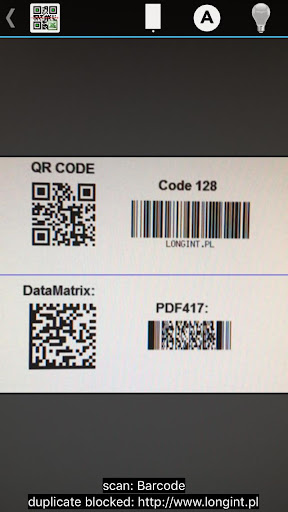
The barcode reader supports the following code formats:
- codes on products: EAN-13, EAN-8, ISBN, UPC-A, UPC-E
- industrial codes: Codabar, Code 128, Code 93, Code 39, ITF, RSS
- 2D codes: QR Code, Data Matrix
The most important functions of the application:
- Continuous scanning of successive barcodes with quantity 1
- Barcode scanning and input of quantity from keybord
- Barcode scanning and input of quantity and price
- Scanning of barcode and serial number
Support of many data sets, which may be named and browsed. Data sets may be saved in Microsoft Excel format compatible with version 97 and newer. The app allows you to send files via e-mail or save them on an SD card.
There is also a possibility of continuing the scanning in the selected data set.
The Excel files created by LoMag barcode scanner are fully compatible with LoMag Inventory Management.
Basing on the files, you can create the following documents in LoMag:
- GRN (Goods Received Note), e.g. delivery of a given item to the warehouse;
- GIN (Goods Issued Note), e.g. sale of an item;
- GRN correction (Return to supplier), e.g. return of a faulty batch of items;
- GIN correction (Return from customer), e.g. return from a customer as a result of a claim;
- Stock level correction note, e.g. loss of item at the warehouse;
- Interbranch Transfer e.g. transfer of a part of a given stock to another building:
- Discount document (Change in the item’s value), e.g. a decrease in prices resulting in a drop in the value of a given item;
- Internal GRN (Internal Goods Received Note), e.g. reception of an item of own production;
- Internal GIN, e.g. issuance of a given item to an employee;
- Inventory sheet, which forms a basis for inventory-making
- Inventory of the whole warehouse
- Opening Balance, i.e. the initial stock level upon the commencement of operations with the program.
Please note:
To perform the scan, your device needs to be equipped with a camera with autofocus function.
Privacy:
http://www.longint.com/PrivacyPolicy.html
Reservations:
The barcode scanner used in the app operates on ZXing library.
https://github.com/zxing/zxing
What's New
In-app purchases
$2.49 per item
Version Information
- Version
- 0.0.162
- Downloads
- 10K+
- Updated on
- Mar 31, 2022
- Released
- Jan 12, 2019
- Requires
- Android 4.0.3
Statistics
Google Play Rating History
Rating Distribution
Downloads Over Time
LoMag Barcode Scanner 2 Excel has been downloaded times. Over the past 30 days, it averaged downloads per day.
Shaded area shows 30-day prediction based on historical trends
Historical data collection started recently. More data points will be available over time.
LoMag Barcode Scanner 2 Excel users say on Google Play
 aisyâfirul
Still testing this apps. Good work!
 A Google user
Good
A Google user
kinda generic, it doesn't define what you have scanned, just tells you doubles- no real quantities or defines what the product is/or gives categories I was hoping to scan the shipping labels and have it give me the quantity of item on the pallets. individually, it works great
A Google user
Lomag scanner 1 is excelent, 2. edition is garbage. It reads barcodes very slow, sometimes cannot read it at all. Order of options are not as intuitive and friendly as in first edition. Only visual improvement is that picture is not doubled when scaning. It was annoying for eyes.
A Google user
Unable to scan QR CODE
ApkTrusted Ratings & Reviews
More from Longint
See more apps
Similar Apps








Scan this QR code to download

Forwarding you to the page at Google Play market in seconds...
Open Google Play market now