
Analyze your Chess Pro v2.1.9
Lucian Musca
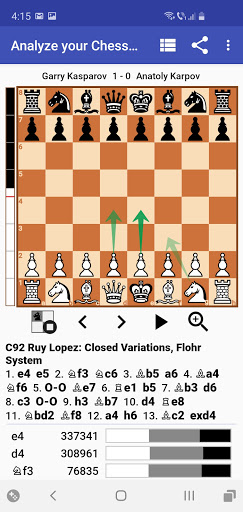
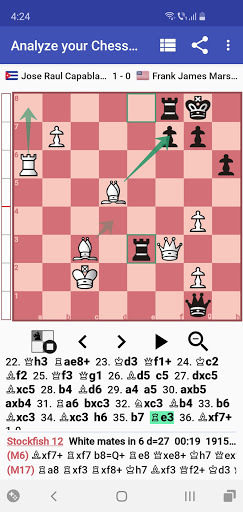
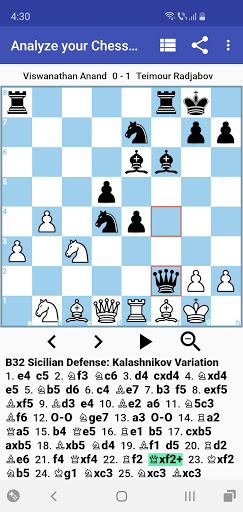
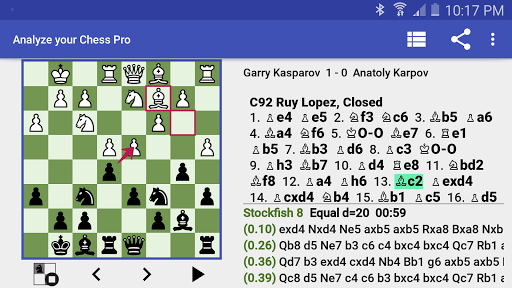

About this app
Developer Description
Easily view, edit, analyze and share your chess games.
Analyze your Chess Pro allows you to easily:
• View chess games
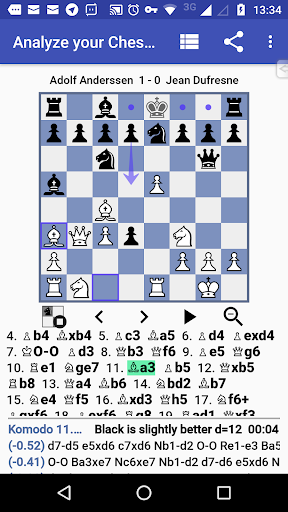
• Analyze chess positions providing the best lines of thinking
• Analyze chess games providing an analysis report containing alternate moves instead of the blunders/inaccuracies played in the game
• Manage your PGN files
• Share your chess games as an animated image (GIF) or as a video (mp4)
• Record chess games
• Annotate chess games
• Create chess problems, tactics or puzzles
Features:
• Intuitive user interface design
• Multiple chess themes
• Support for tablets
• Import chess games in PGN format from internal storage, SD card, Dropbox, web links or clipboard
• PGN specification support (support for comments, move and positional NAGs, tag pairs, recursive annotation variations, move time information etc) for both view and edit scenarios
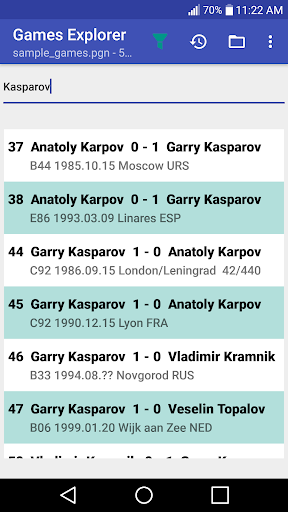
• PGN Games Explorer with advanced filtering (can include white, black, result, FEN information inside the compound filter)
• Accurate chess analysis using Stockfish 16 via the Chess Engines App integration
• Analyze an entire chess game displaying inaccuracies, blunders and suggesting better moves.
• Analyze a chess position with MultiPV (multiple lines of thinking)
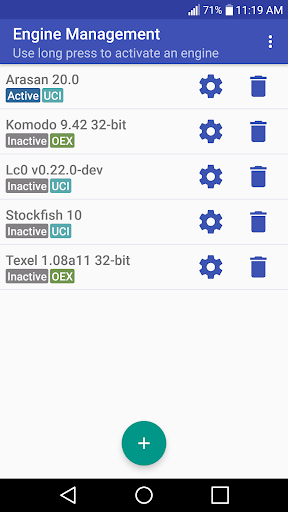
• Open Exchange chess engine support (Stockfish 16, Komodo 9 etc)
• Chess Engine Management (install/uninstall/activate engine)
• Short/Long algebraic notation for chess moves
• Auto replay games
• Move List Navigation
• Share game as PGN text or GIF via email, Twitter, clipboard etc
• Share position as FEN text or image via Messenger, WhatsApp etc
• Collection of 50 high quality chess games included
• Opening detection from the Encyclopedia of Chess Openings (ECO) for any chess game.
• Engine options configuration (Hash, Threads etc)
• Partial games support (chess tactics, chess endgame positions, incomplete games)
• Open game/position using Analyze your Chess Pro, when using the Share action from other chess apps
• Paste game/chess position
• Record and/or annotate chess games
• Set up chess position visually
• Evaluation bar to quickly see which player stands better
• Small embedded opening book, to give advice on good moves used by GMs in the opening stage of a game
Analyze your Chess - PGN Viewer, the free version of Analyze your Chess Pro - PGN Viewer, is available at https://play.google.com/store/apps/details?id=com.lucian.musca.chess.analyzeyourchess&hl=en.
Free vs Pro version
• Pro version does not contain ads
• Pro version includes all features of the Free version
• In the Pro version, you can install any number of OEX chess engines
• In the Pro version, game analysis (either by time or by depth) is not limited.
• In the Pro version, you can set up a position visually, or paste FEN
• In the Pro version, you can configure engine options for OEX chess engines (e.g. Hash, Threads etc)
• In the Pro version, you can use advanced PGN edit functions (promote variation, edit tag pairs)
• In the Pro version, you can filter games using advanced filters in Games Explorer
• In the Pro version, you can receive FEN/game using Share from other apps
• In the Pro version, you can view your recently opened PGNs
• In the Pro version, you have access to the evaluation bar.
• In the Pro version, you have access to more chess pieces options.
• In the Pro version, you have access to opening moves suggestions and statistics provided with the embedded opening book.
• In the Pro version, you can configure a custom opening book.
Permissions
Internet permission - is used for open PGN from Dropbox, open PGN from web links and analytics.
Notes
Chess 960 is not supported.
What's New
Version Information
- Version
- 2.1.9
- Downloads
- 1K+
- Updated on
- Oct 27, 2025
- Released
- Nov 20, 2017
- Requires
- Android 9
Statistics
Google Play Rating History
Rating Distribution
Downloads Over Time
Analyze your Chess Pro has been downloaded times. Over the past 30 days, it averaged downloads per day.
Shaded area shows 30-day prediction based on historical trends
Historical data collection started recently. More data points will be available over time.
Analyze your Chess Pro - Google Play Rankings
Top Rankings
| Rank | Country | Category | List | Change |
|---|---|---|---|---|
| — |
Ranking History in
No ranking data available yet. Rankings are updated daily.
#48 in Top Paid Board in Germany


Analyze your Chess Pro users say on Google Play
 A Google user
As a chess instructor I find this app indispensable. It's a fully featured analysis tool that eliminates the need to drag a laptop around. It's actively maintained by the author who is very responsive to questions/comments. Definitely one of the best chess apps for Android.
A Google user
I have just bought your pro version. I prefer your program to the other ..analyze th.., because we can save as animated gif file. I have just statred to play chess, so I have some problems with so many openings. Gif files help me a lot. I have a suggestion. It is good that the board can be resized, but the lower analysis screen should be expanded also. When the board is small, we can see a big analysis screen (The analysis screen is so small).
 Paul Azzurro
It would be grest if the enginesto analyze would always show up it can be very frustrating defeats the purpose of the program when it works correctly it is excellent however I like the older version which was consistent
 Phidy Bee
At the moment it's not clear at all how to analyse my games using this, please help
 Gary Thomas
I purchased this "Pro" version because it is advertised as an analyzer that is powered by Stockfish 12. After loading one of my otb games, I discovered that this app doesn't have Stockfish 12 capability, but requires that I have my own analyzer software to use with the app. This is unethical marketing at its worst. I will be requiring a refund.
ApkTrusted Ratings & Reviews
More from Lucian Musca
See more apps



Similar Apps

Chessmaster AI
Paid

EasyGo - Tsumego, SGF editor
Free

Chess and Dames
Paid

SparkChess Pro
Paid

Tic
Paid

Checkers Pro 2026
Paid

Dice Roller & Heads and Tails
Paid

Czech Blackjack
Paid

Chessity: Fun Chess Learning
Free

Chess Classic Pro – Premium
Paid

Chess with AI
Paid

Czech Mau-Mau
Paid

WatchGame Tic Tac Toe XO
Paid

Fort Sumter: The Secession Cri
Paid

Number Puzzle - Sudoku Style
Paid

Chess Blitz - Chess Puzzles
Free
Scan this QR code to download

Forwarding you to the page at Google Play market in seconds...
Open Google Play market now