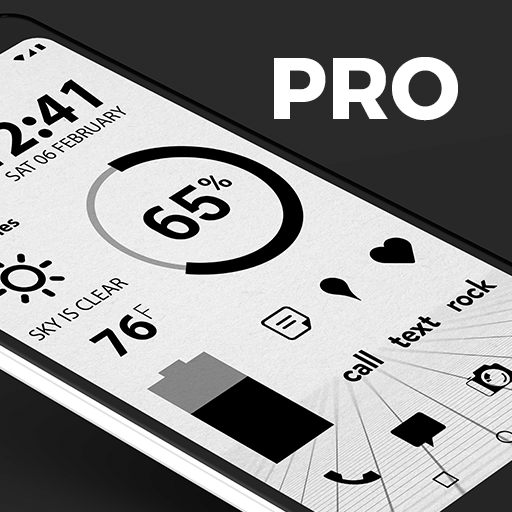
Flight Dark Pro - Icon Pack v3.6.7
Nate Wren Design







About this app
The Flight Dark Pro - Icon Pack app solves the problem of limited icon options for users with dark or minimal themes, providing a comprehensive set of black and dark flat minimalist icons. This app benefits users who value a consistent aesthetic across their device, particularly those with a focus on minimalism. Compared to alternatives in the Personalization category, Flight Dark Pro stands out for its high-quality icons and excellent user rating, but may fall short in terms of the variety of icon packs available. With a strong reputation from developer Nate Wren Design, this app is a solid choice for those seeking a cohesive dark theme.
Pros
- The app boasts an excellent user rating of 4.8/5, indicating a high level of user satisfaction with the quality and functionality of the icon pack.
- With over 10,000 downloads, the app has demonstrated social proof and a level of popularity among users seeking dark theme icons.
- The developer, Nate Wren Design, has a reputation for creating high-quality icon packs, which adds to the credibility and trustworthiness of the app.
- The app's lack of ads and in-app purchases means that users can enjoy the icon pack without interruptions or additional costs, enhancing the overall user experience.
- The app's small size and minimal Android requirement of 4.4 make it accessible to a wide range of devices, including older models.
Cons
- One potential concern is the relatively limited number of downloads compared to other popular icon packs, which may indicate a smaller community of users and less feedback for the developer.
- Although the app has a high user rating, some users may find the icon pack to be too minimalist or lacking in variety, which could be a drawback for those seeking more elaborate or customizable icons.
- The app's paid model may deter some users who are accustomed to free icon packs or are not willing to pay for a premium icon pack, potentially limiting its adoption.
- The lack of information about future updates or new icon additions may leave some users wondering about the app's long-term support and development.
Best for: The ideal user for the Flight Dark Pro - Icon Pack is a tech-savvy individual, likely between the ages of 18 and 40, who values a minimalist aesthetic and is willing to pay for a high-quality icon pack to enhance their device's visual appeal, and has a basic understanding of how to apply and customize icon packs on their Android device.
Developer Description
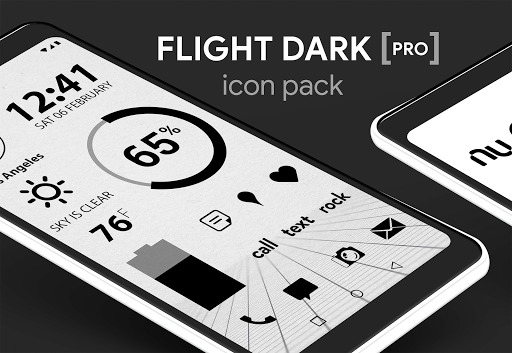
Black/Dark flat minimalist icons for your minimal dark theme.
QUICK TIPS
You can manually edit icons in most launchers by long-pressing the icon you would like to edit.
Widgets: If your widget stops updating, please check your system or battery settings to make sure the app is exempt from battery optimization. More info at https://dontkillmyapp.com/
PRO VERSION
This is the pro version of the Flight Dark icons. Get the free version here: https://play.google.com/store/apps/details?id=com.natewren.darkflightfree
HOW-TO GUIDE
http://natewren.com/apply
FEATURES
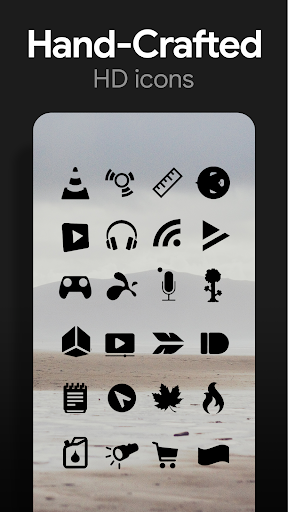
• 5,300+ hand crafted flat, clean & simple dark black flat HD Icons
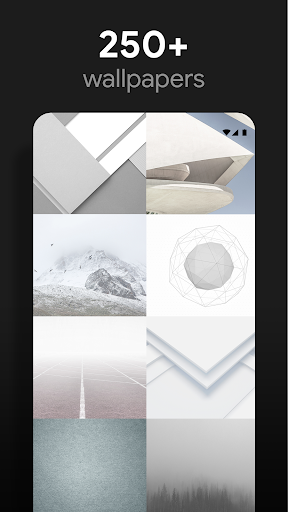
• 200+ wallpapers included. Downloadable from the cloud. Browse and save the ones you want. All wallpapers shown are included!
• XXXHDPI high definition black icons included for super large HD screens. All black icons are 192x192
• Customized cloud/sky/landscape wallpapers. Wallpapers have been edited to show off the black icons nicely
• Some parts of the flat icons are transparent letting each show the provided sky/landscape backgrounds or to your own backgrounds
• Wallpaper chooser comes installed
• Request icons via "Request" tab
• Clean, dark black icons work best with light wallpapers
• Muzei support for rotating wallpapers
• New icons added regularly
WIDGETS
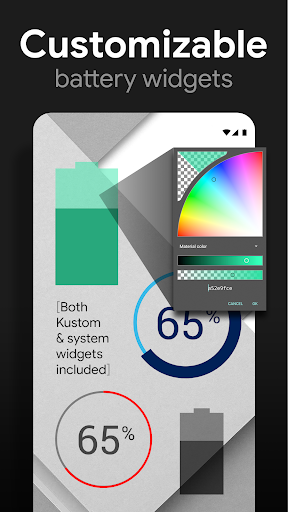
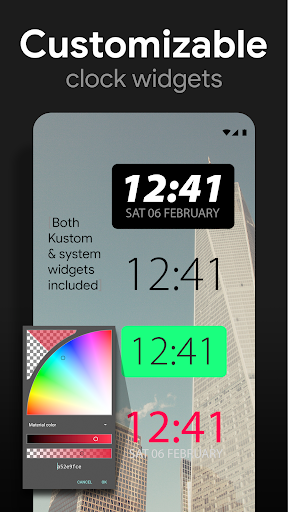
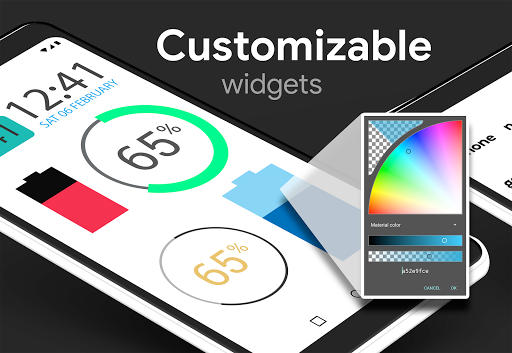
System widgets as well as editable KWGT widgets are included.
• Battery widgets
• Digital clock widgets
• Analog clock widget
• Weather widgets
HOW TO APPLY ICONS VIA ICON PACK
1. Open the app after installing
2. Navigate to "Apply" tab
3. Select your Launcher
DISCLAIMER
You may need a 3rd party launcher to apply the icon pack. Please download a launcher (Nova, Total, Microsoft, etc.) before installing.
Nova is recommended for the best experience and supports icon name search when manually applying icons. For more info on searching while manually applying icons please visit https://natewren.com/manually-edit-icons/.
HOW TO APPLY ICONS VIA LAUNCHER
1. Open Launcher settings by tapping + holding on an empty area of home screen
2. Select personalization options
3. Select icon pack
FOLLOW ME
Twitter: https://twitter.com/natewren
QUESTIONS/COMMENTS
natewren@gmail.com
http://www.natewren.com
Privacy
Given that the app requests no permissions, users can be confident that their data is not being collected or shared, and the app's functionality is solely focused on providing icons. However, users should still be cautious when downloading and installing apps from any source, ensuring they are from trusted developers like Nate Wren Design. To further protect their device, users should keep their operating system and apps up to date.
Tips
To get the most out of the Flight Dark Pro - Icon Pack, users should first ensure their device is set to a compatible theme, then apply the icon pack through their launcher's settings. For optimal performance, users should also consider restarting their device after applying the icon pack, and explore the app's settings for any customizable options. Additionally, users can enhance their overall theme by combining the icon pack with other complementary dark theme elements, such as wallpapers and widgets.
What's New
Added 20 Icons to Free Version
Now Targeting SDK version 35
Updated Appfilter - fixes to un-themed icons
Current Pro Version Icon Count: 5,470
Current Pro Version Icon Count: 2,637
If you've purchased an Icon Pack, thanks for your support!
For Updates: @natewren on bluesky | @natewrendesign on insta
Version Information
- Version
- 3.6.7
- Downloads
- 10K+
- Updated on
- May 25, 2025
- Released
- Sep 7, 2014
- Requires
- Android 4.4
Statistics
Google Play Rating History
Rating Distribution
Downloads Over Time
Flight Dark Pro - Icon Pack has been downloaded times. Over the past 30 days, it averaged downloads per day.
Shaded area shows 30-day prediction based on historical trends
Historical data collection started recently. More data points will be available over time.
Flight Dark Pro - Icon Pack users say on Google Play
 A Google user
I love all of your icon apps, I cant believe how impatient people are about requested icons. do they not know there are so many to choose from that a simple placeholder is sufficient? I have found icons that look so similar to the original if not better. you provide a great set of icons....almost too many :)
 Mitchell
This has been my default icon pack for about 4 years now. I love how it looks and the icons are awesome... when they're supported. About 1/3 of my apps don't have a custom icon so they just turn into black boxes. Fortunately it's only annoying when I go to my app drawer, and my most frequent apps are supported. You can request icons and send an email but they don't seem to be updated all that often.
A Google user
I love this icon pack, ever since I bought this I've been using this only, but yesterday after the update it keeps on force closing causing the widgets on this icon pack not working. please fix this issue
A Google user
Vary Rare updates! And it says once you bay it you can make requests for new icons but they are ignored. AND the interface to choose icons is awful, there is no way to search it and you need to scroll all content to maybe find something you like. And when there is no icon and you choose one by yourself it changes on the front page but it don't change on "all apps menu"
A Google user
I like the design, but with my lenovo tab 10 i can't see any symbols/icongraphics if i want to change single icons
ApkTrusted Ratings & Reviews
More from Nate Wren Design
See more apps
Glass Pack Pro - Clear Icons
Free
Flight Pro - Icon Pack
Paid

Light Void - Flat White Icons
Free

Lines Pro - Icon Pack
Paid

Flight Dark - Icon Pack
Free
Flight Lite - Minimalist Icons
Free
Gold Leaf - Icon Pack
Free

Custom Search Bar Widget CSBW
Free

Dark Void - Black Circle Icons
Free

Glass Pack - Transparent Theme
Free
Gold Leaf Pro - Icon Pack
Free
Light Void Pro - White Icons
Free

Chroma - Icon Pack
Free
Dark Void Pro - Black Icons
Free
Lines Chroma - Icon Pack
Free
Lines Dark Pro - Icon Pack
Free
Similar Apps

Brandon Blackwood
Free

PurpleLine Icon Pack : LineX
Paid

Ikon Pass
Free

SentientMate
Paid

Area 51 Fireworks
Free
Lena Icon Pack Shapeless Icons
Paid

Vera Icon Pack: shapeless icon
Paid
IFSTA Instructor 9
Free

BOLT Icon Pack
Paid

BLUCINDUSTRY
Paid
GranPlayer
Free
Mantis Laser Academy
Free

Number Sixty One Salon & Spa
Free

Dynamic Fitness Texas
Free

Edge Lighting Clock Light
Paid
Scan this QR code to download

Forwarding you to the page at Google Play market in seconds...
Open Google Play market now