
Navigraph Charts v8.40.1
Navigraph








About this app
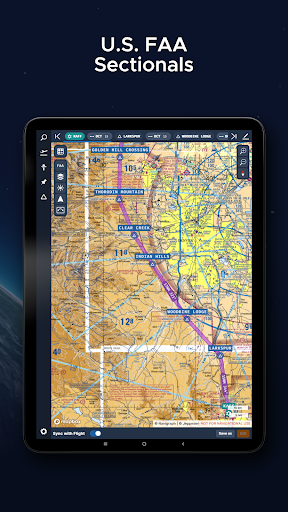
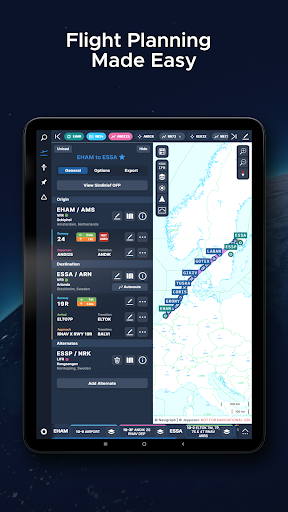
Navigraph Charts solves the problem of accessing Jeppesen charts for flight simulator pilots, benefiting professional and enthusiast pilots alike. It stands out in the Maps And Navigation category by providing specialized charts, with its excellent user rating and moderate download numbers indicating a strong reputation. Compared to alternatives, Navigraph Charts is tailored to a specific niche, making it a go-to choice for pilots. However, its limited scope might not appeal to general users seeking broader navigation features.
Pros
- With an excellent user rating of 4.8 out of 5, Navigraph Charts demonstrates high user satisfaction, suggesting a well-designed and functional app.
- The app's moderate download numbers of 100,000+ indicate a significant user base, providing social proof of its utility and reliability.
- Navigraph Charts is free to use, with no in-app purchases or ads, enhancing the user experience by minimizing distractions and ensuring uninterrupted access to critical flight information.
- The developer, Navigraph, offers a professional website and direct contact email, showcasing transparency and a commitment to user support.
Cons
- One concern is the app's limited appeal to a broader audience, as it caters specifically to flight simulator pilots, potentially limiting its adoption and community growth.
- Although Navigraph Charts does not request any permissions, which is a positive aspect in terms of privacy, it's worth considering whether future updates might introduce necessary permissions that could impact user data.
- The lack of information on data collection and privacy policies, despite the absence of permissions, could be a concern for users prioritizing data security and anonymity.
Best for: The ideal user for Navigraph Charts is a professional or enthusiast flight simulator pilot seeking accurate and accessible Jeppesen charts to enhance their simulation experience, likely within the age range of 18 to 55, with a medium to high level of technical skill and a specific need for detailed navigation aids.
Developer Description
Navigraph Charts gives flight simulator pilots access to Jeppesen charts.
Navigraph Charts 8 has been developed with emphasis on delivering a seamless and intuitive experience, reducing the pilot workload in all phases of the simulated flight.
Why you'll always want Navigraph Charts with you in the cockpit:
- Only provider of Jeppesen charts and navigation data for flight simulation.
- Access to IFR chart coverage at over 7,000 airport worldwide.
- Charts and data sourced from Jeppesen and updated every 28 days according to the AIRAC calendar.
- Largest dataset of its kind in the world.
- Most up-to-date and modern navigation software for flight simulation.
- Simulator sceneries, flight plans, charts, navigation systems, and addon software are all in sync with data from the same source.
- Great support.
New features in Navigraph Charts 8:
- Worldwide VFR Charts powered by Jeppesen VFR data
- Seamless Zoom
- 3D Globe Projection
- Autopinning of Procedure Charts
- Runway Crosswind and Airport Weather Information
- Vector Charts
Navigraph Unlimited features:
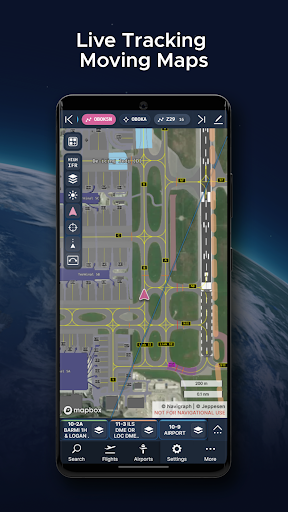
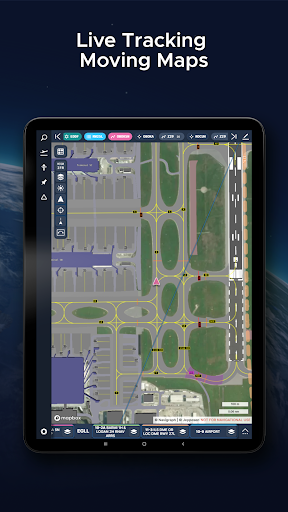
- Moving Maps
- Zoom all the way down to gate level.
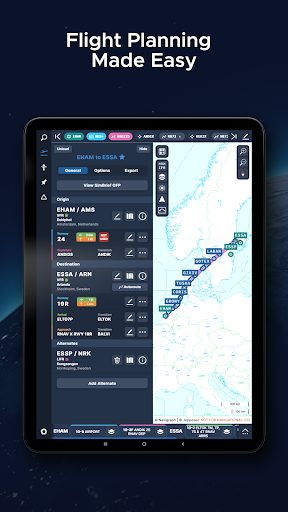
- 3D globe projection helps visualize Great Circle distances and polar routes.
- Saves time and effort by automatically organizing relevant airport charts to pinboard.
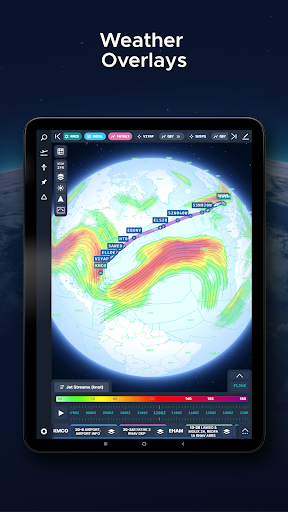
- Weather information including runway crosswinds updated in real-time.
- No commitment - cancel any time you like.
Moving Maps compatible with Microsoft Flight Simulator, X-Plane and Prepar3d.
For the best user experience, we recommend using a tablet. Support for smaller displays is under development. Navigraph Charts is also available as a stand alone software on desktop computers, and can also be accessed on any web browser via https://charts.navigraph.com.
For complete terms of service, please visit https://navigraph.com/legal/terms-of-service
For privacy policy, please visit https://navigraph.com/legal/privacy-policy
Privacy
Given that Navigraph Charts does not request any permissions, it presents a low-risk profile in terms of data privacy. However, users should still be cautious about any future updates that might introduce permissions or data collection practices. It's advisable to regularly check the app's privacy policy and permissions list for any changes.
Tips
For optimal use, first-time users should explore the app's settings to familiarize themselves with the available chart options and customization features. Additionally, ensuring a stable internet connection is crucial for seamless chart access and updates. Lastly, users can enhance their experience by visiting the Navigraph website for additional resources and community support.
What's New
- FAA Helicopter Sectionals are now available as a layer and preset
- Fixed an issue where Ownship was rendered below map elements like overlays and route
- Fixed an issue where text scaled incorrectly
- Fixed an issue where the Ownship icon appeared too large
And much more! Full changelog at navigraph.com/apps/charts/changelog
Version Information
- Version
- 8.40.1
- Downloads
- 100K+
- Updated on
- Dec 17, 2025
- Released
- Nov 4, 2022
- Requires
- Android 7.1
Statistics
Google Play Rating History
Rating Distribution
Downloads Over Time
Navigraph Charts has been downloaded times. Over the past 30 days, it averaged downloads per day.
Shaded area shows 30-day prediction based on historical trends
Historical data collection started recently. More data points will be available over time.
Navigraph Charts users say on Google Play
 David M
The mobile phone app doesn't function as well as the website 😑 Every time I set up a trip using the mobile app, it will not let me complete the SID and STAR final steps. When I'm on that step, it keeps presenting me with the choice of "multiple" instead of "Add to Route." The website does not mimic this behavior. UPDATE: I created several flights on my android 22+ in hopes of recreating the issue(s) as described above. Not sure if there was a recent update but the app is working as expected.
 M Chaari
I'm impressed. The moving map is awesome. Displaying charts on the map accurately is crazy good. Flight planning very bare bone but we have simbrief so i don't mind. For ifr flights navigraph makes it much more easier and fun. The bad: Veeery power hungry. This app is destroying my phone battery this is why i had to remove a star. Also very expensive subscription. Few bugs but very rare. I think the developers are working hard to make it smooth and bugs free.
 Travel Universe
too expensive
 Mike Bekius
10 euro a month. I don't have a problem with app developers charging for their apps. I have a problem with app developers not disclosing up front that their product is going to cost something. I went through the hassle of installing the app and then setting up an online account in order to get access to the app just to be greeted with a paywall that was never disclosed. Maybe it's a good app, you'll have to pay 10 euro a month to find out.
 B.A. S
Requires a subscription, they don't mention that up front. Jumped through the hoops of creating an account for nothing.. "Don't have a Navigraph account? Create one for free!" Really? The app doesn't work unless you subscribe. False advertising.
ApkTrusted Ratings & Reviews
Similar Apps

Orca: Boat GPS, Charts, Routes
Free

ShipAtlas - Ship Tracker
Free

VesselFinder
Free

Gaggle Paragliding, Ultralight
Free

GPS Essentials
Free

Navionics® Boating
Free

Magic Earth Navigation & Maps
Free

Holland America Line Navigator
Free

AlpineQuest Explorer Lite
Free

Compass & Altimeter
Free

Skratch: Travel Map & eSIM
Free
swisstopo
Free

WeFish | Your Fishing Forecast
Free

Nautide: Tides, Wind, Waves +
Free

Plane Finder - Flight Tracker
Free

Matterhorn
Free
Scan this QR code to download

Forwarding you to the page at Google Play market in seconds...
Open Google Play market now