Naver Calendar vVARY
NAVER Corp.


About this app
Developer Description
Have fun planning your day with the NAVER Calendar App
- 700 free stickers to customize
- Weather information and Smart Briefing of the day
- Sync your mobile app calendars with PC
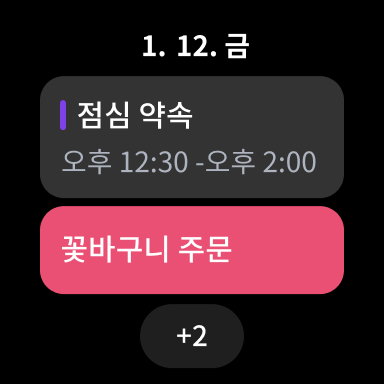
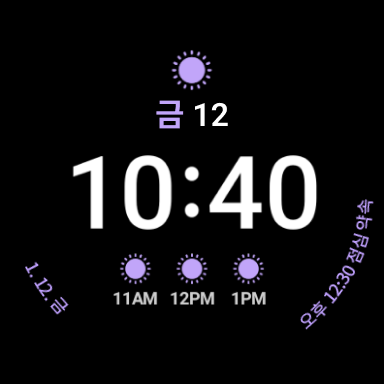
- Smartwatch supported
[Key Features]
1. Schedule, Anniversary, Task, Habit and Diary - All my daily life in the calendar.
Easily manage your daily to-dos, and don’t be stressed out about confusing lunar calendar anniversary that changes every year.
Manage your routine through habits and record your days and thoughts in your diary.
2. Alerts that ring at the right time & moment
Register easily-forgettable anniversaries to your calendar and it will help you to keep track of lunar calendar anniversaries on the right day.
3. Single touch to compose schedule!
Tap and hold dates on Monthly, Dual or Weekly-view to register schedule, to-do and anniversary.
4. View schedules in a view-type of your choice
Set your calendar in the monthly view to see all your schedules for the month, or in the weekly view for the week.
You can also fix your calendar in the list-view for daily schedules or the time-view to manage your schedules hourly.
5. Shifting calendar
If you swipe the screen left and right in the monthly view, you can see the previous or the next month. If you swipe upward, you can see detailed schedules with the calendar.
6. Exciting stickers and category setting
You can categorize each schedule/ anniversary type with different colors for a convenient use and give uniqueness to your schedule with various stickers.
7. Check schedules right away through Widget on your phone
With today/calendar/list/to-do/D-Day type Widget, you can simply check every day schedules even on your smartphone. .
8. Weather information
Check weekly weather forecast in Weekly view and see current weather condition in daily view.
9. Easy and convenient task management
Quickly add daily tasks and manage them by deadlines and groups.
10. Anniversary
Don’t forget approaching anniversary with D-day. Your everyday will become more special.
11. Managing together: shared calendar
You can co-manage your calendar with members including your friends, lover, family members and colleagues by sharing.
12. Time-table
Time table is a must-have item for students and moms. Have your time table on Widget and view schedule all at a glance.
13. Easy-sync with other calendars
You can simply import schedules in default calendar of your phone with a single click.
14. Support different time zones
When you are abroad or scheduling with friends in overseas, you can simply adjust the time zone to register the schedule.
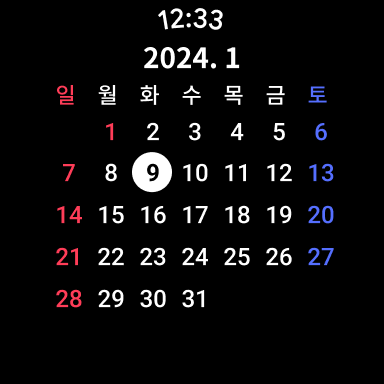
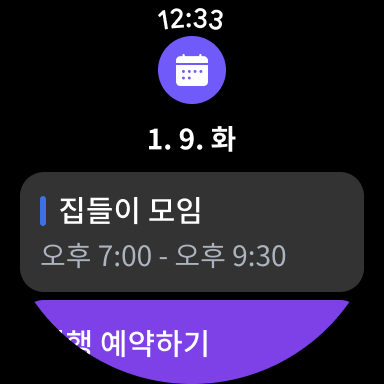
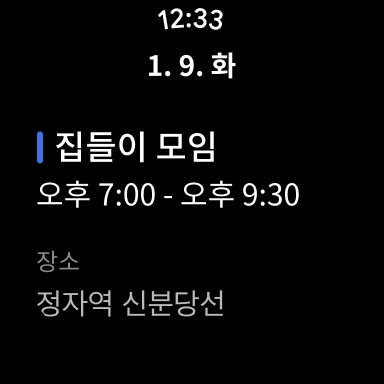
15. Smartwatch supported (Wear OS)
Check your schedule and calendar on your watch. Check your schedule conveniently with Tile and Complication.
■ Details of mandatory access rights
- Calendar: You can import events saved in the device and save them to NAVER Calendar.
- Location: Depending on your current location, you can use the weather function at monthly view and weekly view.
- Address Book: Addresses registered on the device can be used when adding attendees to the schedule.
- Files and media: You can save the attached file to Events or screenshot the Timetable.(Used only on devices with OS version 13.0 or below)
- Alarm: Receive event reminders, habit encouragement reminders , and more. (Used only on devices with OS version 13.0 or above)
- Microphone: Add an event through speech recognition.
Should you face any problem or inquiries while using the app, please contact NAVER Calendar Customer Service Center (https://m.help.naver.com/support/service/main.nhn?serviceNo=5620).
What's New
Version Information
- Version
- -
- Downloads
- 10M+
- Updated on
- Dec 26, 2025
- Released
- Feb 28, 2012
- Requires
- Android Varies with device
Statistics
Google Play Rating History
Rating Distribution
Downloads Over Time
Naver Calendar has been downloaded times. Over the past 30 days, it averaged downloads per day.
Shaded area shows 30-day prediction based on historical trends
Historical data collection started recently. More data points will be available over time.
Naver Calendar - Google Play Rankings
Top Rankings
| Rank | Country | Category | List | Change |
|---|---|---|---|---|
| — |
Ranking History in
No ranking data available yet. Rankings are updated daily.
#71 in Top Free Productivity in South Korea

Naver Calendar users say on Google Play
 Bet
Bet
This app is simply amazing! I've never used such an easy, secured and user friendly calendar. There is just too much to list here but the most important thing for me is that the features are FREE, unlike other famous calendars and organizers. This calendar has multiple stickers, and they are free, multiple colors, weather forecast, to-do list with reminders and folders, I can change the calendar view from a grid view button very easily and it looks simply beautiful! This is what every calendar should be.
 Euni Ichigo S-Guranto
Been using since April 2017. Verification successful but slow. Can use on mobile or desktop! LOVE the sticker collections and Google/Microsoft calendar integration~♡ Unfortunately, the map is limited to korean addresses... (duh, korean app). Major issue: doesn't work offline - not everyone has internet 24/7 - WiFi required input/update calendar details. Timetable feature should be editable after semester end - not just delete option. Miss the old purple cal widget... Keep up the hard work! 👍😉
 Natalie Vong
Love the wide collection of stickers, thats what got me installing this calendar at first. Not a five-star app for my liking because: 1. cannot copy and paste same event to different dates, have to mannually type in every single one; 2. Syncing only goes one way, from google calendar to Naver calendar, but cannot perfore syncing the other way round.
 Agnieszka Winkiewicz
Like many other users, I was looking for something to substitute Sól Calendar, which was beautifully designed with cool widgets and nice stickers. However, this calendar doesn't sync with any of my pre-existing calendars (google, sol calendar) and only has the option of importing holidays from Korea, Japan and China. Moreover, there are many parts, such as permissions, which are all in Korean. I would love this app if it synced with Google calendar and came with more options in English.
 Yohana Gabriella Nanda Kristiani
The timetable is shown in Korean time on the calendar. Annoying.
ApkTrusted Ratings & Reviews
More from NAVER Corp.
See more apps
네이버플러스 스토어
Free
네이버 스마트스토어센터
Free

클로바노트 - 음성 그 이상의 기록
Free

Naver Papago - AI Translator
Free

BAND - App for all groups
Free

Naver Whale Browser
Free

네이버 VIBE (바이브)
Free

Audioclip - audiobooks & ASMR
Free
Naver SmartBoard - Keyboard
Free

네이버 스마트플레이스센터
Free
NAVER Mail
Free

BAND for Kids
Free

네이버 블로그 - Naver Blog
Free

네이버 클로바 - NAVER CLOVA
Free

치지직 – CHZZK
Free

CHZZK XR
Free
Similar Apps

Simple Calendar - easy planner
Free
DigiCal Calendar Agenda
Free

Business Calendar 2 Planner
Free

CalendarTask
Free

Samsung Calendar
Free

TimeTree - Shared Calendar
Free
Calendar Widget: Month/Agenda
Free

Daily Planner Organizer: Brite
Free

TimeTune - Schedule Planner
Free

UpNote - notes, diary, journal
Free

DailyLife - My Diary, Journal
Free
Calendar 2026: Simple Calendar
Free

Workflowy |Note, List, Outline
Free

Student Calendar - Timetable
Free
Taskito: To-Do List & Planner
Free

Calendar Planner - Agenda App
Free
Scan this QR code to download

Forwarding you to the page at Google Play market in seconds...
Open Google Play market now