Naver SmartBoard - Keyboard v1.13.0
NAVER Corp.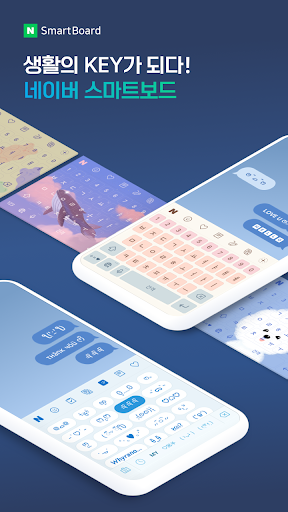



About this app
Developer Description
Typing on phone can come interesting! Search, translate, draw with SmartBoard.
You also can use stickers or your own drawings.
Take a look at NAVER SmartBoard, a keyboard app that just fits you.
1. It gests smarter as you use it.
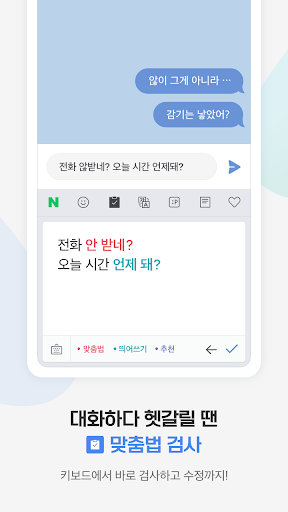
You can use suggestions from SmartBoard such as words, corrections, or emojis.
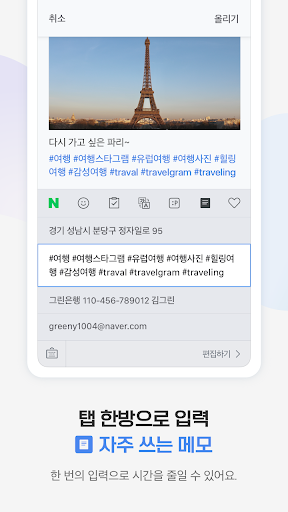
Custom texts help you enter long sentences each with a single tap while Quick Keys let your favorite shortened phrases stay in a single key.
You can not only change Korean syllables to Chinese characters but also type with your voice.
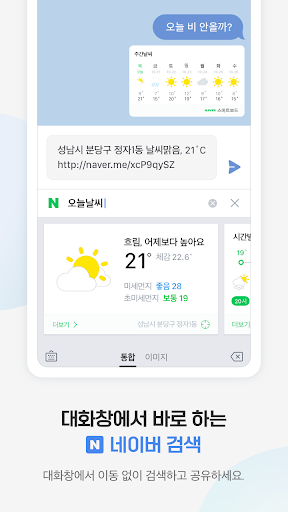
2. Search while you keep texting
You don't have to switch to a search app during a conversation.
Finding information of restaurants, movies, weather, and shopping has never been easier.
Stay where you are and get things done!
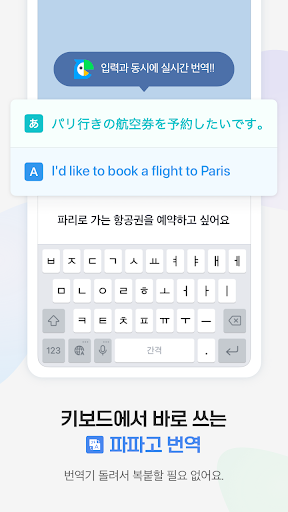
3. Real-time translation as you type in.
Don't be afraid of texting or emailing with foreigners any more.
Just type in Korean and SmartBoard does the rest translating into English, Chinese (Simplified), or Japanese using N2MT technology.
Using voice recognition while translating is even useful.
4. A single image wins the speech.
Sometimes it's a lot better to show a picture than to describe in words.
Send stickers, gifs, and your own drawings either on a empty canvas or pictures in gallery!
5. Customize your keyboard
Accustomed to a certain Korean layout? SmarBoard supports major Korean layouts such as "2-set Korean", "Danmoum", "Cheonjiin", "Naratgul", and "Vega".
You also can set any images for the keyboard background.
※ Permission Required
- Location: SmartBoard can show the weather around you and local search results.
- Microphone: What you say is transformed to texts using voice recognition.
- Camera: For drawing and text recognition, you can use your camera.
What's New
● Notice format has been changed
Version Information
- Version
- 1.13.0
- Downloads
- 1M+
- Updated on
- Sep 3, 2025
- Released
- Jun 26, 2017
- Requires
- Android 8.0
Statistics
Google Play Rating History
Rating Distribution
Downloads Over Time
Naver SmartBoard - Keyboard has been downloaded times. Over the past 30 days, it averaged downloads per day.
Shaded area shows 30-day prediction based on historical trends
Historical data collection started recently. More data points will be available over time.
Naver SmartBoard - Keyboard users say on Google Play
 Keith White
Naver SmartBoard - keyboard has finally been updated for Android Go, Android 12, Android 13, Android 14, Android 15 devices. The only thing that's missing is some new dark mode enabled keyboard themes. Also the autocorrect and the typing speed accuracy rate could be improved too. The weather and news features need translation for English. A built-in Google log in feature and Beta testing feature are needed too.
 Alexis Chantelle
I downloaded it again after I deleted it last year, and now I'm downloading it because I need the search bar. But why does the search bar doesn't appear when I press the N button?NAVER can you do something about this?
 cimannon
Love how customizable the keyboard is and that we can enter our own kaomoji. Autocorrect is abyssmal tho (I dont even conider it really there), so I constantly have to backtrack when typing, REALLY annoying. It's really easy to accidentally press on adjacent keys and the keyboard lags sometimes. They should also consider improving and adding more language inputs. Right now it just offers korean, japanese, and english
 pomme
pomme
please allow glide typing ( ˃̣̣̣̣o˂̣̣̣̣ )( ˃̣̣̣̣o˂̣̣̣̣ )( ˃̣̣̣̣o˂̣̣̣̣ )
 Koneko Cat
translation is horribly wrong no matter how specific you try to be, it's only good because of all the accessories in the app other than that translating is extremely awful. Another issue you can't reverse translations on certain languages for ex: I want an accurate reverse translation on Russian but can't, so you can not confirm if it is accurately translating in the first place. so as for everything else it would be a decent app, as for translator it makes no sense and is frustratingly awful.
ApkTrusted Ratings & Reviews
More from NAVER Corp.
See more apps
네이버플러스 스토어
Free
네이버 스마트스토어센터
Free

클로바노트 - 음성 그 이상의 기록
Free

Naver Papago - AI Translator
Free

BAND - App for all groups
Free

Naver Whale Browser
Free

네이버 VIBE (바이브)
Free

Audioclip - audiobooks & ASMR
Free
Naver Calendar
Free

네이버 스마트플레이스센터
Free
NAVER Mail
Free
BAND for Kids
Free

네이버 블로그 - Naver Blog
Free

네이버 클로바 - NAVER CLOVA
Free

치지직 – CHZZK
Free

CHZZK XR
Free
Similar Apps
Mint Keyboard:Fonts,Emojis
Free
Typewise Custom Keyboard
Free
Microsoft SwiftKey Beta
Free

Design Keyboard - Fonts, Emoji
Free

CleverType AI Keyboard
Free

Emoji Keyboard Lite-Emoji
Free
Gaminik: Auto Screen Translate
Free
Microsoft SwiftKey AI Keyboard
Free
Keyboard - Emoji, Emoticons
Free

Translate: Screen Translator
Paid

AI Keyboard: Writer, Grammar
Free

PlayKeyboard - Fonts, Emoji
Free

GIF Keyboard by Tenor
Free

Bitmoji
Free

blip: Kpop idol schedule app
Free
Yandex Keyboard
Free
Scan this QR code to download

Forwarding you to the page at Google Play market in seconds...
Open Google Play market now