Web to PDF Converter PRO v1.1.31
Oleg Sheremet Software Solutions



About this app
Developer Description
Reliable and handy web to PDF converter.
- Convert any web page to pdf file
- Browse web and save PDF files on the go
- You can share link from your web browser, paste it from clipboard or type directly in the app.
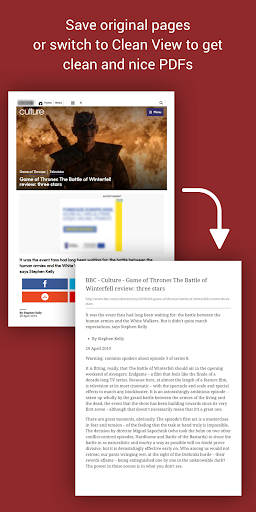
- Clean View will keep only content of page (i.e. article) and remove the rest.
- Bookmark your favourite web pages
- See History of opened links
- Save PDF files to device storage or export to other apps or upload directly to Google Drive
- Manage your PDFs
What's New
Version Information
- Version
- 1.1.31
- Downloads
- 5K+
- Updated on
- Jan 30, 2024
- Released
- Aug 30, 2019
- Requires
- Android 7.0
Statistics
Google Play Rating History
Rating Distribution
Downloads Over Time
Web to PDF Converter PRO has been downloaded times. Over the past 30 days, it averaged downloads per day.
Shaded area shows 30-day prediction based on historical trends
Historical data collection started recently. More data points will be available over time.
Web to PDF Converter PRO users say on Google Play
 Cyrene Lowery
Great app for a mere $0.99! This gives me a lot more control on what gets added to a PDF created from a website page and none of the text gets lost between pages like with other apps and mobile browser tools I've used. Thankfully ads on the website are removed when using the "clean" option. If it became available, I'd pay for an upgrade that allows me to select to remove or at least reduce in size all or some of the images in an article. This would cut down on unnecessary pages.
 Umesh Sharma
Does a fine job, but a few features can make it even more brilliant. The one feature request I have is to have a switch to have the clean view as the default view after pasting link. If we have to save a number of links in cleaned view, not having to convert each page to cleaned page manually will make process much easier. I disabled the option to ask folder each time, and it made my job simpler, similarly, an option to switch between web and cleaned view as default will help a lot.
 T P Q
T P Q
It's not bad. I'd like to see conversion options added (pdf to doc, doc to pdf, pdf to html, html to txt, pdf to html, pdf to jpg, jpg to pdf, etc) and more control over pdf parameters, like A4, A5, letter, etc formatting and text and background colour, pdf editing etc.
 James Thomas
Galaxy S10 Plus. March 24, 2023 version of app. Used to work great. Now, every time I use it I get an error message at the bottom of the screen "Can't load due to certificate problem. Sorry :(". This doesn't seem to affect the app's ability to create pdfs, but it's annoying, and sometimes the message (which always stays on the foreground) doesn't clear for way too long, affecting my use of other apps.
 Joe
Joe
Free works great - Paid "Pro" version doesn't work at all. Problems (none of these happen on the free version): 1. This crashes at save, and every page I try. 2. Won't load many images from the pages I need converted, so I try "Clean View"... 3. Errors, "Sorry, but failed to clean" everytime I try to use "Clean View". There is something very broken in the Paid versions code... all they should have done is remove the call to "load advertisement" function. They must have tried to get fancy.
ApkTrusted Ratings & Reviews
More from Oleg Sheremet Software Solutions
See more apps




Similar Apps

Regula Document Reader
Free

PDF Merge: Scan, Sign & Edit
Free

Mobi PDF・Editor・Scanner・Reader
Free

Falcon PDF Viewer Lite Editor
Free

PDFEsign.com PDF E-Sign
Free

CSV File Viewer - Smart CSV
Free

Smallpdf: Scanner & PDF Editor
Free

PDF Reader Zone
Free
PDFelement-PDF Editor & Reader
Free

Genius Scan - PDF Scanner
Free
OfficeSuite Pro + PDF
Paid
pdfFiller Edit, fill, sign PDF
Free

PDF Scanner Plus - Doc Scanner
Free
CBP ROAM
Free

Foxit PDF Editor
Free
PDF Editor & Reader | Xodo
Free
Scan this QR code to download

Forwarding you to the page at Google Play market in seconds...
Open Google Play market now