
Philips HearLink 2 v1.6.1
SBO Hearing A/S



About this app
Developer Description
Control your hearing aids discreetly with the touch of a finger
• Adjust sound volume for each hearing aid together or separately
• Mute surroundings for better focus
• Switch between programs set by your hearing care professional
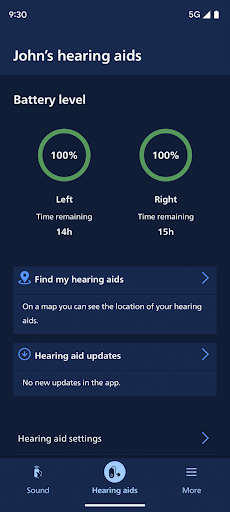
• Check battery levels
• Stream calls, music, and podcasts directly to your hearing aids (availability may vary depending on your phone model)
• Find your hearing aids if lost (requires location services always turned on)
• Access app support and troubleshooting solutions
• Meet your hearing care professional for an online visit (by appointment)
• Adjust streaming sounds with streaming equalizer (available for all hearing aid models except Philips HearLink 00)
• Adjust sounds around you with sound equalizer (available for Philips HearLink 50 and 40 models)
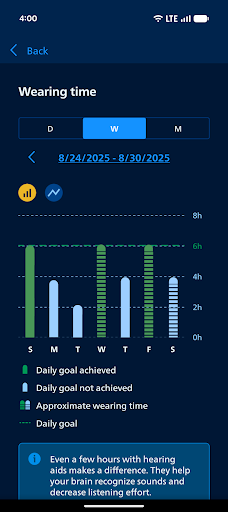
• Track your progress with Philips Journal feature (available for Philips HearLink 50 and 40 models)
• Handle wireless accessories paired with your hearing aids such as TV Adapters and AudioClip
• Connect to and adjust an Auracast™ broadcast (available for Philips HearLink 50 models)
First use:
You need to pair your hearing aids with this app to use it to control your hearing aids.
App availability:
We recommend regular hearing aid updates during your routine check-up with your hearing care professional.
For optimal performance, we recommend updating your device to OS 10 or later. To check the latest list of compatible devices, please visit:
hearingsolutions.philips.com/compatibility
What's New
Version Information
- Version
- 1.6.1
- Downloads
- 100K+
- Updated on
- Oct 27, 2025
- Released
- Jan 17, 2023
- Requires
- Android 8.0
Statistics
Google Play Rating History
Rating Distribution
Downloads Over Time
Philips HearLink 2 has been downloaded times. Over the past 30 days, it averaged downloads per day.
Shaded area shows 30-day prediction based on historical trends
Historical data collection started recently. More data points will be available over time.
Philips HearLink 2 - Google Play Rankings
Top Rankings
| Rank | Country | Category | List | Change |
|---|---|---|---|---|
| — |
Ranking History in
No ranking data available yet. Rankings are updated daily.
#41 in Top Free Medical in Turkey


#48 in Top Free Medical in Canada


Philips HearLink 2 users say on Google Play
 Darrell Long
Very useful app for my Samsung S24. I can set the L&R volumes together or separately, pick my General or Voice programs, and tweak the bass, mid, and high frequency bands. Audio for notifications, phone calls, music, and videos play into my aids, too, in Stereo! Try watching a Minuscule cartoon! 😃
 Jim Hammes
This rating is mostly for the app and not the hearing aids. I have a Samsung Galaxy A15-5G with Android. The app works very well for me and almost always connects flawlessly. Rarely (maybe once a month), the app drops connection to one aid or the other which is usually fixed by turning my phone's bluetooth off and back on. My biggest complaint is that the app does not have a separate Sound Equalizer for each ear. It has separate volume controls for each, why not Equalizer setting?
 Gary Carlmark
not stable and inconsistent.
 Robert Matthews
Since the last update my right earpiece continues to disconnect and I have to go through the process of turning off and on the Bluetooth, sometimes multiple times. I liked it on the prior version where it would connect without all the extra effort. And now my aids keep disconnecting while I'm on a phone call. I have to quickly turn off Bluetooth and use the phone speaker unless the other party thinks I hung up and they disconnected.
 E.B. Gilligan
After a recent Android update on my Samsung phone the app has gone back to disconnecting frequently from my hearing aids and I have to keep trying different things to get the connection back. Sometimes a phone restart has helped, but ost often I seem to have to put the hearing aids in the charging cradle and then remove them again to get the app to recognize them and re-pair. It's frustrating as I use the streaming sound feature a lot as well as the sound settings.
ApkTrusted Ratings & Reviews
More from SBO Hearing A/S
See more apps


Similar Apps

Oticon Companion
Free

Unitron Remote Plus
Free

Signia App
Free

myPhonak
Free

ReSound Smart 3D
Free
ReSound Tinnitus Relief
Free

Philips Hue
Free
eufy Clean(EufyHome)
Free

Arenti
Free

Jabra Sound+
Free

Deseret Bookshelf
Free

GNC
Free

BILT: 3D Instructions
Free

SharkClean
Free

Owlet Dream
Free

VeSync
Free
Scan this QR code to download

Forwarding you to the page at Google Play market in seconds...
Open Google Play market now