
SlideScan - Slide Scanner App v2.7
Photomyne Ltd.


About this app
Developer Description
Analog Photo Slide Scanning
IT’S AUTOMATIC - JUST ADD SLIDES:
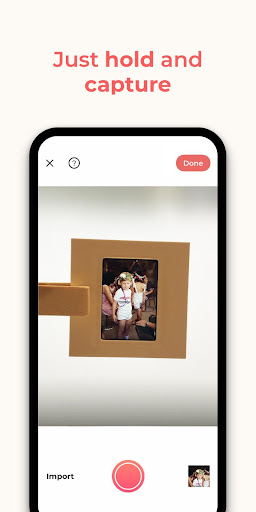
1. Open a backlight source on your computer (or use the link provided in the app)
2. Hold the slide in front of the light
3. Long-press the capture button
4. See slides magically scanned and images revealed
The app’s smart algorithm will automatically crop, rotate, enhance, and save the slide as a digital photo in the app.
CELEBRATE YOUR NEWLY SCANNED SLIDES:
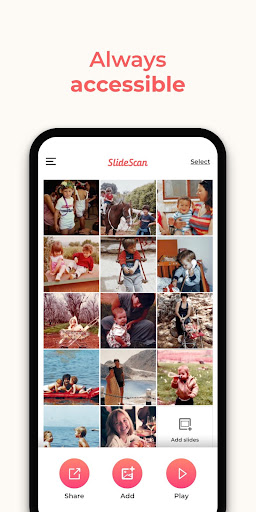
* Save the new digital photos to your phone
* Share your photos and collages with the people you love
OPTIONAL IN-APP UPGRADE:
The first few photos are free. For unlimited use, consider purchasing an optional paid plan (in-app purchase).
Here are the premium features you get with a paid plan:
* Unlimited scanning
* Unlimited photo saving and sharing
* Photo backup and access on other devices and online.
The app offers an optional paid plan via monthly/yearly auto-renewing subscriptions**, as well as a One-Time plan which is paid for by a single upfront payment (valid for 2 years). These offer unlimited access to the premium mentioned above.
Got any questions? We’d love to connect: support@photomyne.com
Privacy Policy: https://photomyne.com/privacy-policy
Terms of Use: https://photomyne.com/terms-of-use
In-app purchases
$5.99 - $69.99 per item
Version Information
- Version
- 2.7
- Downloads
- 100K+
- Updated on
- Jul 2, 2025
- Released
- Aug 6, 2020
- Requires
- Android 8.0
Statistics
Google Play Rating History
Rating Distribution
Downloads Over Time
SlideScan - Slide Scanner App has been downloaded times. Over the past 30 days, it averaged downloads per day.
Shaded area shows 30-day prediction based on historical trends
Historical data collection started recently. More data points will be available over time.
SlideScan - Slide Scanner App users say on Google Play
 Angela Sweet
I have numerous slides to scan and save to the cloud. This app works well! You do need to use either a computer screen or some kind of light table/source to backlight the slides.
 Kay Kole Leary
Once you figure your way through the app on your phone and it's connection to the website on your computer, and you determine the right distance to hold the slide from the screen and your phone from the slide, THEN it is easy to scan slides pretty quickly and they turn out pretty good. I guess what I'm saying is that it's not as intuitive or user friendly as one might hope, but that aside, I like the results.
 Kevin Holt
So so...am using this app in conjunction with their LED light pad. Most slides scanned OK, but there were frequent problems where the scans were totally blurred (any picture that was blurred remained blurred in multiple attempts to re-scan). Same problem with color accuracy, where, for example, violet and light blue wild flowers scanned as almost black and white. Problematic results, particularly if you are archiving lots of slides.
 Graham Slaughter
The app worked quite well with slides that had plenty of natural light but didn't work with slides that included shadows or poorer light. I paid for a month's subscription but won't be extending. The Kodak app, which is free, worked much better, but still not great. A good idea, but probably requires something that is more fit for purpose for useful results.
 Ray Galligan
This app sucks...... It's impossible to use because of all the ads...... I'm going to have to try other apps maybe they're all like this.....
ApkTrusted Ratings & Reviews
More from Photomyne Ltd.
See more apps



Similar Apps

3D Photo: Imager
Paid

Apowersoft Background Eraser
Free

PicMaster - AI Photo Editor
Paid

Photobook: Photo Books & Gifts
Free

Printicular: Print Photos
Free

eZy Watermark Photos Pro
Paid

Easy-PhotoPrint Editor
Free

Via Capitale Camera
Free

QR & Barcode Scanner
Paid

Eventer - Unforgettable Events
Free

PicWish: AI Photo Editor
Free

PicMonkey Photo Editor
Free

AI Photo Editor: AI Expand
Free

CLG Color
Paid

PICNIC - photo filter for sky
Free

Ink Cards
Free
Scan this QR code to download

Forwarding you to the page at Google Play market in seconds...
Open Google Play market now