Type Keeper - Your keylogger v2.8.0
Viliyan Vasilev


About this app
Developer Description
Your personal keylogger is here. Never lose any text and clipboard data again.
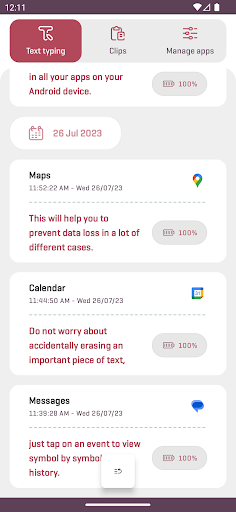
Type Keeper is here! It is designed to automatically save everything you type and copy, in all your apps on your Android device. Just open it whenever you want to take a look at your old input entries & copy to clipboard events. By using it you will never lose text typing and clipboard data again.
What Type Keeper automatically does for you:
• It saves your text typing as events and sorts them by date and time.
• It saves your clips as events and sorts them by date and time.
• It requests and saves location on each text typing event start (only if device Location is enabled).
• It deletes old events (and their data) in order to free up storage and provide you better overall performance.
Type Keeper automatically monitors and saves all text fields inputs and copy to clipboard actions. It works with an accessibility service that you need to setup (enable) manually on your Android device.
Text typing features:
• Explore your text typing in detail. Drag the slider to view symbol by symbol history.
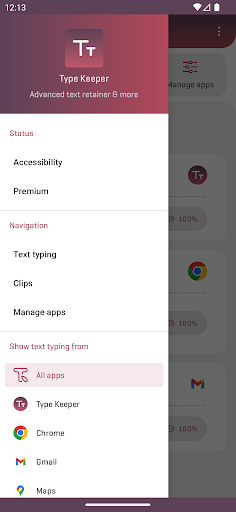
• Show text typing events only from a specific app.
• Search in history for specific text typing events.
• Manage your text typing events. Copy, share, and delete them with one tap.
• View the location of each text typing event (displayed on a map).
• Easily enable/disable Type Keeper text typing storing globally or for specific apps.
Clips features:
• Take a look at your last clips.
• Search in history for specific clip events.
• Manage your clips. Copy, share, and delete them with one tap.
Additional features & options:
• Easily enable/disable Type Keeper events storing.
• Adjust the automatic cleanup interval.
• Choose a preferred provider for location tracking.
• Require screen lock confirmation right after app opening.
Technical information:
• Important: This Android app uses an accessibility service that must be enabled to ensure primary functionality.
Accessibility information disclosure:
The application uses the accessibility service and its API to enable text typing and copy to clipboard events monitoring. To provide such functionality, this Android application has access to nodes, visible on your screen. This app and it's accessibility service can observe your actions, retrieve window content, and detect text that you type.
This app is not designed to track you in any way whatsoever. Type Keeper isn't a password manager and isn't acting like such. It will never save any text typing from password input fields. All device data, which being recorded, is stored internally on your device, and only you have access to it. The developer and publisher of this software product care about user privacy and don't collect or share any kind of personal information and data, result of your usage of this product.
Permission(s):
• Notifications - Allows the app to notify you about important events (e.g., something went wrong with the accessibility service and future data won't be stored).
• Location (incl. background) - Allows the app to request a location (while in foreground or background), save it locally on your device, and then make it appear for you when you need it (e.g., when viewing text typing event).
Other information:
• Contact us by email if you have any issues or feature requests.
• Email address: typekeeper@gmail.com
Agreements texts (terms of service, privacy policy) available at: https://www.type-keeper.com
Thank you for stepping by and choosing Type Keeper!
Written with passion to help you out.
What's New
Version 2.0 is out now and Type Keeper is even better!
Definitive, new rewritten version with all-new user interface and styles.
Added advanced clipboard manager (inclusively supported in all Android versions) and a bunch of new features.
Introducing operating modes, improved feedback, and even better user experience.
Including premium subscriptions with great opportunities.
Huge improvements and plenty of bug fixes.
In-app purchases
$6.99 - $69.99 per item
Version Information
- Version
- 2.8.0
- Downloads
- 100K+
- Updated on
- Mar 20, 2025
- Released
- Mar 10, 2019
- Requires
- Android 5.0
Statistics
Google Play Rating History
Rating Distribution
Downloads Over Time
Type Keeper - Your keylogger has been downloaded times. Over the past 30 days, it averaged downloads per day.
Shaded area shows 30-day prediction based on historical trends
Historical data collection started recently. More data points will be available over time.
Type Keeper - Your keylogger users say on Google Play
 L Blincoe
Got tired of repeatedly investing my time and mental facilities writing lengthy messages, comments, emails, etc to have it all lost after whatever app I was using inexplicably crashed without warning. It was sincerely infuriating! This app has saved my sanity and allowed me to always have a failsafe for my work when all other apps have failed to do their duty. No complaints to speak of!
 Mehal Patil
but it does not save password login password
 MaTT Belis
App have great promise and even it sometimes delivered that I didn't have to write again some long text. But sporadicky it didn't save accessibility setting wasnt working. And as august of 2023 it's lost it's freemium model and free capabilities are not present not longer providing any value and it's just payed 60$ per year for sometimes working utility. Resizing is pleasent but in some small number instances not functional- poorly provided UX and UI design.
 Kam M
Kam M
No excuse for not having a dark mode option in 2024. Next issue is there's no lifetime subscription option. There's 'Inputting Plus' that does the same thing, even adds a floating undo/redo button for A1 time fee. Even if you added a £30 lifetime option, maybe higher. Devs need to understand that most people already have too many subs, antivirus, streaming (music, gaming, TV) services, cloud storage... but they'd be happy to buy an app for a one time price, that's income you're missing out on.
 sk8n barrow
Easily 50 3rd party apps that they sell your data to. They try to deceive you by forcing you to individually turn them off, one. by. one, until you just give up. Then whatever's left sells your data. This app is shady from the very get go. I just did a test, and it didn't record anything. So it's a bug in your app that makes it completely useless,
ApkTrusted Ratings & Reviews
More from Viliyan Vasilev
See more apps
Similar Apps

AnyTracker - track anything!
Free

WaiverForever - Online Waiver
Free

BeenVerified Background Search
Free

ParentSider
Free

Pushbullet: SMS on PC and more
Free

TAP Kiln Control Mobile
Free

Co-parenting
Free

OurFamilyWizard Co-Parent App
Free

RAYNET CRM
Free

Pinwheel Caregiver
Free

Mattermost
Free

Unmutify
Free

KidsGuard Pro-Phone Monitoring
Free

Business Texting with Salesmsg
Free
Breakroom Chat & Scheduling
Free

TicNote: AI Recorder & Agent
Free
Scan this QR code to download

Forwarding you to the page at Google Play market in seconds...
Open Google Play market now