
Sun Surveyor (Sun & Moon) v2.7.2
Adam Ratana







About this app
Sun Surveyor (Sun & Moon) solves the problem of planning and predicting sun and moon movements for photographers, outdoor enthusiasts, and astronomers, providing a valuable tool for those who need to visualize and prepare for optimal lighting conditions. This app benefits professionals and hobbyists alike, offering a unique set of features that set it apart from other photography apps. Compared to alternatives, Sun Surveyor's accuracy and user-friendly interface make it a top choice, although its paid model may deter some users. The app's excellent rating and moderate download numbers attest to its quality and effectiveness.
Pros
- With a 4.7/5 rating and over 100,000 downloads, Sun Surveyor has demonstrated its value to a significant user base, indicating a high level of satisfaction with its performance and feature set.
- The app's lack of permissions requests is a significant advantage, as it ensures user data privacy and security, a crucial consideration for any app, especially those used for planning and prediction.
- The developer's reputation, as evidenced by the app's quality and regular updates, suggests a commitment to maintaining and improving the app, which is essential for an app that relies on astronomical data.
- Sun Surveyor's offline capability and accessibility features make it a versatile tool for users in various locations and with different needs, enhancing its overall usability and appeal.
- The app's paid model, although a potential deterrent for some, ensures that users receive a high-quality, ad-free experience without in-app purchases, which can be a significant advantage for those seeking a distraction-free tool.
Cons
- The app's paid model, while ensuring a high-quality experience, may limit its adoption among casual users or those on a tight budget, potentially restricting its user base.
- Some users may find the app's feature set, although comprehensive, to be overwhelming or difficult to navigate, particularly if they are not familiar with astronomical terminology or concepts.
- The lack of free version or trial may deter some potential users who want to test the app before committing to a purchase, which could impact the app's overall visibility and user acquisition.
- Although the app has a moderate number of downloads, its user base may not be as large as some other photography apps, which could limit the community support and resources available to users.
Best for: The ideal user for Sun Surveyor is a professional or hobbyist photographer, astronomer, or outdoor enthusiast who requires accurate and reliable predictions of sun and moon movements to plan and prepare for optimal lighting conditions, and is willing to invest in a high-quality, paid app to achieve their goals.
Developer Description
Your personal guide to the sun and moon. Plan ahead, visualize and predict!
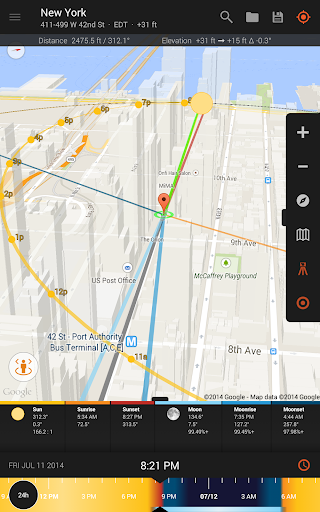
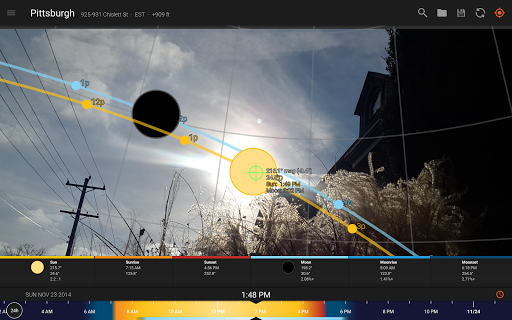
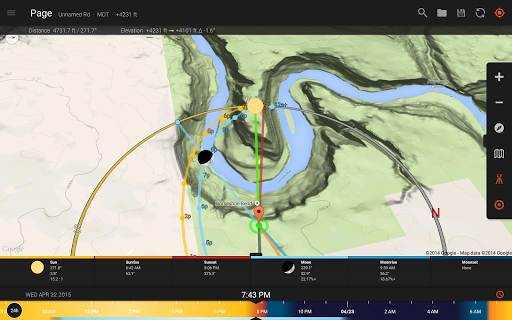
The Live Camera View, Interactive Map (with Street View), 3D Compass, and detailed Ephemeris provide a wealth of information about the largest natural light source in the galaxy, as well as the moon, and milky way:
- View augmented reality projections of the sun and moon paths, pinpoint the time the sun or moon will be at a particular location in the sky
- Predict and plan for the golden hour, blue hour and every sunrise, sunset, moonrise and moonset
- Prepare night photography shots with the Milky Way & star trail features
Solar Industry (PV) Professionals, architects, real estate agents, and gardeners will also find a wealth of empowering interactive features:
- Show clients the quality and quantity of seasonal sunlight at a given location
- Understand potential shade of surroundings and discover any obstructions
- Create images of the summer and winter Solstice & Equinox paths for a site
Additional features:
- Photo Opportunities (new!) - an interactive listing of critical times to help inspire and generate shot ideas; including the full moon looming low in the sky during magic hour, total darkness for stargazing, and more
- Position Search (new!) - an extremely powerful tool to search for sun, moon and milky way center positions within various constraints, for the perfectionist planner
- Visual time machine - take a quick glance at the light for a day, or dial in desired compositions easily
- Moon distance, age, apogee, perigee, super moon predictions
- Sun shadow information - calculate the length of shadows cast by objects
- Share details and locations with clients and colleagues
- Offline usage (excludes Map View, Street View) - enter coordinates, save & load locations with no data connection or GPS available
- Measure distance, and difference between elevations, and vertical angle differentials with the Map view
- Import and export Google Earth .kmz/.kml locations
- Magnetic declination compensation
- Widgets - 9 varieties of sun and moon widgets for your homescreen
** NOTE: the Live View and 3D Compass portions of this app make use of your device's compass. Some devices may not have a compass.
Privacy
Given that Sun Surveyor requests no permissions, users can be confident that their data is not being collected or shared, and the app's functionality is not compromised by privacy concerns. However, users should still be cautious when using any app that provides location-based services, as their device's location services may still be active. To ensure maximum privacy, users should review their device's location settings and adjust them according to their preferences.
Tips
To get the most out of Sun Surveyor, users should take the time to explore the app's various features and settings, including the augmented reality view and the ability to save favorite locations. Additionally, users can optimize the app's performance by ensuring their device's location services are enabled and up-to-date, and by regularly checking for app updates to ensure they have the latest features and improvements.
What's New
- Targeting the latest Android version (SDK: 36)
- Visual updates, bug fixes, and tweaks.
2.6
Major visualization update!
- New 3D Renderer, multiple camera usage, among many other updates.
Version Information
- Version
- 2.7.2
- Downloads
- 100K+
- Updated on
- Oct 25, 2025
- Released
- Apr 30, 2011
- Requires
- Android 8.0
Statistics
Google Play Rating History
Rating Distribution
Downloads Over Time
Sun Surveyor (Sun & Moon) has been downloaded times. Over the past 30 days, it averaged downloads per day.
Shaded area shows 30-day prediction based on historical trends
Historical data collection started recently. More data points will be available over time.
Sun Surveyor (Sun & Moon) - Google Play Rankings
Top Rankings
| Rank | Country | Category | List | Change |
|---|---|---|---|---|
| — |
Ranking History in
No ranking data available yet. Rankings are updated daily.
#14 in Top Paid Photography in United States


#1 in Top Paid Photography in Japan


#7 in Top Paid Photography in South Korea
#18 in Top Paid Photography in Vietnam


Sun Surveyor (Sun & Moon) users say on Google Play
 Zoe Larkin
I've been using this app for years, and it's never let me down. As a wedding photographer I am often tasked with working in tricky and new situations with challenging light. With this app I can track the position of the sun at any given time, giving my clients magical light that I wouldn't have been able to find without this app. It is so simple, you just hold up the phone to the sky and using VR its tracks the position of the sun in a line, using your camera! So cool and nifty. Well worth it.
 Beep Boop
Nicely made app! But it bought it to perhaps create horizon files for use with PV-Software. I'd like to be able to log the heading and azimuth of objects like the LOG function in the IOS-App "Theodolite". At the moment I'd have to create a ton of Screenshots from all the points i'd like to log and then create the file manually. Would it be possible to add a feature like this? I'm sure this would help a lot of PV-planners :) thank you!
 Kathryn Davidson
"Photo opportunities" - fail to mention eclipses. App will not notify me of special celestial events, nor even mention them in "opportunities" section. I was very disappointed last year when eclipse happen on my birthday - and I didn't even know about it. What good is an app that's perfectly designed to let you photograph such an event but doesn't even tell you about it? Please add a system of notifications for events in areas I plan to travel, and where I'm currently located.
 Milt MacFarlane
Still waiting on an alarm preferably dawn or Sunrise adjustable even better updated from the 30/8/23
 Jeff Corcelius
App is Inaccurate to often. I use the app to help me set up my time-lapse and aim my camera for sun rises. The app is off by a lot every time. It's been so inaccurate that I'm missing the shot not just by a few degrees but several degrees. I paid for the full version to increase my accuracy but in the past several months it's ruined my efforts. Ive been restarting the app and making sure the gps is on. I've triple and quadruple checked. I've calibrated over and over. App has gone down hill.
ApkTrusted Ratings & Reviews
More from Adam Ratana
See more apps
Similar Apps

PhotoPills
Paid

SkySafari 7 Pro
Paid
My Emotional Compass
Paid

Sunrise and Sunset Times
Free
Knots 3D
Paid
Solar Walk 2: Planetarium 3D
Paid

PeakFinder
Paid

PlantSnap: Plant Identifier
Free
Star Walk 2 Pro:Night Sky View
Paid

Plant identifier - Picturethis
Paid
SunCalc org
Free

Moto Widget
Free
Weather Forecast Accurate Info
Paid

Star Chart
Free

Flora Incognita
Free

WeatherX Forecast
Free
Scan this QR code to download

Forwarding you to the page at Google Play market in seconds...
Open Google Play market now