S Secure vVARY
Samsung R&D Institute India Noida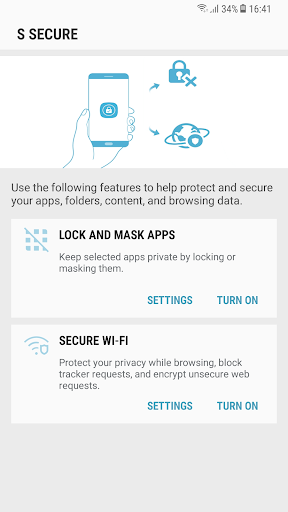

About this app
Developer Description
Protect and secure your apps, folders, content, and browsing data.
your apps, folders, content, and browsing data using below features.
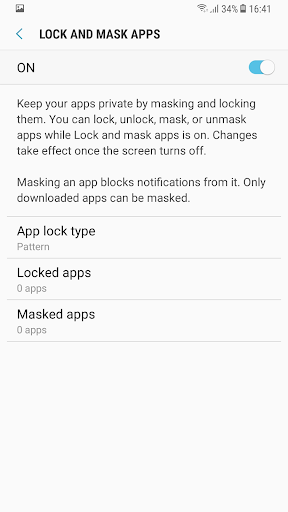
1. Lock and Mask apps:
Keep selected apps and its data private by locking or masking them.
Locking and masking can be done via a pattern, PIN, password, or your fingerprints.
Apps will be locked once the screen turns off. Once apps are unlocked, they will remain unlocked until the screen turns off.
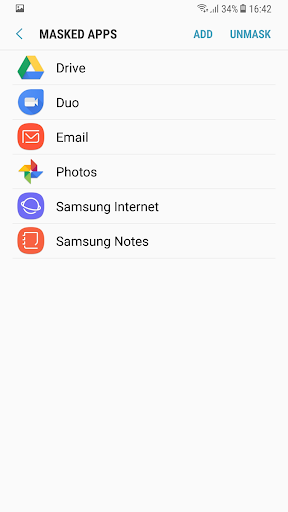
Masking an app will block notifications from it and mask it on your phone. Only downloaded apps can be masked .
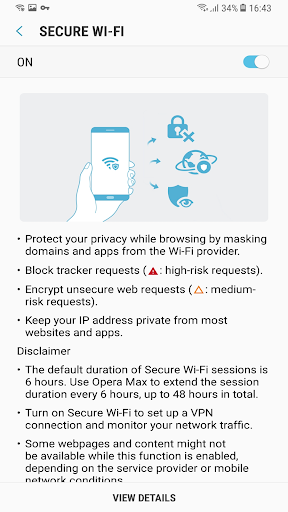
2. Secure Wi-Fi
Protect your privacy while browsing by masking domains and apps from the Wi-Fi provider.
Block tracker requests using the Easy privacy list.
Encrypt unsecured web requests Keep your IP address private from most websites and apps.
Disclaimer:
The default duration of Secure Wi-Fi sessions is 6 hours. Opera Max can be used to extend the session duration every 6 hours, up to 48 hours in total.
Turn on Secure Wi-Fi to set up a VPN connection and monitor your network traffic.
Some websites and content might not be available while this function is on, depending on the service provider or mobile network conditions.
Some websites may not be able to locate or track your IP address.
What's New
Version Information
- Version
- -
- Downloads
- 50M+
- Updated on
- Dec 26, 2019
- Released
- Feb 3, 2026
- Requires
- Android Varies with device
Statistics
Google Play Rating History
Rating Distribution
Downloads Over Time
S Secure has been downloaded times. Over the past 30 days, it averaged downloads per day.
Shaded area shows 30-day prediction based on historical trends
Historical data collection started recently. More data points will be available over time.
S Secure users say on Google Play
 All is well
Subject: Request to Bring Back S Secure App for Samsung Galaxy S24 Ultra Dear Samsung Team, I am a dedicated user of the Samsung Galaxy S24 Ultra and truly appreciate the quality and innovation of your products. I would like to request the return of the S Secure app, which was previously available on Samsung devices. While the Secure Folder app is still present, it does not offer the same user-friendly experience or features that S Secure provided. s secure folder provides app lock.
 Vijayakumar
not working in Galaxy M06 5G
 Abbaan Anzaan
This app is useless because when we delete the app,the lock also gone. The lock is not saved in the phone...... But the app is good onlt the problem 🥲
 fateh singh
app is not working please fix this.
 Haroon Sayyed
Bring Back the App Lock Feature or Secure App Option In previous versions of One UI, there used to be a “S Secure App” or similar feature that allowed users to lock individual apps with a PIN or fingerprint. This feature was very convenient for privacy and security. However, it seems that the Secure App is now missing from both the Galaxy Store and the Play Store. Please consider bringing back this feature or adding a built-in App Lock option in One UI 8.5 or Available Separate App Lock.
ApkTrusted Ratings & Reviews
More from Samsung R&D Institute India Noida
See more apps




Scan this QR code to download

Forwarding you to the page at Google Play market in seconds...
Open Google Play market now