
Storage Saver v11.0.10
Samsung R&D Institute India Noida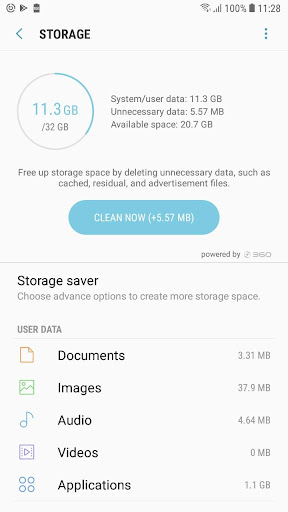
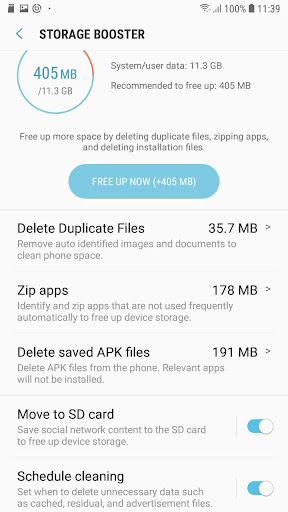
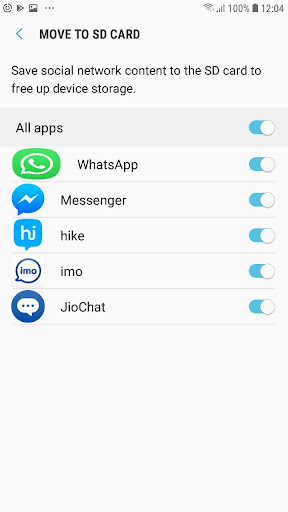

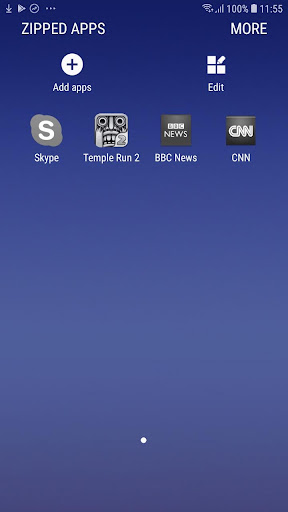


About this app
The Storage Saver app efficiently manages and organizes phone storage, solving the problem of cluttered devices and improving usability. This app benefits users who frequently download and install apps, take numerous photos, or have limited storage capacity, by helping them free up space and maintain their device's performance. Compared to alternatives in the Tools category, Storage Saver stands out due to its simplicity and effectiveness, with a high user rating of 4.3/5 and over 500 million downloads. However, its lack of additional features beyond storage management might make it less appealing to users seeking a more comprehensive tool.
Pros
- With over 500 million downloads and a 4.3/5 user rating, Storage Saver has demonstrated its effectiveness and reliability in managing phone storage, making it a trustworthy choice for users.
- The app's simplicity and ease of use make it accessible to a wide range of users, including those who are not tech-savvy, allowing them to efficiently manage their storage without requiring extensive technical knowledge.
- As a product of Samsung R&D Institute India Noida, Storage Saver benefits from the reputation and resources of a major technology company, ensuring a certain level of quality and support.
- The app's offline capability and lack of in-app purchases or ads provide a seamless and uninterrupted user experience, focusing solely on storage management without distractions or additional costs.
- Regular updates, such as the recent version 11.0.10, indicate the developer's commitment to maintaining and improving the app, ensuring it remains compatible with the latest Android versions and devices.
Cons
- One concern is the app's limited functionality beyond storage management, which might not appeal to users seeking a more comprehensive tool that includes additional features such as file transfer or device cleaning.
- Although the app requires no permissions, which is a positive aspect in terms of privacy and security, some users might find the lack of integration with other Samsung services or apps to be a drawback, limiting its potential for a more holistic device management experience.
- The app's effectiveness can be highly dependent on the user's storage habits and the types of files they store on their device, which might lead to varying levels of satisfaction among users, with some potentially finding it more useful than others.
- There is no developer website provided for additional support or information, which could be seen as a limitation for users seeking more detailed guides or troubleshooting resources beyond what is available within the app itself.
Best for: The ideal user for Storage Saver is likely an individual who frequently uses their Android device for various purposes, such as social media, photography, and app downloads, and requires a simple, effective tool to manage their storage, potentially including younger adults and professionals who value ease of use and efficiency in maintaining their device's performance and usability.
Developer Description
Efficiently manage and organize your phone storage for better device usability.
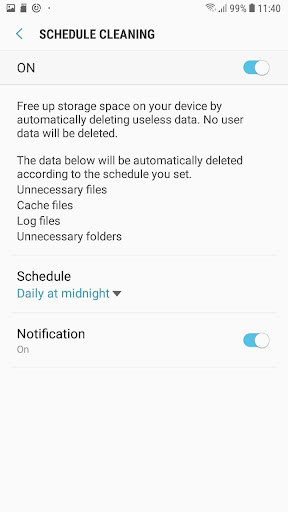
Create available space on your phone by automatically periodic deleting useless data. No user data will be deleted.
Identifying background processes/Services responsible for CPU hogging& excess memory usage
The data below will be automatically deleted according to the schedule you set.
Unnecessary files
Cache files
Log files
Unnecessary folders
2. Duplicate Remover:
Auto recognize & prompt removal of unnecessary duplicate content. Current days duplicate images are not included for removal to avoid unnecessary scanning of files every time picture is clicked or saved.
3. S Zip
Zip apps to optimize storage. Background Services for Unused Apps. User will not receive any notification from zipped apps. zipped apps can be restored with user data by unzipping from zipped folder or zipped apps list.
4. Move to SD card
Redirects the social messenger application's media content from device Internal Storage to External SD card for coming out of device storage scarcity without hampering user experience.
Privacy
Given that Storage Saver requires no permissions, it presents a low risk in terms of data collection and privacy concerns, making it a safe choice for users. However, users should still be cautious when deleting files to avoid accidentally removing important data, and it's advisable to regularly back up important files to an external storage device or cloud service to ensure their safety.
Tips
To get the most out of Storage Saver, users should regularly run the app to maintain their device's storage, especially after installing or uninstalling apps, and consider setting up automatic cleaning schedules if available. Additionally, users can optimize the app's performance by closing unnecessary apps and background processes before running Storage Saver, ensuring it can efficiently manage storage without interruptions.
What's New
Version Information
- Version
- 11.0.10
- Downloads
- 500M+
- Updated on
- Mar 24, 2020
- Released
- Feb 4, 2026
- Requires
- Android 9
Statistics
Google Play Rating History
Rating Distribution
Downloads Over Time
Storage Saver has been downloaded times. Over the past 30 days, it averaged downloads per day.
Shaded area shows 30-day prediction based on historical trends
Historical data collection started recently. More data points will be available over time.
Storage Saver users say on Google Play
 HM Faruque
Best app
 SUJIT DEY
good
 thembinkosie brian
very help me
 Amandeepsingh Aman
okay
 al zk
al zk
I don't know what is it. i don't want it. I can't uninstall it that causes battery consumption and data leak.how can l throw away .how can I open it.why don't respect to our choice. why don't respect to your customer,
ApkTrusted Ratings & Reviews
More from Samsung R&D Institute India Noida
See more apps




Similar Apps

1Tap Cleaner (clear cache)
Free

F-Secure: Total Security & VPN
Free

F-Secure Mobile Security
Free

AT&T Personal Cloud
Free

iStatus: Recover Deleted Chat
Paid

ASTRO File Manager & Cleaner
Free

Bitdefender Central
Free

Norton Cleaner – Junk removal
Free

Boxer - Workspace ONE
Free

Smart Tutor for SAMSUNG Mobile
Free

AVG Protection
Free

Aegis Authenticator - 2FA App
Free

NetGuard - no-root firewall
Free

ChargeNow
Free

Samsung My Files
Free

Avira Security Antivirus & VPN
Free
Scan this QR code to download

Forwarding you to the page at Google Play market in seconds...
Open Google Play market now