
Samsung One UI Home vVARY
Samsung Electronics Co., Ltd.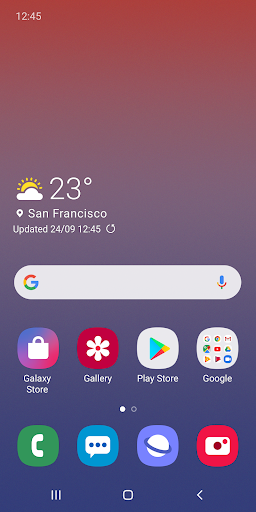
About this app
Developer Description
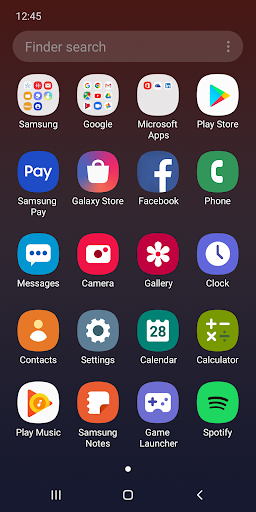
Meet the official Samsung launcher for Galaxy. It's beautiful and convenient.
[New features available from Android Pie]
• Use Full screen gestures on the Home screen.
- You can hide the Navigation buttons at the bottom of the Home screen, and quickly switch between apps using gestures. Now, enjoy an even bigger Home screen.
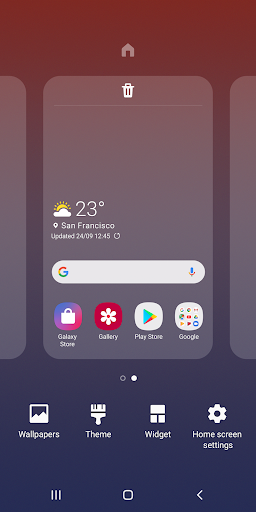
• Lock the Home screen layout after rearranging app icons.
- This can prevent pages from being added and app icons from being repositioned or removed by accident. To lock the Home screen layout, go to Home screen settings, then turn on Lock Home screen layout.
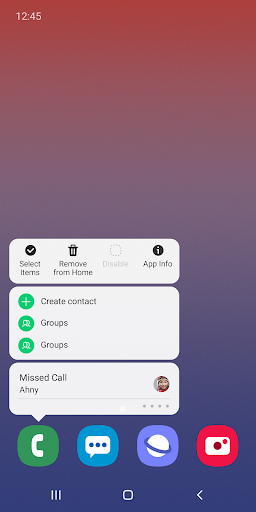
• Touch and hold an app icon or widget.
- You can quickly access the App info or Widget settings screen without going through multiple menus.
※ The features described above require an update to Android 9.0 Pie or a later version.
※ Available features may differ depending on the device or OS version.
If you have any questions or experience any issues while using One UI Home, contact us through the Samsung Members app.
※ App permissions
The following permissions are required for the app service. For optional permissions, the default functionality of the service is turned on, but not allowed.
[Required permissions]
• None
[Optional permissions]
• Storage : Used to restore the home screen layout data
• Contacts : Used to restore the contact widget information
If your system software version is lower than Android 6.0, please update the software to configure App permissions.
Previously allowed permissions can be reset on Apps menu in device settings after software update.
Version Information
- Version
- -
- Downloads
- 1.0B+
- Updated on
- -
- Released
- Jun 14, 2012
- Requires
- Android Varies with device
Statistics
Google Play Rating History
Rating Distribution
Downloads Over Time
Samsung One UI Home has been downloaded times. Over the past 30 days, it averaged downloads per day.
Shaded area shows 30-day prediction based on historical trends
Historical data collection started recently. More data points will be available over time.
Samsung One UI Home users say on Google Play
 A Google user
I love one UI 8.5 i love Samsung products specially galaxy s series
 Masemola Tlhompho
but I want more
 IA
IA
it works until I moved countries and stopped working after 10 or 5 seconds when I leave apps
 A O
A O
People need to download Goodlock app, or Nicelock app and then the modules you want to use and you have a ton more features for this Samsung Ui app. You just might find it handy. I sure did and I usually use Nova.
 Douglas Irby
One UI has convinced me to NEVER BUY ANOTHER SAMSUNG PHONE. It updates while I am using the phone, even using GPS while I am in traffic, and it only boots back up when I try to actually use the phone, plus they've removed a lot of personalization features lately. It's like they're trying to emulate Apple, but if I'd wanted an iPhone I would have gotten an iPhone!
ApkTrusted Ratings & Reviews
More from Samsung Electronics Co., Ltd.
See more apps
Smart Tutor for SAMSUNG Mobile
Free

POWERbot-S
Free

Samsung WE VoIP
Free

Galaxy Buds Core Manager
Free
Samsung Accessory Service
Free

Galaxy Buds+ Manager
Free

Galaxy Buds2 Pro Manager
Free

Galaxy Buds FE Manager
Free

Galaxy Buds Pro Manager
Free

Galaxy Buds2 Manager
Free

Galaxy Buds3 Manager
Free

Galaxy Buds Manager
Free

Samsung Plus 2
Free

POWERbot-E
Free

Galaxy Buds3 Pro Manager
Free

Galaxy Buds3 FE Manager
Free
Similar Apps
POCO Launcher 2.0 - Customize,
Free

Xiaomi Community
Free

Action Launcher: Pixel Edition
Free

Nova Launcher
Free
XOS Launcher -Cool Stylish
Free

Shop Samsung
Free

Swift Backup
Free

AppDash: App Manager & Backup
Free
HiOS Launcher - Fast
Free
Lenovo
Free

Sesame Search & Shortcuts
Free
Thunderbird Beta for Testers
Free

OnePlus Community
Free

fooView - FV Float Viewer
Free

Smart Launcher 6 ‧ Home Screen
Free

Cool Mi Launcher - CC Launcher
Free
Scan this QR code to download

Forwarding you to the page at Google Play market in seconds...
Open Google Play market now