
Super Handwriting Note v7.0
Shining Pic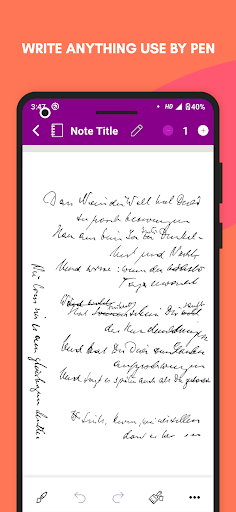


About this app
Developer Description
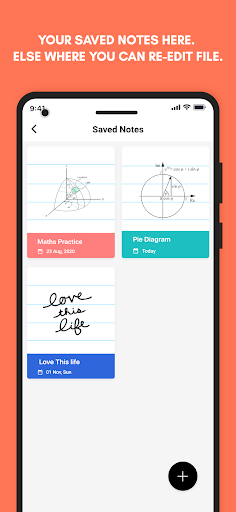
Take notes with your handwriting input. Export it to PNG, JPEG, & PDF.
You can use this app for drawing, writing something like a grocery list, taking notes during lectures and meetings, capturing your ideas, etc.
Here you have to write notes using your finger, and you will get an outstanding writing experience. You will feel as if you are writing a note in your own handwriting, on a sheet of paper with an ink pen.
On a page, you can write and draw using the pen tool, here there are four types of pen styles, and you can customize its size and color. With the eraser, undo, and redo, you can correct your mistakes.
Using the Clear Drawing Paint option, you can clear the things in a note that you have drawn or written using the pen tool.
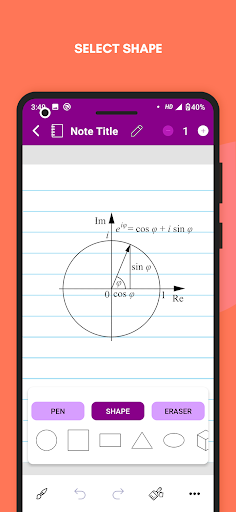
On a page, you can insert some elements like geometrical shapes, text, and images. You can resize and rotate these elements. For text here, you will get different font styles and colors too.
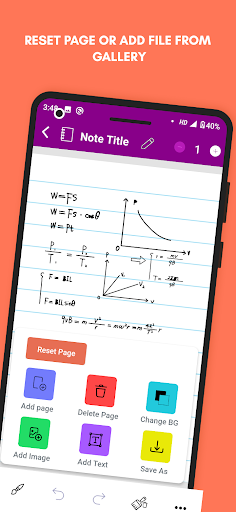
To remove everything present on the page, you have to tap the Reset Page button.
In a note, you can add multiple pages and make it like a paper notebook. From the Change BG option, you can change the page background format.
You can give a title to your note, and you can export it’s all pages or a single page in PNG, JPEG, and PDF. This app uses super vector graphics so you will get good clarity.
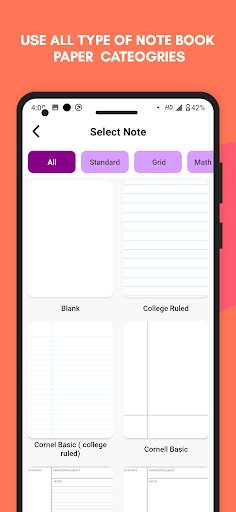
Here different formats of pages are divided into categories like:
📄 Standard:
- Blank
- College Ruled
- Cornel Basic (college ruled)
- Cornell Basic
- Cornell Styled (college ruled)
- Cornell Styled
- Narrow Ruled
- Wide Ruled
📉 Grid:
- Cross Grid (4-in)
- Cross Grid (5-in)
- Dot Grid (4-in)
- Dot Grid (5-in)
- Graph (1 cm)
- Graph (1 mm) - bold
- Graph (4sq-in) - bold
- Graph (4sq-in)
- Graph (5 mm)
- Graph (5sq-in) - bold
- Graph (5sq-in)
- Isometric Dots
- Isometric Grid
➗ Maths & Engineering:
- Engineering
- Log- Log
- Polar (degrees)
- Polar (radius)
- Polar
- Semi-log X (4-in) - bold
- Semi-log X (4-in)
- Semi-log X (5-in) - bold
- Semi-log X (5-in)
- Semi-log Y (4-in) - bold
- Semi-log Y (4-in)
- Semi-log Y (5-in) - bold
- Semi-log Y (5-in)
🏀 Sports:
- Baseball fields
- Baseball stat - Score sheet
- Basketball court HS
- Basketball Half - Court HS
- Football Field red zone
- Football Field
- Hockey rink international
- Hockey rink USA
- Soccer Field
- Soccer half - Field
🎼 Music:
- Bass staff
- Double staff
- Grand staff
- Staff
- Treble staff
☑️ Plans & Lists:
- Daily (Blank)
- Daily (College ruled)
- Daily (Dot grid)
- Monthly(5 Weeks)
- Monthly (6 Weeks)
- Task List (2 Columns)
- Task List
- Weekly (Blank)
- Weekly (College ruled)
- Weekly (Dot grid)
- Weekly Columns (5 Days)
- Weekly Columns (7 Days)
Download this note-taking app, write in a natural way or type the text, add shape and images to your notes, and export it to PNG, JPEG, or PDF.
What's New
Version Information
- Version
- 7.0
- Downloads
- 10K+
- Updated on
- Aug 14, 2025
- Released
- Dec 17, 2020
- Requires
- Android 7.0
Statistics
Google Play Rating History
Rating Distribution
Downloads Over Time
Super Handwriting Note has been downloaded times. Over the past 30 days, it averaged downloads per day.
Shaded area shows 30-day prediction based on historical trends
Historical data collection started recently. More data points will be available over time.
Super Handwriting Note users say on Google Play
 Melody Pusheen
I like this app. So much. I am using an old tablet but when I am using this app for note taking it makes this tablet look professional. I highly recommend it. It has premium templates that squid has but in this app it's free. I am using this for school and this app is very useful.
 JC Chrome
1. Large pages I can write on directly w/ my stylus --not in a small box at the bottom of the screen. 2. No palm interference. 3. Intuitive tools that don't get in the way. 4. Add pages with the press of a button. 5. Many kinds of papers, including musical scores. I'd purchase this "as-is" if I could--just eliminate ads. One fluke is it offers various means of sharing files, but they don't all work. UPDATE: Really wish I could save a shortcut of a note to HomeScreen, if you could add that?
 Gh nabi Kumar
Adds,otherwise
 Jennifer Phillips
Features were OK but completely unable to not get palm/marks from hand. I'm using a stylus on a tablet.
 Andrei Chavez
the screen stopped fix it
ApkTrusted Ratings & Reviews
More from Shining Pic
See more apps
Shining Glitter Live Wallpaper
Free

Comic Memes & Cartoon Maker
Free

Black & White Photo Maker
Free
WhatsBG - Cool Wallpapers
Free

Write Telugu Text On Photo
Free

Tamil Text & Quotes On Photo
Free

Photo Par Hindi Likhe
Free

Bangla Text Art On Photo
Free

Premium Esport Gaming Logo Mak
Free
Happy Birthday Wishes GIF
Free
Jesus & Cross Parallax Wallpap
Free

Write Urdu Poetry on Photo
Free

Arabic Poster Maker
Free
Write Odia Text On Photo
Free
Stylish Text Floating Bubble
Free
Bhagvan Ram Wallpaper Parallax
Free
Similar Apps

Noteshelf - Notes, Annotations
Paid

PDFEsign.com PDF E-Sign
Free

Huion Note : Easy note-taking
Free

Nothing Pomodoro Timer
Free

Freed: AI Clinician Assistant
Free

touchnotes
Free

Mindbook Pro
Paid

Cursive Writing Wizard - Kids
Paid

UpNote - notes, diary, journal
Free
Inkpad Notepad & To do list
Free
NBSTSA CST Exam Prep Mastery
Free
Scan this QR code to download

Forwarding you to the page at Google Play market in seconds...
Open Google Play market now