
XPS Midi Hub v2.2.0
Smart Edições



About this app
Developer Description
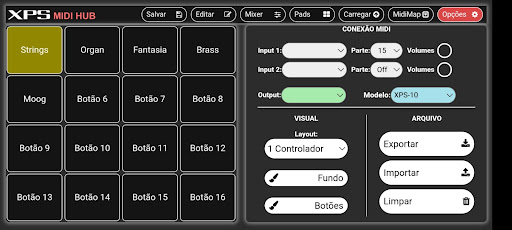
Connect a keyboard controller to your XPS 10 or 30 and use your tones.
Now you can use any midi controller to use the XPS sound engine in the controller.
Through the application you can choose which part of the performance the controller will play, so even that controller that only allows access to midi channel 1 can be used.
A Mixer screen for you to control parameters of the performance's 16 parts.
16 shortcut buttons to change the tone of the controller, without having to enter menus in the xps or press any button on it.
Access to all your XPS tones including tones saved in the User category.
Editing functions for the timbre set to the controller as:
Cuttof, Resonance, Attack and Release.
Shift octave or transpose even if your controller doesn't have physical buttons to do so.
Export your settings to an external file and load it when you need it.
What's New
Novo menu de edição atalhos
Função Patch Learn
Cor por botão
Conecte até 4 controladores
Version Information
- Version
- 2.2.0
- Downloads
- 500+
- Updated on
- Oct 27, 2025
- Released
- Mar 9, 2023
- Requires
- Android 5.0
Statistics
Google Play Rating History
Rating Distribution
Downloads Over Time
XPS Midi Hub has been downloaded times. Over the past 30 days, it averaged downloads per day.
Shaded area shows 30-day prediction based on historical trends
Historical data collection started recently. More data points will be available over time.
XPS Midi Hub users say on Google Play
 Jade On Keys
This Midi Hub app is also very useful for my Roland XPS-10. I suggest that you also put English language so that I can understand deeply the functions.
ApkTrusted Ratings & Reviews
More from Smart Edições
See more apps





Similar Apps






Scan this QR code to download

Forwarding you to the page at Google Play market in seconds...
Open Google Play market now