Solocator - GPS Field Camera v2.7.7
Civi Corp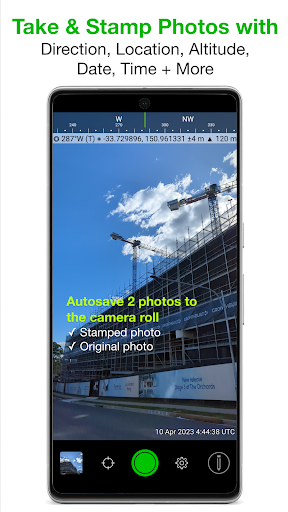



About this app
Developer Description
Solocator stamps photos you take with GPS location, Compass Direction, Date/Time
Solocator is used by many industries, government agencies and professionals across the globe for photo documentation.
TAILOR OVERLAY INFORMATION TO YOUR NEEDS
Select the information you need to capture & stamp on your photos:
+ GPS position (Latitude & Longitude in various formats) ± Accuracy
+ UTM/MGRS coordinate formats (Industry Pack)
+ Compass direction–bearing
+ Altitude (Metric & Imperial units)
+ Tilt & Roll angles
+ Crosshair
+ Local date & time based on your GPS location
+ Local time zone
+ UTC time
+ Show compass
+ Street address (Industry Pack)
+ Show cardinal direction in Building mode, e.g. North elevation of a building face.
+ Option to use abbreviations or Unicode characters for direction, position and altitude.
CAMERA
Overlays are designed for both back and front selfie cameras. Supports pinch zoom, plus other standard camera controls, including self-timer, flash and exposure.
AUTOSAVE PHOTOS TO CAMERA ROLL
Take and autosave two photos at once: one stamped with the selected overlays and the original photo with no overlays.
SORT, SHARE OR EMAIL
+ Photos are sorted by time, location, distance from current location and project name if using the Industry Pack.
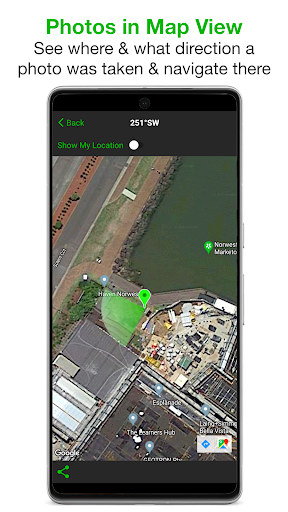
+ View photo direction and location in map view and navigate there.
+ Share photos individually or as a zip file via the share sheet.
+ Email photos including the following information:
- Exif metadata
- Compass direction
- GPS position ± accuracy
- Altitude
- Tilt & Roll
- Date & time taken
- Street address (Industry Pack)
- Elevation of building face viewed
- Link to maps so the receiver can navigate there easily
INDUSTRY PACK (In-App Purchase) “One-time charge”
EDITABLE NOTES OVERLAY
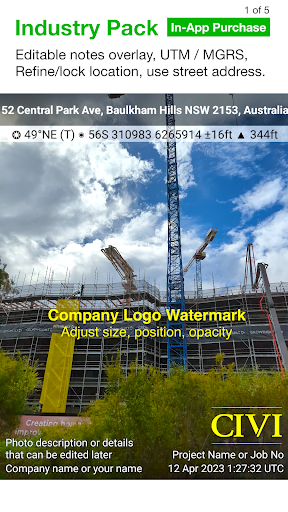
Stamp your photos with "Project name", "Description" & “Watermark”. The Project Name field could be used as a job or ticket number. The Watermark field is typically used for company or username. You can also edit these fields later.
CUSTOM EXPORT FILENAME
Define your photo export filename from a selection of fields: Project Name, Description, Watermark, Street Address, Date/Time, Number# and the Custom text field.
BATCH EDIT NOTES OVERLAY FIELDS
Select multiple photos from the library and edit Project Name, Description & Watermark fields in one go.
STREET ADDRESS & UTM/MGRS
Add street address to your overlay or use UTM/, UTM Bands & MGRS coordinate formats instead of Lat/Long.
AUTOSAVE OR EXPORT PHOTOS TO CLOUD STORAGE
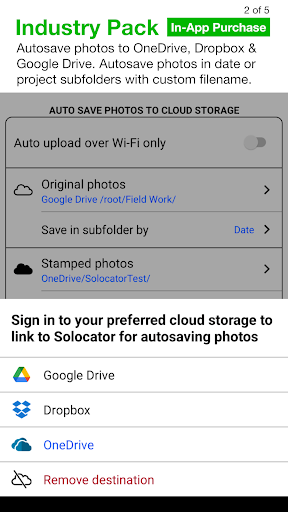
Autosave original and stamped photos to Google Drive, Dropbox, and OneDrive (Personal & For Business), including SharePoint Sites and Teams. You can also save photos in date or project name subfolders - automatically. Or select and export photos later.
PHOTO DATA in KML, KMZ & CSV
Along with photos, email or export photo data and notes in KML, KMZ or CSV formats. Both email and export buttons are customisable to suit your data requirements.
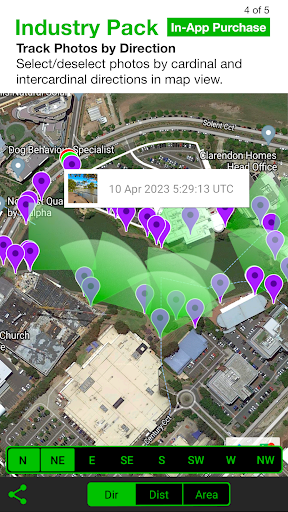
TRACK PHOTOS IN MAP VIEW
View photos by direction, the distance between photos, and the area of photos taken.
REFINE & LOCK GPS LOCATION
Ideal for those working in and around buildings; to improve your GPS location. You can also use it to lock the asset position you're photographing.
COMPACT VIEW
Switch off Compass, Building and Street modes and only show the GPS info bar on top of photos for a more compact view.
IMPORTANT NOTE - DEVICES WITHOUT A COMPASS
From v2.18, we have made Solocator accessible for incompatible devices that do not have a compass. These devices are without a magnetometer (magnetic sensor), which means the compass and some direction features in the app won’t function as designed. However, when you change/update to a device with a compass, all directional features will be enabled to work as intended.
What's New
Industry Pack:
New export filename fields, enhanced cloud autosave with multi-destination support, new upload buttons, photo filters, customizable options, and KMZ 1080p photo size support.
For a full list of what’s new in v2.7+ please visit https://solocator.com/article/android-version-history/
In-app purchases
$5.99 per item
Version Information
- Version
- 2.7.7
- Downloads
- 100K+
- Updated on
- Dec 18, 2025
- Released
- Dec 17, 2012
- Requires
- Android 8.0
Statistics
Google Play Rating History
Rating Distribution
Downloads Over Time
Solocator - GPS Field Camera has been downloaded times. Over the past 30 days, it averaged downloads per day.
Shaded area shows 30-day prediction based on historical trends
Historical data collection started recently. More data points will be available over time.
Solocator - GPS Field Camera - Google Play Rankings
Top Rankings
| Rank | Country | Category | List | Change |
|---|---|---|---|---|
| — |
Ranking History in
No ranking data available yet. Rankings are updated daily.
#1 in Top Paid Photography in United States

#1 in Top Paid Photography in United Kingdom
#1 in Top Paid Photography in Australia

#4 in Top Paid Photography in Thailand

Solocator - GPS Field Camera users say on Google Play
 Kevin O Donnell
I have been using this app in the Australian construction industry for many years now, I have tried a few others, but none even come close to Solocator, it really works well for me with the GPS location, the ability to add descriptions to each photo of works progressing is un-matched, but above all is the back up from the people at Solocator is unbelievable, once I had a very small issue and I received a personal phone call from John (the developer ) after he had read my email, he had it sorted
 fpc223
Works good for what I need, but difficult to navigate.
 April Arroyo-Monroe (April)
This app used to be so easy to use. I don't know what happened or when, but it has changed. The options on the photos change whenever, the fields in the csv do not populate when you fill them in, the photos don't separate into albums and uploading the photos has gotten incredibly difficult. I used to love this app but now I am looking for something else for my company to use in the field for our environmental science work.
 Rachael Hyland
Great concept, extremely buggy and inconsistent execution, especially for the paid profe. Photos do not upload as advertised, some will, but not all. The naming convention and inability to upload photos has resulted in multiple photos with the same name when im actually able to connect my phone to the computer to upload. Also, the picture is not instantaneous, it takes a very long time to take the actual photo, so if you move it's blurry or not a picture of what you wanted. Not worth it.
 Paul Backus
Required for my job, but still missing a lot of basic features. The inability to change where pictures are saved is a major headache, and the dev STILL hasn't implemented in over 2 years. The "pro" features (paid) break half the time if I don't have signal anyway. Somehow this is a popular app in my field, but it still needs a lot of work to even meet basic minimum criteria for app development. Very disappointing. 2 years later, again, and none of these issues have been addressed. Bad dev.
ApkTrusted Ratings & Reviews
Similar Apps

Timestamp Camera Pro
Paid
GPS Map Camera
Free
NoteCam Lite - GPS memo camera
Free

mcpro24fps manual video camera
Paid

Framelapse 2 Time Lapse Camera
Free

Camera FV-5 Lite
Free

Professional HD Camera
Free

MiX Camera for Mi Camera
Free
Camera - HD Camera for Android
Free

3D Photo: Imager
Paid

Camera Scanner
Free

POV – Disposable Camera Events
Free
Sun Seeker: Sunlight Tracker
Paid
HD Camera
Free

PhotoPills
Paid

SPYPOINT
Free
Scan this QR code to download

Forwarding you to the page at Google Play market in seconds...
Open Google Play market now