
Misthios Panda Watch Face v1.0.3
SPRAKENTURN



About this app
Developer Description
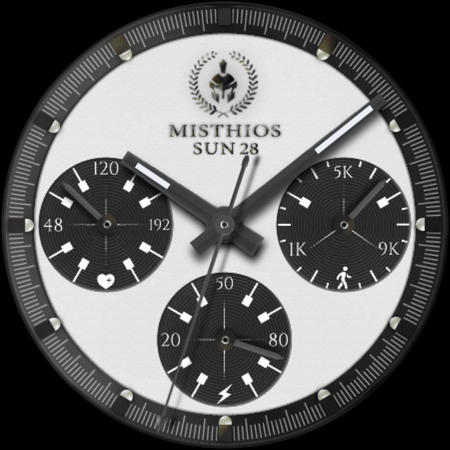
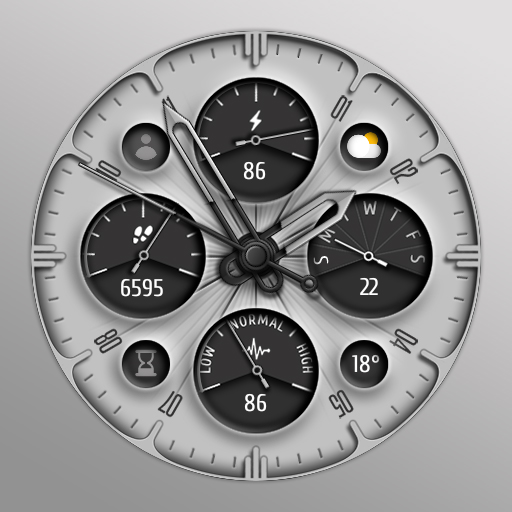
Classic Watch Face Misthios Panda
✰ Features:
- Analog dial for time, heart rate, steps and battery information
- Customization (dial background, frame, index and dial hands colors)
- Day of the week and day display
- 3 preset app shortcut (heart rate, steps and battery)
- 6 custom shortcuts to access your favorite widget
- Always on display which is synced to your main display color.
INSTALLATION:
1. Make sure your watch is connected to your smartphone (Bluetooth) with same GOOGLE account.
2. In Play Store App, select your watch as targeted device for installation. The watch face will be installed on your watch.
3. After installation, if your active watch face is not replaced. Follow these 3 SIMPLE STEPS before you comment not working.
3.1- Long press on your current watch face --> swipe to right until --> "Add watch face" (+/plus sign)
3.2- Scroll down and look for "Downloaded" section
3.3- Search and click on your new watch face to activate it - and that's it!
SETTING UP SHORTCUTS/BUTTONS:
1. Press and hold the watch display.
2. Tap customize button.
3. Swipe from right to left until you reach the "complications".
4. The 6 shortcuts are highlighted. Click on it to set what you want.
CUSTOMIZATION OF DIAL STYLE e.g. BACKGROUND, INDEX ETC:
1. Press and hold display then hit "Customize".
2. Swipe left and right to choose what to customize.
E.g. Background, Index frame etc.
3. Swipe up and down to choose options available.
For bugs, comments or suggestions, don't hesitate to contact me at (sprakenturn@gmail.com). If you like this watch face hope you wouldn't mind leaving a review. Thanks for your support!
What's New
- Updated target SDK Requirement (technical)
- Minor updates on complication slots for shortcuts
- Minor updates for AOD
Version Information
- Version
- 1.0.3
- Downloads
- 100+
- Updated on
- Sep 24, 2025
- Released
- May 19, 2024
- Requires
- Android Varies with device
Statistics
Google Play Rating History
Rating Distribution
Downloads Over Time
Misthios Panda Watch Face has been downloaded times. Over the past 30 days, it averaged downloads per day.
Shaded area shows 30-day prediction based on historical trends
Historical data collection started recently. More data points will be available over time.
Misthios Panda Watch Face users say on Google Play
 kyamwk
Very beautiful. Can we make AOD mode a dimmer version of the original rather than a blacked out version ?
ApkTrusted Ratings & Reviews
More from SPRAKENTURN
See more apps
Rogue Moon Phase Watch Face
Paid
The Misthios Watch Face
Paid

Bangkero Panda Watch Face
Paid

SPRAK Icarus Blaze Watch Face
Paid

Icarus Watch Face
Paid

SPRAK Lagoon Watch Face
Paid

SPRAK Phantom Watch Face
Paid

SPRAK 925 Ag Moon Watch Face
Paid

The Misthios Watch Face BASIC
Free

SPRAK 143 Dark Moon Watch Face
Paid

Misthios Chronograph WatchFace
Paid

Rogue Watch Face
Paid
Similar Apps

Watch face 10h08.com #63
Paid

ZKin Watch Ink White Quartz
Paid

SamWatch Steelo Series 3 2021
Paid
Analog Prime Watch Face
Paid
Tancha S50 Classic Watch Face
Paid

MPC WF Classic Comfort
Free

DM011 Analog Watch Face
Paid
KTwL
Paid

DM008 Analog Watch Face
Paid

JW077 jwstudio
Paid

Cloud Elegant Watch Face
Paid

JW094 jwstudio
Paid

Pars Simple Smart Analog
Paid

JWSTUDIO_LUXURY01
Paid

3D watch minimal
Paid

PKG013
Free
Scan this QR code to download

Forwarding you to the page at Google Play market in seconds...
Open Google Play market now