
Edge Gestures v1.15.2
Total_Apps

About this app
Developer Description
Just swipe the edge to do something!
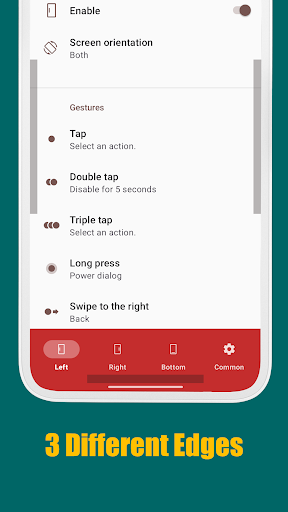
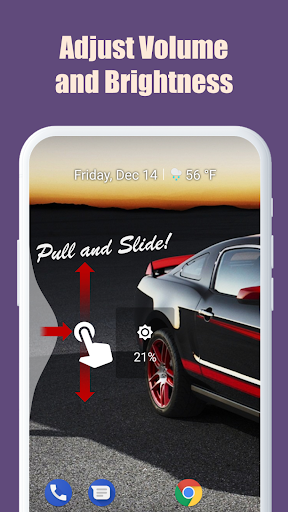
Supports many different gesture types: Tap, Double tap, Long press, Swipe, Swipe diagonally, Swipe and hold, Pull and slide, and Pie controls
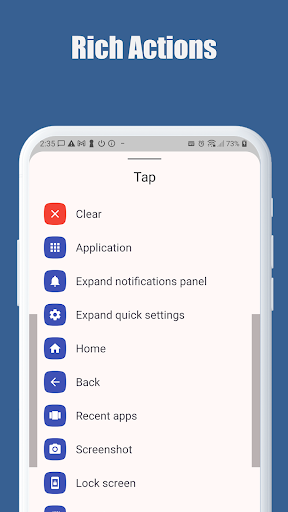
* Supported actions:
1. launching an application or a shortcut.
2. soft key: back, home, recent apps.
3. expanding the status bar: notifications or quick settings.
4. scroll to start. (Android 6.0 or higher)
5. power dialog.
6. adjusting brightness or media volume.
7. fast scroll.
8. toggle split screen.
9. switch to the previous app.
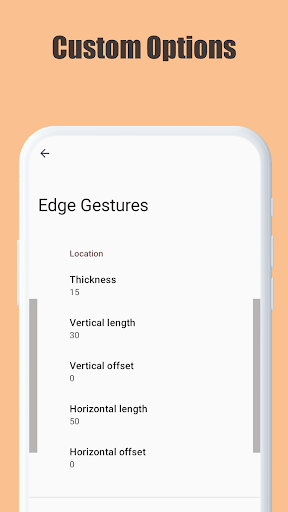
The edge area also can be customized for thickness, length and position.
And this app requires only the permission that are needed!
* This app uses accessibility service API to implement the following features.
The permission is ONLY used to detect the app in foreground and command the system for the following actions:
- Expand notifications panel
- Expand quick settings
- Home
- Back
- Recent apps
- Screenshot
- Power dialog
- Scroll to start
- Fast scroll
- Toggle split screen
- Lock screen
No other information is processed from this permission.
What's New
- new gestures: Swipe up and down and hold, Swipe left and right and hold, and so on
- new actions: Open Internet panel, Open WiFi panel, Open volume panel, Open NFC panel, Current app info
- fixed a bug in the backup/restore functions
- fixed some bugs
Version Information
- Version
- 1.15.2
- Downloads
- 50K+
- Updated on
- Nov 23, 2025
- Released
- Nov 29, 2016
- Requires
- Android 8.0
Statistics
Google Play Rating History
Rating Distribution
Downloads Over Time
Edge Gestures has been downloaded times. Over the past 30 days, it averaged downloads per day.
Shaded area shows 30-day prediction based on historical trends
Historical data collection started recently. More data points will be available over time.
Edge Gestures - Google Play Rankings
Top Rankings
| Rank | Country | Category | List | Change |
|---|---|---|---|---|
| — |
Ranking History in
No ranking data available yet. Rankings are updated daily.
#51 in Top Paid Tools in United States


#7 in Top Paid Tools in Japan


#7 in Top Paid Tools in Spain


#22 in Top Paid Tools in Indonesia


Edge Gestures users say on Google Play
 Amir
Amir
Update: The issue is resoved now with the touch model option on the pie control menu. Issue: Pie control has a terrible issue and not resolved after several months !!! When it is open, background area is still active (even if background is dimmed through settings!) When the area outside the pie control is touched, the underlying area (whether app or widget) pops up! In this scenario, expected behavior is to close the pie control, similar to the behavior in Samsung Edge Panels.
 Someboddey
Great app! Love that there's so many options! There's only one complaint I have and that is, it takes too long for it to take a screenshot. There's a 1 second delay between pressing and it actually taking a screenshot. But besides that this is an amazing app! Wished there was smth similar but for the top aswell. PS idk where to put this but the vibration feedback stopped working on OxygenOS 15
 K
K
As I suggested awhile ago, I'd like to see Developer support shortcuts from the Be Nice app (creates app pairs). The Panels side bar launcher app does. For anyone using alternative launchers it would be helpful and without it Edge Gestures had fallen behind.
 Chris Taylor
unfortunately it barely works. Diagonal up to open app switcher almost never works, diagonal down to the home screen works for a couple of attempts then stops working (even with the option to fix it switched on), and none of the adjust settings seem to do anything. Vertical width (which should be called height) and vertical offset are the only settings that work, I adjust horizontal offset, threshold, and horizontal width but they don't change anything even with handles turned on
 rak mik
why full network access permission? app shouldn't need it ...
ApkTrusted Ratings & Reviews
More from Total_Apps
See more apps








Similar Apps

Retro Mode - Icon Pack (Light)
Paid

AIO Launcher
Free

PurpleLine Icon Pack : LineX
Paid

Nothing Pomodoro Timer
Paid
Hermit — Lite Apps Browser
Free

Ares Dark Icon Pack
Paid

Quikshort: Shortcut Creator
Free

Action Launcher: Pixel Edition
Free

ADW Launcher 2
Free

Sesame Search & Shortcuts
Free

Vera Icon Pack: shapeless icon
Paid

dynamicSpot - Dynamic Island
Free

Ares Light: Pastel Icon Pack
Paid
Shortcut Maker
Free

Gothic Forest Green Icons
Free

Taskbar
Free
Scan this QR code to download

Forwarding you to the page at Google Play market in seconds...
Open Google Play market now