Phone Mirror - Android to PC v3.0.4
TENORSHARE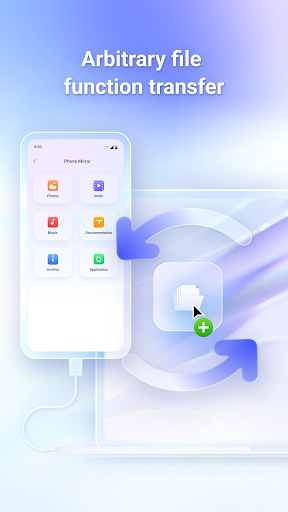

About this app
The Phone Mirror - Android to PC app aims to solve the problem of seamless device mirroring and control, benefiting individuals who frequently need to access their Android devices from their computers, such as developers, gamers, and multitaskers. Compared to alternatives in the Tools category, Phone Mirror stands out with its promise of keyboard and mouse control, but falls short in terms of user ratings, indicating potential issues with performance or functionality. With a moderate download count and a below-average user rating, it's crucial for potential users to weigh the pros and cons. The app's ability to mirror Android devices to PC and Mac without requiring extensive technical knowledge is a significant advantage, but its overall value is hindered by user-reported issues.
Pros
- The app offers a unique feature set that allows for mirroring and control of Android devices from computers, which can be particularly useful for presentations, gaming, or remote work.
- With no permissions required, users can feel more secure about their data privacy, as the app doesn't request access to sensitive information.
- The developer, TENORSHARE, has a professional website and provides a support email, indicating a level of commitment to customer service and support.
- The app's free model without ads or in-app purchases means that users can utilize its features without interruptions or additional costs.
- The simplicity of not needing any permissions could imply a straightforward and potentially less resource-intensive application, which might appeal to users concerned about performance or privacy.
Cons
- The below-average user rating of 2.5/5 suggests significant issues with the app's performance, functionality, or user experience, which could deter potential users.
- Despite its unique feature set, the lack of a robust user rating and the presence of only moderate download numbers may indicate that the app has not yet reached its full potential or resolved critical user complaints.
- The absence of permissions might also imply limitations in the app's functionality or capabilities, potentially restricting its usefulness for advanced users who require more complex features.
- There's a risk that the app's simplicity and lack of permissions might not fully leverage the potential of device mirroring and control, leading to a less than satisfactory experience for some users.
Best for: The ideal user for the Phone Mirror - Android to PC app is likely a tech-savvy individual or professional who frequently needs to access their Android device from their computer for work, entertainment, or development purposes, and values simplicity and data privacy, but may need to tolerate some limitations in functionality due to the app's current state and user-reported issues.
Developer Description
Mirror Android to PC & Mac and control it with keyboard and mouse.
Please note that this Phone Mirror app should be used in conjunction with its desktop program: https://www.tenorshare.com/products/phone-mirror.html
Key Features
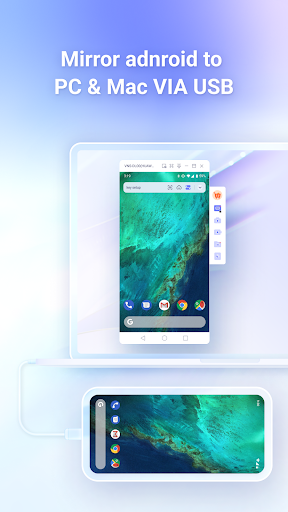
*Mirror Android to PC via USB: View your Android screen on your PC and control it using a keyboard and mouse.
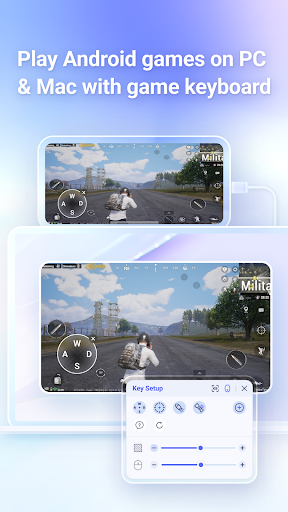
*Play Android Games on Windows and Mac: With the game keyboard feature, you can set key mappings to play mobile games on your PC.
*Transfer Files Between PC and Android Device: Drag and drop file icons with your mouse to quickly transfer files between your PC and Android device.
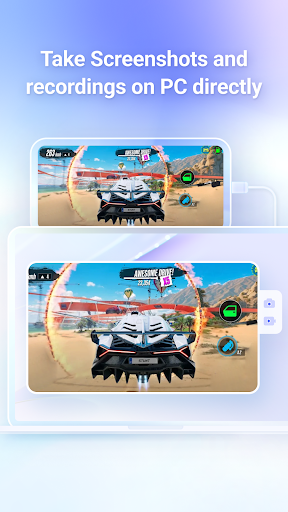
*Take screenshots and record the Android screen directly on the PC
*Use Phone Mirror to mirror up to 5 Android devices simultaneously
How to Use Phone Mirror
1.Download and launch the Phone Mirror software on your computer.
2.Connect your phone to the computer via USB and enable USB debugging.
3.Install and set up the Phone Mirror app on your Android device.
4.Drag and drop files between your PC and Android for file transfers.
5.Control your phone or play mobile games on your PC.
Compatibility:
*Supports Android devices running Android 6/7/8/9/10/11/12, including Samsung, Huawei, Xiaomi, Oppo, and more.
*Compatible with Windows and Mac.
Languages:
English, Russian, German, French, Italian, Portuguese, Spanish, Japanese, Arabic, Korean, Dutch, Simplified Chinese, and Traditional Chinese.
Privacy
Given that the Phone Mirror app requires no permissions, it appears to pose minimal risk to user data privacy. However, users should still be cautious about the data they transmit through the app and ensure they are using it over secure networks. It's also advisable to monitor the app's performance and data usage to ensure it does not consume excessive resources or behave unexpectedly.
Tips
For the best experience, users should ensure their Android device and computer are connected to the same network before attempting to mirror their device. It's also recommended to consult the developer's support resources for troubleshooting common issues and to explore all the app's features, including any hidden settings that might enhance performance or functionality. Regularly checking for updates can also help in addressing any bugs or performance issues reported by the community.
What's New
2. Support iOS screenshot on PC.
Version Information
- Version
- 3.0.4
- Downloads
- 100K+
- Updated on
- Sep 8, 2025
- Released
- Jul 11, 2022
- Requires
- Android 6.0
Statistics
Google Play Rating History
Rating Distribution
Downloads Over Time
Phone Mirror - Android to PC has been downloaded times. Over the past 30 days, it averaged downloads per day.
Shaded area shows 30-day prediction based on historical trends
Historical data collection started recently. More data points will be available over time.
Phone Mirror - Android to PC users say on Google Play
 Shubham A Dekhane
My mobile's Display is broken so that app is very useful to me it is very useful app ever
 Craig x
It works, but... The required desktop component is not free, it's $40 USD per year. The trial version gives 10 minutes per day free access, which was enough for me to successfully interact with my old Note 8 (via USB) which has a very busted screen. Bring down the subscription for individual users to $20 and I'd be more likely to go for it. For now, I'll keep trying other apps in search of a functional free one.
 Charlse
Not mirroring audio, that's the only problem, fix it please
 Paras Rawat
Works excellent! Only problem is after some time it gets black screen.... which is irritating and need to start again and again
 Abhishek Kanjilal
They offer only 10 minutes of phone screen sharing PER DAY and then they want to charge you after. There are much better applications which offer the same benefits on play store for FREE!
ApkTrusted Ratings & Reviews
More from TENORSHARE
See more apps

Similar Apps

Send Anywhere (File Transfer)
Free

RealVNC Viewer: Remote Desktop
Free

Lib of Dev (Open Source)
Free

AirDroid: File & Remote Access
Free

HQ Video Player & Casting
Paid

Loom – Screen and Cam Recorder
Free

Quick Share: File Transfer
Paid

Deye Cloud
Free

pCloud: Cloud Storage
Free

SuperCam Plus
Free

TeamViewer Remote Control
Free

Video Recorder
Paid

Data Transfer
Free

Taskbar
Free

Linksys
Free

Lorex Classic
Free
Scan this QR code to download

Forwarding you to the page at Google Play market in seconds...
Open Google Play market now