
DryLINK v4.2.4
Therma-Stor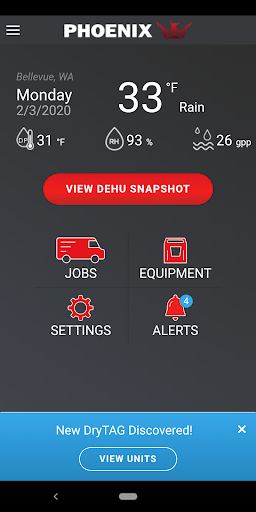



About this app
Developer Description
Automated Drying Log for Restoration Professionals
E3 is now integrated into DryLINK. Use this revolutionary technology to transform your business. Have complete control of any loss, regardless of the class, category, outside conditions, or equipment used.
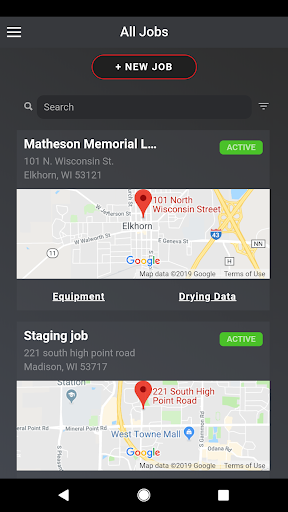
With the Phoenix DryLINK App you can:
Upload and Share Data with Your Team
• Create One Company Account with Multiple Users
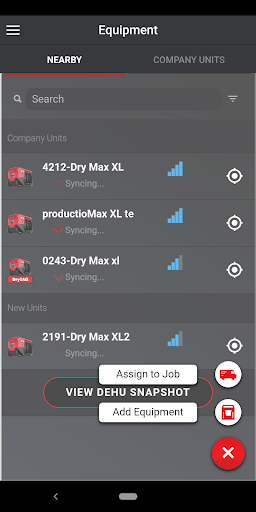
• Connects by Bluetooth to Smart Dehumidifiers and other DryLINK enabled equipment
• Make any dehumidifier “smart” with DryTAG RH
• Automate the affected area, unaffected area, or an HVAC reading with DryTAG RH
• Automate your moisture point readings with DrySENSE
• See the Last Known Location of your DryLINK enabled equipment
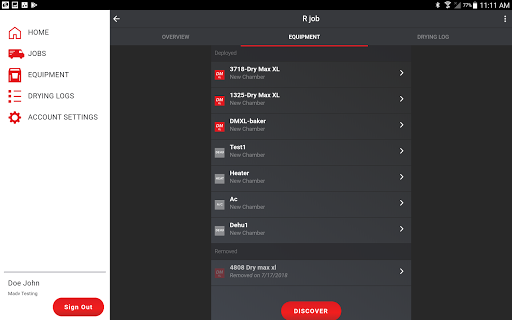
• Add Non-Smart Equipment to Your Company’s Inventory
• Log Manual Psychrometric or Moisture Material Levels for Non-Smart Equipment
• Record More Than One Visit in a Day
• Connects to the DryLINK Cloud Through your Devices Cell Service or Wi-Fi
• Stores Data Locally if no Internet is Available
• Uploads Data When an Internet Connection is Restored
• Use the Job Mapping Feature with your Devices Native Phone App
Create and Share Drying Reports
• Stunning New Report
• Add Your Company’s Logo
• Add Rooms and Chambers with Dimensions and add Chamber Notes
• Optionally Use the Built in IICRC Equipment Recommendations
• Save Job Setup Time by Auto Selecting Nearby, Running, Smart Equipment
• Automatically Import Readings from Smart Dehumidifiers
• Create and Share the Drying Log Link by Text or Email
• View Data Graphically
• Manually Enter Readings from Non-Smart Dehumidifiers and Other Devices
Remote monitoring with DryPHONE - Optional DryPHONE Required for these features
• Enter daily readings remotely
• Plan daily visits based on job site conditions
• Receive real-time alerts of your choice
Use Alerts to Stay Informed – DryPHONE Required for some alerts
• Equipment Alerts – Equipment turned off, last known location, filter, DryTAG battery level
• Job Status Alerts – monitor temperature, RH, GPP, and provide notifications if out of range
• Job Management Alerts – Job started, completed, not completed on time.
Connect to and Control Your Smart Dehumidifiers
• Get the Current Psychrometric Readings
• Turn Quiet Mode On/Off
• Enable Humidistat Mode
• Get Notifications of New Firmware and Install it Using Your Phone
• Set Filter Reminders Based on Hours of Use
• Locate the Smart Dehumidifier to Which You Are Connected
• Purge the Water
• Turn the Dehumidifier On or OFF
• Check for Alerts
• Run Diagnostics Mode
And much more!
To learn more about the entire Phoenix product line please visit www.UsePhoenix.com.
What's New
updates and bug fixes on moisture points
Version Information
- Version
- 4.2.4
- Downloads
- 5K+
- Updated on
- Dec 19, 2025
- Released
- Jul 19, 2018
- Requires
- Android 5.1
Statistics
Google Play Rating History
Rating Distribution
Downloads Over Time
DryLINK has been downloaded times. Over the past 30 days, it averaged downloads per day.
Shaded area shows 30-day prediction based on historical trends
Historical data collection started recently. More data points will be available over time.
DryLINK users say on Google Play
 A Google user
So far this app works great. I use it at all of my water loss projects. There is a bit of a learning curve, but once you understand how to use it, it make doing the psychometry report so much easier.
ApkTrusted Ratings & Reviews
More from Therma-Stor
See more apps

Similar Apps

Airthings
Free

Lib of Dev (Open Source)
Free

PDK Access by ProdataKey
Free

Hydrawise
Free

Infobric Field
Free

Plume Home
Free

Roomvu
Free

JobNimbus: All-In-One Roof App
Free

Guideline
Free

Yubii Home
Free

XPENG
Free

Intellifi by Adtran®
Free

Clim8
Free

WaiverForever - Online Waiver
Free

SIGNALERT
Free

INKBIRD
Free
Scan this QR code to download

Forwarding you to the page at Google Play market in seconds...
Open Google Play market now