Toggl Track - Time Tracking v8.4.0
Toggl.com



About this app
Developer Description
Flexible time tracker for teams of 1 to 100
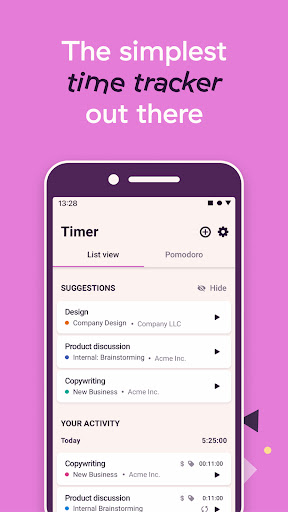
You can track time by projects, clients, or tasks and see how your workday breaks down into hours and minutes your reports. Find out what’s making you money, and what’s holding you back.
We also have you covered across all of your devices! Start tracking your hours in a browser, then stop it later on your phone. All of your tracked time is safely synced between your phone, desktop, web and a browser extension.
Our time-saving features:
◼ Reports
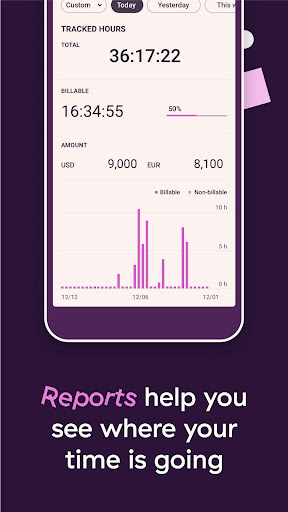
See how you spend your time with daily, weekly or monthly reports and graphs. Look them in the app or export them to send that data to your clients (or to analyze it further with through business intelligence and see to where your hours are going).
◼ Calendar
Toggl Track integrates with your Calendar! With this feature, you can now easily add your events from your calendar as time entries, through the Calendar View!
◼ Pomodoro Mode
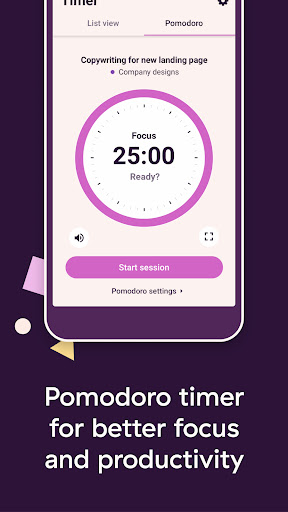
Enjoy better focus and productivity by trying out the Pomodoro technique, thanks to our built-in Pomodoro mode.
The idea behind the Pomodoro technique is that you can work more effectively when you work in timed, 25-minute increments (with breaks in between). Our Pomodoro timer automatically tracks your time in 25-minute increments, with notifications, a full screen mode, and countdown timer to really help you stay focused and on task.
◼ Favorites
Favorites allows you to create shortcuts to frequently used time entries. Start tracking time on a favorite time entry with one tap.
◼ Notifications
Enable notifications so that you always know if & what are you tracking (or if you're not tracking anything!), and always be aware where does your time go.
◼ Customize your time entries with projects, clients and tags
Organize and add more details to your time entries by adding projects, clients and tags. Clearly see where your work hours go and adjust your precious time & routines accordingly.
◼ Shortcuts
By using @ and #, you can quickly add those projects and tags much faster and get back to work right away!
◼ Widgets
Place a Toggl Track widget on your Home Screen to see your timer running — and to start or stop a time entry.
◼ Sync
Your time is safe with us - phone, desktop or web, your time is seamlessly synced and kept safe between all of your devices.
◼ Manual Mode
Want more control? Add and edit all of your time manually and make sure that every second of your time is accounted for. This feature is optional and it's accessible from the Settings menu.
◽ But what if I'm offline?
No problem! You can still track your time through the app, and once you're back online, it will sync with your account (and the rest of your devices) - your time (and money!) is not going anywhere.
◽ Is the app free?
Yes, Toggl Track for Android is completely free for you to use. Not only that, there are no ads at all - ever!
◽ Can I send you some feedback?
You betcha (and we'd love to hear from you)! You can send us feedback directly from the app - look for the 'Submit Feedback' in the Settings menu.
And that's Toggl Track - a time tracker so simple that you'll actually use it and get things done! Track important tasks, use reports to see how you spend your time and boost your productivity. Whether you are at an office, in commute, stuck on a space mission to Mars or just want to see how much time you're wasting on projects that aren't bringing you money - track your time anywhere you go!
What's New
🧹 Cleaner lists: Removed suggestions to keep the List View simple.
🐛 Bug fixes: Squashed bugs, mostly around autocomplete suggestions.
🎨 Minor UI updates across the app
Version Information
- Version
- 8.4.0
- Downloads
- 1M+
- Updated on
- Jan 15, 2026
- Released
- Jul 12, 2018
- Requires
- Android 9
Statistics
Google Play Rating History
Rating Distribution
Downloads Over Time
Toggl Track - Time Tracking has been downloaded times. Over the past 30 days, it averaged downloads per day.
Shaded area shows 30-day prediction based on historical trends
Historical data collection started recently. More data points will be available over time.
Toggl Track - Time Tracking users say on Google Play
 Florian Mühlethaler
Since many years (about since 2016) I am a happy daily user of Toggl to track my time at work and other projects! I mostly like the easy and immediate view of hours spent per project and the calendar view to note down my hours. As well Support was very responsive, if I reported that something was broken, which anyway only happens every 2nd year or so. ☺️ Solution was immediately given! 💪🏻 Keep the great work up Toggl Team 🎇🥰 Give it a try and you won't regret it =)
 Kaitlin Harrison
I'm really enjoying the time tracking features, lack of ads, and charts! So I'd love to give this 5 stars, but: 1) You can't turn off the Billable function. I could not wait for my free trial to end because I was so annoyed by having to uncheck Billable every time. 2) You can't change the color of your projects on the free version. It is the most ridiculous nickel-and-diming I've ever seen. (You can on the web app though.) These two things together soured my feelings on the app some.
 Moses Gale
I've been using Toggl for multiple years. The app has mostly improved but recently the developers seem determined to make it less useful and less accessible. I'm sure I wasn't the only seasoned user disappointed by the removal of the ability to copy 'start timer' links. This is my most-used Toggl feature which I can now only set-up from desktop. More recently, replacing the 'set to last stopped time' button with a fiddly circular scrolling UI is inconvenient and less accessible.
 Shubham Thakur
Edit: It's August 2025 and still not fixed. Pomodoro timer does not makes any sound upon completion unless you have kept the Auto-start breaks option enabled. For the love of god, let it make a sound once pomodoro duration has been reached. Just add another toggle button titled "Session End" in sound section of the Pomodoro Settings. Surely, you are not fixing this on purpose because this issue has been there for three* years with plenty of complaints in the review section.
 BHUSHAN ALHAT
I have been using the app for years now and the new ui update was unnecessary. while cleaning up the ui for editing a time entry, they removed an important feature to move the start time of current entry to end time of previous entry, which is absolutely crucial if we do end up forgetting to start tracking and remember midway or afterwards
ApkTrusted Ratings & Reviews
More from Toggl.com
See more apps

Similar Apps

Boosted Time Tracker
Free

Timelog - Goal & Time Tracker
Free
Sectograph. Day & Time planner
Free
Stay Focused: Site/App Blocker
Free

TimeTune - Schedule Planner
Free
StayFree - Screen Time
Free
Modes and Routines
Free

Engross: ADHD Focus Timer
Free

Daypad - Simple Time Tracker
Free

Atto - Time Clock & Scheduling
Free

TickTick:To Do List & Calendar
Free
Way of Life: habit tracker
Free

AppBlock - Block Apps & Sites
Free

Screen time: App blocking
Free
UBhind(App lock/Screen time)
Free
Pavlok
Free
Scan this QR code to download

Forwarding you to the page at Google Play market in seconds...
Open Google Play market now