Partometer3D - camera measure v3.2.0
vistech.projects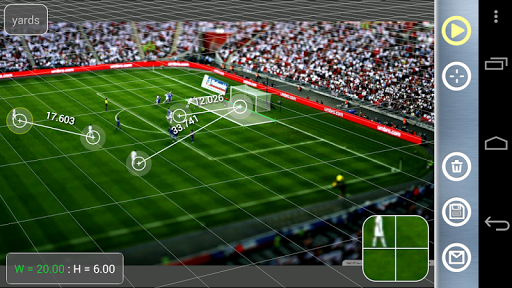


About this app
Developer Description
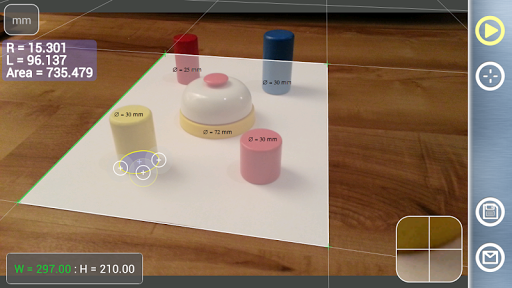
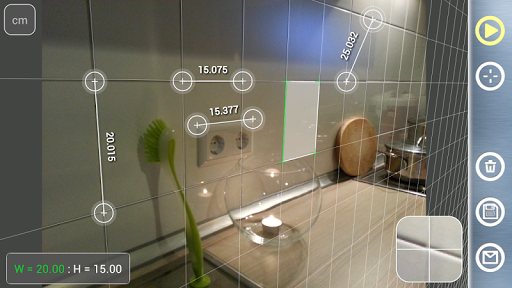
Distances, angle, area and circle measure in any plane in 3D with your camera.
The distances and object size can also be measured by Partometer App, but Partometer3D has no constrains on the camera position relative to the measured object.
The measurement plane / object plane don't have to be parallel to the camera plane.
It expands number of situations where application can be used. For example, big objects now can be measured by taking a picture from the side, objects and distances that are difficult to reach can be measured as well.
Partometer3D has the same application area as Partometer, but gives you more flexibility and power. Angle Mode / Protractor / Goniometer can be used for roof angle measurements. This data can be used in SolarMeter app for solar energy calculations.
It has following important and distinctive features:
- measure in any selected plane in 3D space
- Length, Angle, Area, Circle Modes
- add/delete any number of measurement/ruler lines
- values assigned to each ruler line
- measure objects in different directions
- save and share you measurement
- find object ratios, if you do not need absolute measurements
- compare object parts to each other
- use custom and predefined reference objects
- automatic reference object fine alignment using image processing
- reset reference object alignment by LONG TOUCH on auto alignment button
Partometer3D uses a phone/tablet camera and any available object with known size as a reference to perform measurement. To define the measurement plane a rectangular object (sheet of paper, credit card, custom object) is used. Image processing is used for automatic fine alignment with the reference object.
The App shows measurement results in different units: meters, millimeters, centimeters, feet, inches based on user settings. It also calculate dimensions of the object in relative units with respect to the reference object (ROL).
There is an option to make a picture and work with the still image instead of live camera view. Picture Load feature is also implemented to work with any picture from your photo gallery. Zoom View feature helps to align object boundaries accurately.
Partomter3D can be very useful if you need to measure bigger distances on the plane, where the simple ruler or tape is difficult to apply. All you need to do in this case is to place a rectangular object (credit card or sheet of paper) on the measurement plane,
make sure that the object of interest fits into the camera view and make measurements.
Thank you for your support.
Follow us:
Google+: +VisTechProjects
Facebook: vistech.projects
Twitter: @VTProjects
What's New
3.1.3 - yard units, use screen outside ZOOM VIEW for fine ruler adjustment
3.1.1 - sharing and saving fix for KitKat 4.4, better pic upload - Picasa, Drive, browsers
3.1 - Area mode add points, Auxiliary Plane Grid
Quick access to Units, Plane and ROL settings
Delete selected point in area mode
3.0.1 - reset reference object alignment (LONG TOUCH in auto align button)
3 - Angle, Area Modes
2 automatic object alignment
1.1 Touch to switch points under control.
Version Information
- Version
- 3.2.0
- Downloads
- 5K+
- Updated on
- Feb 13, 2014
- Released
- Jul 20, 2012
- Requires
- Android 2.2
Statistics
Google Play Rating History
Rating Distribution
Downloads Over Time
Partometer3D - camera measure has been downloaded times. Over the past 30 days, it averaged downloads per day.
Shaded area shows 30-day prediction based on historical trends
Historical data collection started recently. More data points will be available over time.
Partometer3D - camera measure users say on Google Play
 A Google user
Still not happy with instructions. Please write them for dummies to understand. That said. Take very good pictures (get an app to improve picture quality) use as large a reference rectangle as you can and the app works. I will use the app to get measurments from inside and outside of buildings for making bids for work to do. I recomend -- purchase the app -- then use your head. You will be happy. Sorry about the first review.
A Google user
App works but doesn't have a vast library of reference objects and requires you to set a frame of points over the object to get reference size. Also doesn't detect dimensions automatically. Should save dimensions of objects in the app for later use.
A Google user
A reasonably accurate app nearly crippled by some of the worst documentation ever written. The best first step to learning this app is to eliminate the Reference Object Line feature--go right to Preferences and drop it, it's clutter that serves no essential function--and to *fix* your reference object rectangle in place (long press the "W/H" area in the lower left side of the screen) or you run the risk of DESTROYING the measuring grid by inadvertently moving the corners of your reference plane when you start moving rulers around. And make sure the object that you're measuring is confined *exactly* in the measuring plane or the accuracy will drop dramatically. The limits inherent in this type of measuring system become apparent fairly soon, but still reasonably accurate, so 3 stars, 4 stars when those awful user guide pages are rewritten.
A Google user
not as it suppose to be 1.cannot load picture from gallery for measurement 2.when change mode of measure from line to circle and to other taken pic will lost and need to retake again 3.same effect then phone ring and other pop-up 4.cannot zoom 5.cannot change different type of arrow 6. ellipse? 7.what about a buttom for option on screen.
 Shashank Bahirat
Useless
ApkTrusted Ratings & Reviews
More from vistech.projects
See more apps
Pie+ camera measure
Free

Laser Distance Meter cam tool
Paid

Millimeter Pro - screen ruler
Paid
ColorMeter camera color picker
Paid

Millimeter - screen ruler app
Free
ColorMeter - color picker RGB
Free

Partometer - camera measure
Paid

Unit Converter 4U quick tool
Free
My Face Shape Meter and frames
Paid
Pupil Distance PD Meter Pro
Paid

Planimeter - GPS area measure
Free
Planimeter Area Measure Guide
Free
Pupillary Distance Meter | PD
Paid
Diskometer - camera measure
Paid

Planimeter GPS area measure
Free
Pupil Distance Meter | Custom
Free
Similar Apps

DreamBuild: Sketch to 3D
Paid

Qibla Direction- GPS Compass
Paid

Windmate
Paid
CompanyCam
Free

AI Plant Identifier
Paid

Earth Map App - Live Cam View
Paid

My Emotional Compass
Paid

Leafplant: AI Plant Identifier
Paid

Componentry
Paid

CamCard-AI Scanner, Transcribe
Paid
Ruler
Free

Bike Route Planner
Paid

ConstructionOnline
Free

Wristcheck
Free

Shrimp Care Reminder
Paid

Banano Pro İmage Generator
Paid
Scan this QR code to download

Forwarding you to the page at Google Play market in seconds...
Open Google Play market now