
Eclipse Watch Face for Wear OS vVARY
Prime Design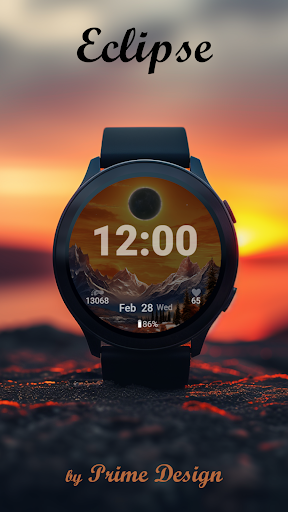


About this app
Developer Description
Dynamic Wear OS watch face • day/night scenes • 3 complications • AOD
On phone: Play Store → Available on more devices → your watch → Install.
To apply: the watch face should appear automatically; if it doesn’t, long-press the current face and select the new one (you can also find it under Library → Downloads on the watch).
About
Eclipse is a dynamic, digital Wear OS watch face inspired by nature’s rhythm — from bright day to moonlit night.
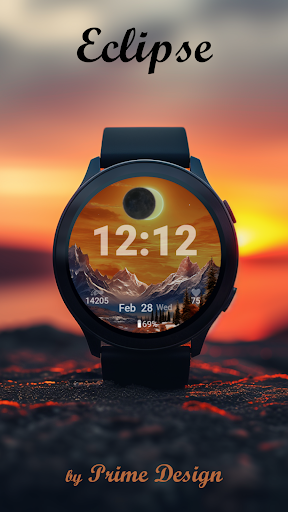
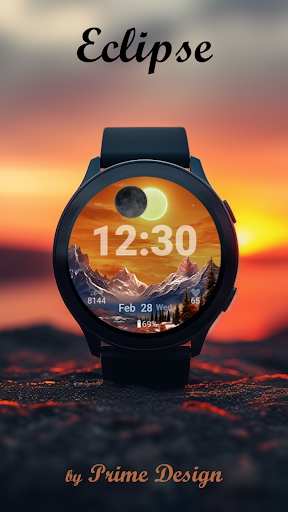
Watch a warm sunrise fade to sunset, then a moonrise at midnight, mirroring the real-world light cycle.
At noon, a glowing eclipse appears — a subtle animation that makes your watch feel alive.
Features
• Digital design with smooth transitions through day and night
• Seconds display (new in this version)
• 3 complications, 3 custom app shortcuts for quick access to your favourite apps
• Auto day/night theme with eclipse animation at noon
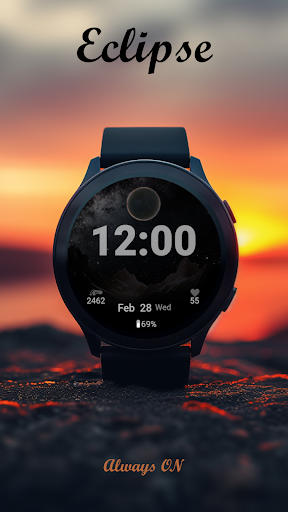
• AOD (Always-on display) – simplified moon scene for minimal battery use
• Dynamic data: steps / heart rate visible only when active > 0
• Customization: color themes, seconds, complication layout
• 12 / 24-hour support
• No phone companion required — standalone on Wear OS
How to customize
Long-press the face → Customise →
• Complications: choose any provider (Battery, Steps, Calendar, Weather …)
• Seconds style: ON, OFF
• Style: adjust theme colors
Not sure about compatibility?
If you’re uncertain, start with our Free Watch Face to test how Prime Design faces work on your device.
Free Watch Face: https://play.google.com/store/apps/details?id=com.primedesign.galaxywatchface
Support & feedback
If you enjoy our watch faces, please consider rating the app.
For any issues, contact us via the email listed under App support — your feedback helps us improve.
What's New
New seconds option
Minor polish
Version Information
- Version
- -
- Downloads
- 5K+
- Updated on
- Dec 21, 2025
- Released
- Jan 29, 2024
- Requires
- Android Varies with device
Statistics
Google Play Rating History
Rating Distribution
Downloads Over Time
Eclipse Watch Face for Wear OS has been downloaded times. Over the past 30 days, it averaged downloads per day.
Shaded area shows 30-day prediction based on historical trends
Historical data collection started recently. More data points will be available over time.
Eclipse Watch Face for Wear OS - Google Play Rankings
Top Rankings
| Rank | Country | Category | List | Change |
|---|---|---|---|---|
| — |
Ranking History in
No ranking data available yet. Rankings are updated daily.
#53 in Top Paid Personalization in France


Eclipse Watch Face for Wear OS users say on Google Play
 Days Of 2024
I'm on my watch and it won't let me open app
 Leana
Leana
Won't download to watch
ApkTrusted Ratings & Reviews
More from Prime Design
See more apps

Similar Apps

WatchFace FullMoon
Free

Sunset Digital Watch Face
Free
SamWatch Fantasy A 2023
Paid

ZKin Watch Face Apex Month
Paid

Winter Digital Watch Face
Free

Red Mountains - Watch Face
Free

Burning Mountains - Watch Face
Free

Mountain Landscape 2
Paid

Key WF42 Mountain Watch Face
Paid

Forest Ambient - seasonal art
Paid

SP Digital 5
Paid

EXD055: Galaxy Moon Face
Paid

Sunset Trees - Watch Face
Free

SamWatch Fantasy A 2023 S
Paid

Shuffle - Analog Watch Face
Free

Desert Dune Watch Face
Free
Scan this QR code to download

Forwarding you to the page at Google Play market in seconds...
Open Google Play market now