
VF Element Hybrid Watch Face v1.0.0
VeselkaFace DESIGN






About this app
Developer Description
A stylish and powerful hybrid watch face for Wear OS
VF Element Hybrid Watch Face is beautiful functionality. Information style.
VF Element Hybrid Watch Face — where elegance meets functionality. A smart, modern design packed with meaningful information and deep personalization.
Crafted for Wear OS (API 34+), this hybrid watch face blends classic analog beauty with digital precision. Whether you're at work, at the gym, or on the go, VF Element Hybrid gives you instant access to everything you need — at a glance.
Designed for those who value both style and substance, it brings together essential data, a sleek visual experience, and intuitive features tailored to you.
✅ Essential info at a glance: time, date, step count, heart rate, battery level
✅ Smart color indicators for heart rate and battery — change based on current levels
✅ Track your activity: distance (km or miles) and calories burned
✅ Live weather data: current temperature, UV index, precipitation chance, and accurate icons for day & night conditions
✅ Optional leading zero off in 12-hour mode
🎨 Endless personalization:
✅ 10 unique backgrounds
✅ 22 color themes
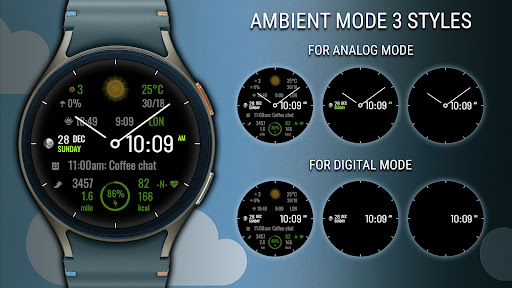
✅ 3 always-on display (AOD) styles
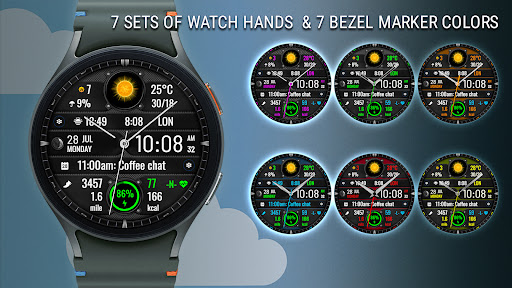
✅ 7 sets of watch hands (option to disable analog)
✅ 7 bezel marker colors
📌 Custom shortcuts and complications:
✅ 3 customizable complication
✅ 4 customizable app shortcuts, including 2 invisible zones (at 3 and 9 o’clock on the bezel)
✅ Invisible button "Аlarms" — tap the digital minutes
✅ Invisible button " Calendar" — tap the date
✅ Moon phases
🚶♀ Distance traveled (KM/MI)
Distance is calculated based on the number of steps:
📏 1 km = 1312 steps
📏 1 mile = 2100 steps
Select the unit of distance in the watch face settings.
Temperature units (°C/°F) are set automatically selected according to your device settings.
📌 Important information about the weather forecast feature
The weather forecast button on the watch is linked to the default Samsung "Weather" app preinstalled on Galaxy Watch devices. On other watch models (such as Google Pixel Watch), this function may be unavailable — however, the weather forecast itself will still be displayed on the watch face without any limitations.
Heart rate zones are based on the average resting heart rate
🕒 Time format
12/24-hour mode is selected automatically based on your phone settings.
Leading zero option can be set in the watch face settings.
⚠ For Wear OS API 34+
🚫 Not compatible with rectangular watches
✉ Have questions? Contact me at veselka.face@gmail.com — I’m happy to help!
➡ Follow me to receive exclusive updates and new releases!
• Facebook -https://www.facebook.com/veselka.watchface/
• Telegram - https://t.me/VeselkaFace
• YouTube - https://www.youtube.com/@VeselkaFace
Version Information
- Version
- 1.0.0
- Downloads
- 500+
- Updated on
- Dec 16, 2025
- Released
- Jul 31, 2025
- Requires
- Android Varies with device
Statistics
Google Play Rating History
Rating Distribution
Downloads Over Time
VF Element Hybrid Watch Face has been downloaded times. Over the past 30 days, it averaged downloads per day.
Shaded area shows 30-day prediction based on historical trends
Historical data collection started recently. More data points will be available over time.
VF Element Hybrid Watch Face users say on Google Play
 Gopal Goenka
Excellent Full data display design, Great watchface. Thank you.
ApkTrusted Ratings & Reviews
More from VeselkaFace DESIGN
See more apps


Similar Apps

CFS129 Digital Essence
Paid

Futorum H6.5 Digital watchface
Paid

WFP 125 Digital watch face
Paid

Merge Labs KS 3
Paid

HMK WD133
Paid

PKG016
Free

Weather watch face W7.5
Paid

Iris518 Digital Watch Face
Paid

ORB-18 Active
Free
HKR052
Free

TVV Sport 5 Digital Watch Face
Paid

GW Weather 3
Paid

Watch Face CUE154
Paid

SamWatch Digital Weather
Paid

CLA021 Analog Steel
Paid
TSD48 Digital Watch Face
Paid
Scan this QR code to download

Forwarding you to the page at Google Play market in seconds...
Open Google Play market now