
KeyTrigger(Ads) vVARY
StrAI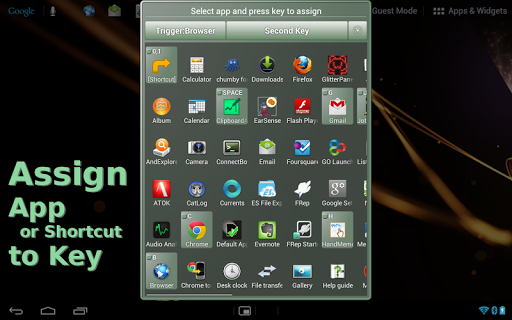
About this app
Developer Description
Bluetooth keyboard will become your remote launcher. (Free/Ads)
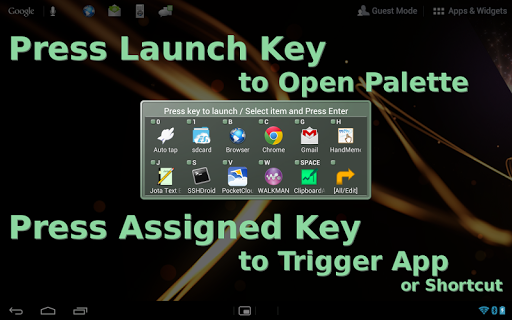
- Launch app / trigger shortcut / show sub launcher by each "app-launch" key
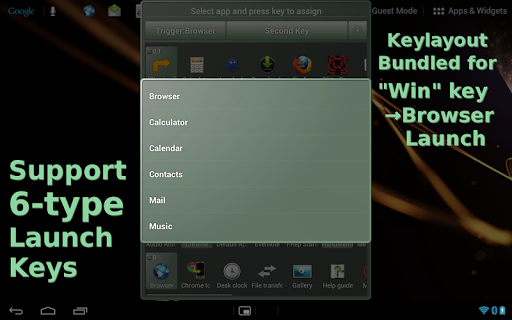
- Use Windows* key as browser "app-launch" key (Android 4.1 or later)
- Set key assignment in sub launcher for second trigger
*Left-meta key will be replaced by bundled key map (layout)
This is ad version. If this works well, please consider getting non-ad KeyTrigger.
Usage Example
- Launch memo app instantly, anytime you get ideas.
- Trigger voice recognition app on remote tablet.
- Trigger shortcut of automation tool such as FRep remotely.
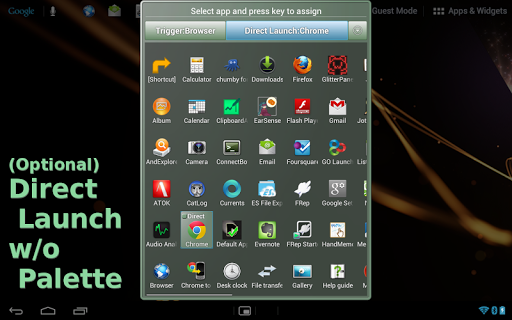
Initial Settings (see images)
1. Pair (connect) the Bluetooth keyboard to your Android.
2. Push either of app-launch keys; Browser, Calculator, Calender, Contacts, Mail, Music.
3. If "Complete action using" popup is shown, choose KeyTrigger(Ads).
If any key does not show the popup, try setting below (Win->Web) keyboard layout.
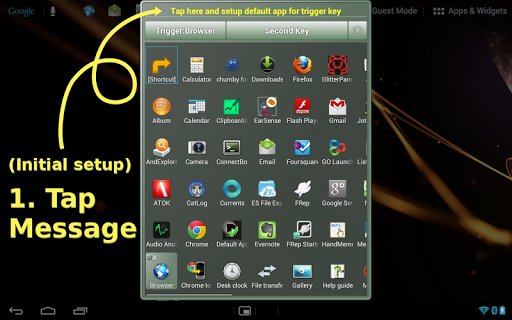
4. In green frame dialog, push Enter or tap "Tap here and setup default app for trigger key" at the top.
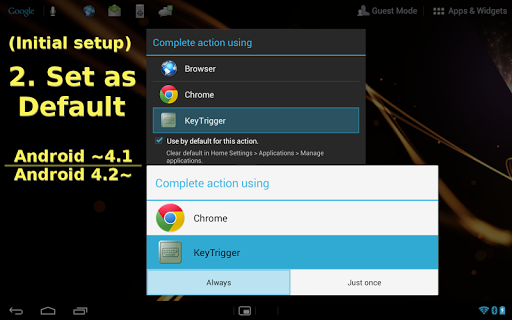
5. Again, you will see "Complete action using" popup, and in this time;
(Android 4.0, 4.1) Check Use by default for this action, and then select KeyTrigger(Ads).
(Android 4.2 or later) Select KeyTrigger(Ads), and then choose Always.
Now you can launch KeyTrigger(Ads) by pushing the app-launch key.
Features
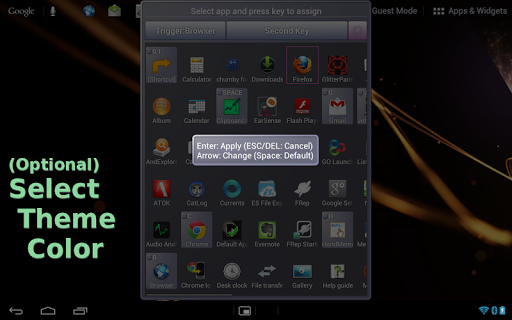
- Selectable Direct Launch, Second Key, or Unused for each app-launch key.
Direct Launch: start designated app/shortcut instantly when the app-launch key pushed.
Second Key: register multiple apps and shortcuts for sub launcher palette, which popup when the app-launch key pushed.
- Unused: disable KeyTrigger(ads) app for the app-launch key, to remove from app candidate list.
- Color variation of frame.
(Win->Web) keyboard layout (Android 4.1 or later)
If your keyboard has Windows key (or Left-meta key), bundled key layout can replace it with Browser app-launch key by steps below.
1. Pair (connect) your Bluetooth keyboard to Android.
2. Open Android Settings screen and select Language & input.
3. In Physical Keyboard section of Language & input screen, tap (your keyboard name).
4. In Choose keyboard layout popup, push Set up keyboard layouts.
5. In Keyboard layouts list, you can see (Win->Web) **** with (KeyTrigger) Android keyboard, and check one of them, then Back.
6. If the Choose keyboard layout popup says, "To switch, press Control-Spacebar" or such, do it to switch the keyboard layout to checked one. Then Back.
7. Now you can see the checked layout name under your keyboard name.
8. Try pushing your Windows (or Left-meta) key, which will popup browsers. Then go to step 3. in Initial Settings above.
Permissions
- Run at startup: availability setting of activity for UNUSED app-launch key.
- Full Internet access, View network status: for ads.
Requirements
- Android 4.0.3 or later
- Physical keyboard (Bluetooth, usb, built-in or other)
If you have any question or request, please mail to us. The reply will be in English.
== DISCLAIMER ==
THIS SOFTWARE AND THE ACCOMPANYING FILES ARE DISTRIBUTED and SOLD "AS IS" AND WITHOUT WARRANTIES AS TO PERFORMANCE OR MERCHANTABILITY OR ANY OTHER WARRANTIES WHETHER EXPRESSED OR IMPLIED. LICENSEE USES THE SOFTWARE AT HIS/HER OWN RISK. NO LIABILITY FOR CONSEQUENTIAL DAMAGES.
================
Version Information
- Version
- -
- Downloads
- 1K+
- Updated on
- -
- Released
- Dec 12, 2013
- Requires
- Android Varies with device
Statistics
Google Play Rating History
Rating Distribution
Downloads Over Time
KeyTrigger(Ads) has been downloaded times. Over the past 30 days, it averaged downloads per day.
Shaded area shows 30-day prediction based on historical trends
Historical data collection started recently. More data points will be available over time.
KeyTrigger(Ads) users say on Google Play
 A Google user
Why would I want ads?
ApkTrusted Ratings & Reviews
More from StrAI
See more apps


Similar Apps


Scan this QR code to download

Forwarding you to the page at Google Play market in seconds...
Open Google Play market now