
FRep - Finger Replayer vVARY
StrAI


About this app
Developer Description
Try FRep to make your finger replayer! *For Android 10~, try FRep2, instead.
- Record and Replay/Repeat/Edit operations of touchscreen and/or keystroke
- Easy record/play on current app, by pushing the button of floating console
- Console shows/hides depending on playable records for current app
Unlock key provides the unlimited number of records & Tasker/Locale plugin functionality.
Usage Example
- Recording analog Push/Swipe/Flick operations for automatic process/scroll/gesture
- Playing continuous virtual space key push with interval for browsing
- Preload delayed or continuous pushing in prospect of processing delay, such as CPU load or network communication
- Avoid blind area or blurring by the finger operation
- Combination with automation App through FRep replay shortcut/Tasker plugin
- Demonstrate your App in actual device
=== Initial Setup ===
FRep needs the initial setup below. If your Android is ROOTED, you can skip this section by permitting su.
To setup FRep initially or when Android rebooted, you need USB connection to Win/Mac/Linux/Android. Please retrieve and run the setup tool from following URL.
FRep Setup Tool http://strai.x0.com/frep/#tool
================
Tutorials http://strai.x0.com/frep/category/tutorial
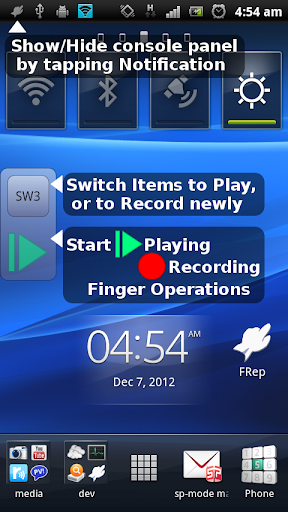
Show/Hide console
After starting service, FRep will stay in the notification. By tapping it, the console shows/hides. Once you record by the recording circle button, FRep automatically show console on the app on recorded. Then, the record can be replayed by the playing triangle button.
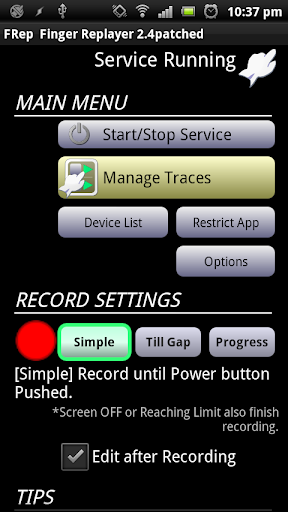
Recording mode
Choose which you like at the FRep front app;
Simple: record until Power push.
Till Gap: record until designated seconds of no input.
Progress: record continuously and construct editable sequence separated by input gap.
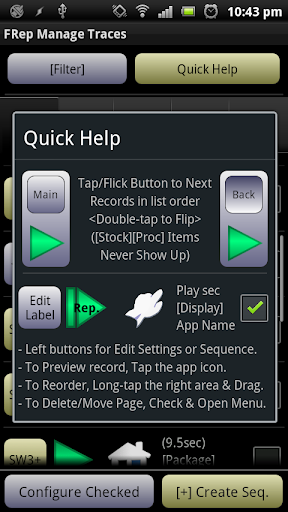
Repeat/Edit playing
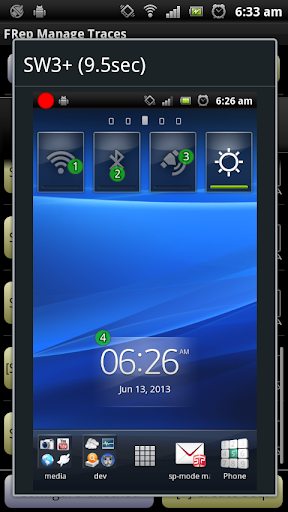
By setting the Repeat number >1 in Manage Traces, FRep play the record continuously by the count. You can also create/edit the playing sequence consisting of multiple records/controls. In addition, each stroke in traces can be moved/set wait/clipped.
Power button
FRep do not record Power push, which will finish any recording/playing immediately.
Restrict by current App
In record/replay, occasional call or App change may cause a problem. To avoid that, FRep is restricted on Phone, Google Play and FRep itself. You can configure restriction for other Apps.
Interruption of playing
To abort replaying, you can interrupt easily by the overlapping the operation.
Virtual keyboard
Double-tapping the upper button on the console, you can open another page which has key operation editor.
Customization
Notification type/icon, console size/transparency, drag/flick sensitivity, default settings, etc.
= Notice&Tips =
- This app uses Accessibility Service by ACCESSIBILITY_SERVICE permission to detect current app, for responsive switching function of floating console.
- Full network access permission is used only for communication with the setup process in localhost.
- Do not record including personal information and/or password.
- The replay result may differ depending on the CPU load or such. To make good reproducibility, take longer delay for processing wait, stop touch at end point for dragging/flick, and more, try to Edit Sequence with image matching (see Tutorial in support site).
- The records have no compatibility with other device.
If you have any question or request, please mail us. The reply will be in English.
== DISCLAIMER ==
THIS SOFTWARE AND THE ACCOMPANYING FILES ARE DISTRIBUTED and SOLD "AS IS" AND WITHOUT WARRANTIES AS TO PERFORMANCE OR MERCHANTABILITY OR ANY OTHER WARRANTIES WHETHER EXPRESSED OR IMPLIED. LICENSEE USES THE SOFTWARE AT HIS/HER OWN RISK. NO LIABILITY FOR CONSEQUENTIAL DAMAGES.
================
What's New
- Added Adjust video size in Screen API Settings.
- Added Reference Screenshot Path option in Wait Image control, to replace prepared image by the file* of designated path at the replay. (Requires FRep Unlock Key)
*Supposed to be used together with the Screenshot control with Rotation 0 degree setting.
- Fixed issue of video recording by Screen API, on some screen width environment.
- Fixed issue of popup message on Android 11 (Text only, Position is ignored).
Version Information
- Version
- -
- Downloads
- 1M+
- Updated on
- Oct 29, 2021
- Released
- Dec 9, 2012
- Requires
- Android Varies with device
Statistics
Google Play Rating History
Rating Distribution
Downloads Over Time
FRep - Finger Replayer has been downloaded times. Over the past 30 days, it averaged downloads per day.
Shaded area shows 30-day prediction based on historical trends
Historical data collection started recently. More data points will be available over time.
FRep - Finger Replayer users say on Google Play
 Christian Segura
Its capabilities are unmatched by any other app. I have used it on different rooted Pixel phones throughout the years, and I haven't had any issues with it. Fantastic for automating repetitive touchscreen tasks. It's interface is simple enough for basic actions. Yet there is room to create complex coded loops and executions to cater to nearly any string of actions. The learning curve is high for more complex stuff, but once you take the time to read and understand how the if statements, image matching, variables, loops, and touch locations work, there is very little you can't do with this app!
 Jamie
Jamie
Wish I had some more options for variable manipulation, but this does just fine for simple things. The people complaining about the usb thing apparently don't realize how this sort of thing works.
 Abdul Dimala
Update: 6-27-2021 I have new phone(realme7), it will work only if the cable still plug to the pc/laptop but if it is unplugged, ill be getting again this kind of error. "No reply from strserv" Hope the devs can notice this one. (5-9-2020) - 100% helps me from repetitive touch #EZ
 Mobil Wijen Bambang
My phone is rooted,why always "no reply from strsev"
 Saputra Anom
After update this app was suck. Cant work without usb, every time i want to use they show this "frep is restricted for this apps" then cant work. ITS USELESS APP NOW. The worst from this apps is without the pc we cant use this apps.. did you know? the apps without usb setup tool its cant work and its wasting my time, than the other apps can work without usb setup tools... So you must make it simple the apps. Ex: apps can work without the other device, install then play...
ApkTrusted Ratings & Reviews
More from StrAI
See more apps



Similar Apps

Macrorify - Image Auto Clicker
Free

Touch Screen Test
Free

Automate
Free

Unmutify
Free

TAP Kiln Control Mobile
Free

TicNote: AI Recorder & Agent
Free

LiveMic: Bluetooth Mic Speaker
Paid
ChargeNow
Free

Castro Premium - system info
Paid

MeisterTask - Task Management
Free

Voice Memos: Braindump
Free

Quikshort: Shortcut Creator
Free

DiaTrack
Paid

Morning Routine Builder
Paid
Automatic Scroll
Free

PDK Access by ProdataKey
Free
Scan this QR code to download

Forwarding you to the page at Google Play market in seconds...
Open Google Play market now